emersonvier
Getting the hang of it
I tried different computers; the same issues occur when loading UI3. Also, double-check that you're on the correct network.That error message means the connection timed out, which is a fancy way of saying your tablet could not connect to Blue Iris.
Double check these things:
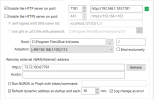
1. That the URL matches exactly between working and non-working machines; that192.168.1.103is the Blue Iris computer's IP address on your LAN, and that7781is the port number its web server is listening on.
2. The tablet is connected to the correct network (e.g. not a guest network or a neighbor's or cellular, etc).
Here my setup from BI,
UI3 Stoped to work after upgrade to version 6