Dahua SD5A825GA-HNR PTZ ZOOM QUESTION

Longview

n3wb
Nov 27, 2020
14
4
Texas
have just rebuilt my NVR (DHI-NVR5216-16P-I), and after readjusting most of everything, it is getting close to what I need. I had a PTZ that had a great view and replaced it with the SD5A825GA-HNR that has great zoon but in a bad position behind a TREE! I don't want to move it!

Set it up with thee Presets and a Spotter Camera with a tour of the Presets, with help from this Board! Thank you all for the guidance. The camera follows vehicles and humans well and tracks well.

It does not auto zoom and I am not sure if it is capable? I would like it to zoom into the target when they are at a distance (Maybe 40 Feet). I attached a photo of a pederstrian and want to know if the camera can zoom in for a closer view? Thanks...

Thanks...
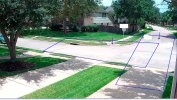
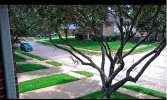
Pedestrian.jpgVehicle.jpg
 
Yes its capable

Tough between the tree limbs, they may quickly block it, but as previously discussed, if that’s a saved preset exactly as shown, it must have its own IVS rules and target ratio set. The target has to cross a preset IVS rule to try to track.

Zoom level is decided by the tracking target size ratio
ptz-IVS-TargetSize.jpg

Show the presets with an image for each and the preset information and IVS rules on the image so we can tell.

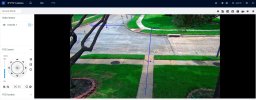
Like this. Shows Preset # and blue IVS rules.
SmartPSS Lite or your NVR live screen can show this

ptzpreset.jpg
 
Last edited:
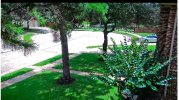
Spotter left IVS is linked to PTZ Preset2 Spotter Right Linked to PTZ Preset3. Preset1 is default return.
Yes its capable

Tough between the tree limbs, they may quickly block it, but as previously discussed, if that’s a saved preset exactly as shown, it must have its own IVS rules and target ratio set. The target has to cross a preset IVS rule to try to track.

Zoom level is decided by the tracking target size ratio
View attachment 246886

Show the presets with an image for each and the preset information and IVS rules on the image so we can tell.

Like this. Shows Preset # and blue IVS rules.
SmartPSS Lite or your NVR live screen can show this

View attachment 246888
 

Attachments

  • Spotter.jpg
    Spotter.jpg
    237.1 KB · Views: 2
  • Preset2.jpg
    Preset2.jpg
    57.4 KB · Views: 2
  • Preset3.jpg
    Preset3.jpg
    53.6 KB · Views: 2
  • Preset1.jpg
    Preset1.jpg
    283.6 KB · Views: 2
The spotter simply tells the PTZ to go to another preset

The preset on the PTZ must be configured with IVS rules of its own and set the target ratio on each rule it to determine zoom level as shown in my first thumbnail
 
I don’t see IVS rules on preset 2 or 3
 
They are only on the Spotter. Don't think I can set them on Presets?

IVS rules on the spotter mean Nothing to the PTZ... The PTZ has no idea a spotter cam exists
IVS rules MUST be set on each Preset of the PTZ
Each IVS rule has a target ratio to determine zoom level (too little it wont zoom, too much it will zoom a lot but easily lose the target becasue its zoomed to high. Its an art.

Turn OFF Tour until you get the basics of how things work figured out

Each Preset must have a spotter telling the PTZ to go to that Preset. It wont go there by itself unless commanded.

You can have a preset that isnt used by spotters that you just want for convenient manual looking
 
Same way you added preset #2
 
I added the Preset3 and it now shows green and allows IVS addition? I removed Scanning and Touring for the PTZ. Will see what results are in a few hours?
 
And what directs the PTZ to Preset#3? What makes it go there?
 
No you aren't getting it

How will the camera know how and when to go to Preset #3?

The IVS rule AT Preset 3 which you show, will trigger an alert.
But the camera has to first GET to Preset #3......
 
I had the Spotter camera with an IVS on it and a Link to the Preset2 PTZ Camera via Linkage and it functioned.

I was told that was wrong! Now it does not follow anything.
 
You’re constantly confusing using the spotter to direct the PTZ to a preset, and the actual tracking which is done by the PTZ and has nothing to do with the spotter cam
 
So IGNORE spotter and just rely on IVS within local camera PRESETS to establish the tracking?
To set up a Dahua spotter camera (a stationary camera that triggers a PTZ camera), you must configure the preset on the PTZ camera first and then link it to the spotter camera's event rules via the NVR.

1. Configure PTZ Preset

Access the PTZ camera’s web interface directly (not via the NVR).

Manually position the camera to the desired view.

Save this position as a Preset (e.g., Preset #1).

Note: Presets must be defined on the camera itself; NVR-only presets may not function correctly for spotter linkage.

2. Link via NVR IVS Rules

Log into the NVR interface.

Navigate to AI > Parameters > IVS.

Select the Spotter Camera channel.

Choose or create an IVS Rule (e.g., Line Crossing, Intrusion).

Scroll to PTZ Linkage and Enable it.

Select the PTZ Camera channel and the specific Preset number to trigger.

3. Automate Return (Optional)
 
Yes

The spotter sees something that the PTZ cant at its Home #1 Preset where it parks most of the time

Then Spotter tells the PTZ look over here at your (PTZ) Preset #2 which is the same general field of view the spotter sees

PTZ goes to its Preaset #2 and with its Preset #2 IVS rules, it hopefully picks up the target and tracks it.
Now if the target is hauling ass and has already left the field of view of Preset #2, it wont see and there's nothing you can do about it.

Often I have a spotter tell a PTZ to go to a Preset that I defined that is past the field of view of the spotter, anticipating that the target is heading towards this area based on the spotter seeing it heading that direction, particularly fast moving targets like vehicles.

Again Sample


Spotter camera sees car traveling right to left.
It tells PTZ move from HomeWest (Preset#1 or its home parking place) to LPR East (Preset #2) and wait for a car to get a good shot of its license plate

3.jpg


PTZ - Note Preset names in top left

If I wanted it to TRACK the car from Preset #2, I would add IVS rules on Preset 2 and enable tracking.
View attachment 192.168.1.110_ch7_20260711142210_20260711142226.mp4
 
That Last sentence of mine above is key

“If I wanted it to TRACK the car from Preset #2, I would add IVS rules on Preset 2 and enable tracking.”