- May 20, 2015
- 101
- 223
I did some digging to interpret what the debug data at the top of the images mean. This is what I found:
HQ: Indicates that the camera is currently using its High Quality stream profile
E: Stands for Enhanced Video Encoding
CS:[32-16000-16000]:00: Represents the Camera-to-Server connection stats.
32: The minimum required stream bitrate.
16000: The target encoding bitrate.
16000: The maximum allowable bitrate cap configured in the Protect settings
:00: An internal system status code indicator
M:NA: Stands for Motion Adaptive Bitrate. In setups where it is enabled, the camera dynamically drops or scales up the bitrate depending on how much movement is happening in the scene. The "NA" means it is not actively fluctuating or is currently fixed to your maximum streaming profile
@30: Displays your active framerate setting of 30 Frames Per Second (FPS).
T: 16000: The Target Bitrate that the camera is actively attempting to transmit back to your UniFi console or Network Video Recorder (NVR)
L: 0: Typically reflects a placeholder or benchmark indicator for internal packet Latency or dropped frames. A score of 0 is ideal, indicating no latency issues.
1/120: The current Shutter Exposure Speed. This means the sensor is letting in light for 1/120th of a second per frame.
R:1977: Represents the Recorded Bitrate. This is the exact number of actual bits per second being packaged and received by the NVR.
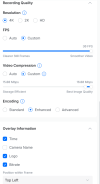
I believe that bitrate may be something that needs looking into. Why is it recording at that if I have it set to the Maximum of 16000.
Also, from what I've gathered, I can tell the camera to not include certain zones in its interpretation of exposure needed for the scene. It looks like I can include that bush in a zone to ignore.
Also, it looks like I can turn on an Enhanced bitrate zone to force a higher bitrate in certain areas.
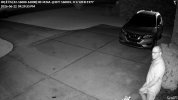
HQ: Indicates that the camera is currently using its High Quality stream profile
E: Stands for Enhanced Video Encoding
CS:[32-16000-16000]:00: Represents the Camera-to-Server connection stats.
32: The minimum required stream bitrate.
16000: The target encoding bitrate.
16000: The maximum allowable bitrate cap configured in the Protect settings
:00: An internal system status code indicator
M:NA: Stands for Motion Adaptive Bitrate. In setups where it is enabled, the camera dynamically drops or scales up the bitrate depending on how much movement is happening in the scene. The "NA" means it is not actively fluctuating or is currently fixed to your maximum streaming profile
@30: Displays your active framerate setting of 30 Frames Per Second (FPS).
T: 16000: The Target Bitrate that the camera is actively attempting to transmit back to your UniFi console or Network Video Recorder (NVR)
L: 0: Typically reflects a placeholder or benchmark indicator for internal packet Latency or dropped frames. A score of 0 is ideal, indicating no latency issues.
1/120: The current Shutter Exposure Speed. This means the sensor is letting in light for 1/120th of a second per frame.
R:1977: Represents the Recorded Bitrate. This is the exact number of actual bits per second being packaged and received by the NVR.
I believe that bitrate may be something that needs looking into. Why is it recording at that if I have it set to the Maximum of 16000.
Also, from what I've gathered, I can tell the camera to not include certain zones in its interpretation of exposure needed for the scene. It looks like I can include that bush in a zone to ignore.
Also, it looks like I can turn on an Enhanced bitrate zone to force a higher bitrate in certain areas.