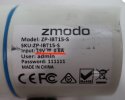
Zmodo ZP-IBT15-S Camera setup/operation. Special POE???

Steve Bowman

Young grasshopper
Sep 29, 2018
88
4
Ohio, USA
So I have a Zmodo system that was partially damaged by a power surge. The NVR has a 4 port POE switch and I was running 4 of the 720p IBT15-S cameras. But it was damaged by lighting.

Well, i am trying to salvage some of the cameras for use with my new Dahua NVR. Fortunately, I was left with one good port on the Zmodo NVR, so i am able to use it somewhat in the testing process.

I have at least one camera that will function on the zmodo NVR and display a normal picture. In the zmodo NVR software, the camera has an IP of 182.168.1.11, which is the subnet of my Dahua admin portal. But not the subnet of my Dahua cameras. I believe the zmodo is running DHCP.

As a basic test of the camera, I can cover the lens of the camera and hear it switch to night mode, and switch back - when connected to the zmodo NVR.

When I plug it into my Dahua NVR, I get nothing at all. Most basically, there is no indication that the camera is powered up from the NVR because I do not hear it switch to night mode. Forthermore, it does not show up when I search for it on the Dahua. I figure that if I cannot hear it switch modes, there is very little chance of finding it on the network. I tried a manual search for the mac address of the camera too.

I have not tried to connect one of my Dahua cameras to the zmodo to verify the POE on it.

So, it seems to me that possibly the zmodo uses a proprietary POE? Any other reason? Any suggestions?


Thanks
 
So I have a Zmodo system that was partially damaged by a power surge. The NVR has a 4 port POE switch and I was running 4 of the 720p IBT15-S cameras. But it was damaged by lighting.

Well, i am trying to salvage some of the cameras for use with my new Dahua NVR. Fortunately, I was left with one good port on the Zmodo NVR, so i am able to use it somewhat in the testing process.

I have at least one camera that will function on the zmodo NVR and display a normal picture. In the zmodo NVR software, the camera has an IP of 182.168.1.11, which is the subnet of my Dahua admin portal. But not the subnet of my Dahua cameras. I believe the zmodo is running DHCP.

As a basic test of the camera, I can cover the lens of the camera and hear it switch to night mode, and switch back - when connected to the zmodo NVR.

When I plug it into my Dahua NVR, I get nothing at all. Most basically, there is no indication that the camera is powered up from the NVR because I do not hear it switch to night mode. Forthermore, it does not show up when I search for it on the Dahua. I figure that if I cannot hear it switch modes, there is very little chance of finding it on the network. I tried a manual search for the mac address of the camera too.

I have not tried to connect one of my Dahua cameras to the zmodo to verify the POE on it.

So, it seems to me that possibly the zmodo uses a proprietary POE? Any other reason? Any suggestions?


Thanks
The zomodo is does not support 802.3 poe so its not getting power...even if it did, it does not support onvif and you would need to stream via rtsp...toss it in the trash.
 
  • Like
Reactions: mat200
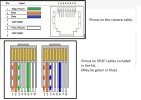
Those Zmodo cams are 'sPOE' as in 'simplified' I guess. The power is about 19VDC and is NOT on pins 4&5 (+) and 7&8 (-) as 'genuine' POE expects. Early versions had an RJ-45, later ones a micro USB. I would never recommend these cams. I hooked up BI to a set of 4 and Zmodo NVR a friend inherited. One out of the 4 failed after about 2-1/2 years but was replaced about 6 months ago. My friend paid $50 for one on eBay, as Zmodo refused to honor their so-called 3 year warranty, their support and sales ignored all e-mails.

They are a crappy co. selling even crappier products, also sold under 'Funlux' name.

FYI, he has Blue Iris and the Zmodo NVR streams all 4 cams to it as here.
 
thanks for the info guys. Little dissapointed to loose the cheap cameras.

On the up side, due to the lightning, I did think the whole zmodo system was junk, but did find that I could use it as a single camera system if needed.
 
I'm not 100% sure. Bout I suspect that you could add a cheap Ethernet switch to expand the number of 'ports'
thanks for the info guys. Little dissapointed to loose the cheap cameras.

On the up side, due to the lightning, I did think the whole zmodo system was junk, but did find that I could use it as a single camera system if needed.
 
So I have a Zmodo system ...
that was partially damaged by a power surge.

Well, i am trying to salvage some of the cameras for use with my new Dahua NVR. Fortunately, I was left with one good port on the Zmodo NVR, so i am able to use it somewhat in the testing process.

..
So, it seems to me that possibly the zmodo uses a proprietary POE? Any other reason? Any suggestions?

HI @Steve Bowman

I'm so sorry to hear you have a zmodo system... zmodo / funlux is perhaps the WORST system I have seen posted on various other websites.

They use deceptive ads to deceive purchasers into thinking they're getting a compatible PoE product - when really the truth is they are not. They also are known to convert on-premise internet connected products to cloud based ones - which will require a monthly service charge after 3-6 months of "free" cloud service...

More here
Zmodo / Funlux suck how they manipulate the game.

My recommendation:
Avoid them, and their products

Fenderman provides good advice: "toss it in the trash"
and TonyR is spot on: "They are a crappy co. selling even crappier products, also sold under 'Funlux' name."

I'm not 100% sure. Bout I suspect that you could add a cheap Ethernet switch to expand the number of 'ports'

HI @TomC

Won't work as zmodo / funlux "sPoE" products are really not meeting any meaningful PoE or ethernet standards.
 
  • Like
Reactions: looney2ns
The Zmodo ZP-IBT15-S camera is pretty easy to set up and doesn’t need any special PoE injector—it works fine with a standard 802.3af or 802.3at PoE switch. Just plug it in, and it powers up right away. You can find the camera on your network using Zmodo’s Zviewer software. It’s not fully supported by the Zmodo app unless you're using it with their NVR system. The camera has decent video quality and night vision, but it doesn’t support ONVIF or audio.
 
The Zmodo ZP-IBT15-S camera is pretty easy to set up and doesn’t need any special PoE injector—it works fine with a standard 802.3af or 802.3at PoE switch. Just plug it in, and it powers up right away. You can find the camera on your network using Zmodo’s Zviewer software. It’s not fully supported by the Zmodo app unless you're using it with their NVR system. The camera has decent video quality and night vision, but it doesn’t support ONVIF or audio.

HI Bravo, do you actually have one ?
 
HI Bravo, do you actually have one ?
Pretty sure "bravo99" is/was a bot.
Joins up just to post a reply containing inaccurate info to your 6 year old post and then vanishes.... :wtf:
 
  • Like
Reactions: mat200
The sPoE can be good enough once you get used to it...
The problem is at certain firmware revisions they disable onvif\trsp...

I have been trying to find a firmware for zmodo cameras... from what i can tell they put some proprietary junk attached to their net packets to mask their video signal... there are ways to enable onvif/rtsp by just reverting firmware and sending a command with a hijacked web ui... but i cant find an older firmware to save my life.
 
The sPoE can be good enough once you get used to it...
The problem is at certain firmware revisions they disable onvif\trsp...

I have been trying to find a firmware for zmodo cameras... from what i can tell they put some proprietary junk attached to their net packets to mask their video signal... there are ways to enable onvif/rtsp by just reverting firmware and sending a command with a hijacked web ui... but i cant find an older firmware to save my life.

RonG, are you a bot ?
 
??? Wtf u talking about?

You've got 2 posts, and claim sPoE is good enough .. which I find to be very surprising considering how much better proper PoE and the selection of proper PoE cameras are now
 
Good enough doesn't mean Great or Excellent... its 'good enough' lol

Its great when you have the nvrs and cameras laying around and you can squeeze out 2 devices on one wire run... but ideally you aren't in a situation where you are forced to use zmodo.

If zmodo was smart they wouldve let people keep using onvif or rtsp and they probably would've sold multiples more cameras.
Instead its 10 years later and I am reverse engineering old android apks and windows builds to try to resurrect a 32 camera system that a business doesn't want to change out of.
 
Its great when you have the nvrs and cameras laying around......
That's the criteria for installing an inferior, outdated product...because it's "laying around"?
....and you can squeeze out 2 devices on one wire run...
Which can also be done with conventional, 802.3af/at-compliant POE.
I am reverse engineering old android apks and windows builds to try to resurrect a 32 camera system that a business doesn't want to change out of.
You must be hungry for business or welcome the challenge....you could likely do several other more profitable projects in the time it takes to fool around with this one that involves Zmodo, projects that have a much greater chance of success and working very well. Knowing that I had quoted the potential client a very fair and honest price for the quality installation of a highly-rated and excellent performing system, I learned to avoid clients that insisted on getting the best for little or nothing, especially when they can amortize the write-off of a legitimate install as a business expense. But it's your time and your energy, so best of luck to you. :cool: