Just recently acquired two EmpireTech IPC-T54IR-ZE-S3 (only one is setup), and while the quality isn't quite what I was hoping for, I'm sure some of it just comes down to settings and the situation will improve over time.
While understandable since there are so many models, it's frustrating that info for these cameras (both IP at large and Dahua specifically) is so all over the place. I've found a good amount of information on the forums and the Dahua wiki, though a lot is for the older system with the gray/orange UI and not the newer blue/white one, though of course there is significant carryover (though some terms have changed). This, though, I imagine is a decent starting place for tweaking some of the paramters.
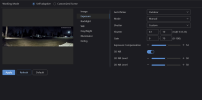
One setting in particular that has helped a lot is the different Backlight modes as the camera sits under shadow during most of the day and has a coach light near it during the night, so dealing with the large dynamic range seems important.
While it seems to me that this camera may very well be capable of staying in color at night due to decent ambient lighting where I've placed it, it's clear to me it still needs night time specific tweaking. My confusion lies around the frequently referenced "Working Mode" and Day/Night settings.
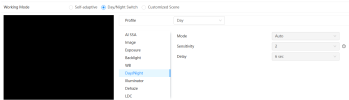
I understand that the camera has an ambient light sensor it should use to decide when to switch either when it's on "Self-adaptive" or "Day/Night Switch", but what isn't clear is how to know when it's in one mode or the other, or how exactly the function works. I believe customized scene is basically the same thing but with many more profiles than 2 (i.e. day and night), and a built-in scheduler. I know some people use the HTTP API to change between profiles are more specific times than the built-in software allows, which I may do with Home Assistant, though so far I haven't had luck querying the API at all (empty response, perhaps it isn't enabled by default or something).
In my mind it would make sense to have one profile optimized for the day, one for night, and maybe even a third for some special case; however, even just sticking with the two for now, I wish there was a clear way to force the camera between the two modes or to at least see which mode it's in. Intuitively I know if it was in B/W mode and the illuminator was on that it would be in night mode, but the way these settings read make it seem like it's possible to be in Night mode without B/W and the illuminator; specifically, the Day/Night setting within Day/Night Switch (who came up with that?) has forced options and auto for the "Mode" under both profiles. In my case I think it's quite possible I'd keep it in color at night, but I need some confirmation that it's actually still entering the night profile (or not, so I can tune the sensitivity if needed). Perhaps it's easier to just bite the bullet now and get the change working via HA, though I'd like the give the built in sensor a chance first.
Essentially, it seems clear to me that I should tune the day profile while observing the output during the day, tune the night profile while observing the output during the night, and then evaluate whether the built-in switch trigger is good enough or if I need resort to a HA automation (based on sunset or my own sensor) as a separate issue, but I don't have confidence at the moment on how to know the camera is in either mode, or how to switch between them manually if needed just to set them up. It doesn't help that the "Day/Night" options under Day/Night Switch, where I'd think they'd be the most relevant, are greyed out for whatever reason. I've seen some say they can change them in the other Working Modes and they will apply to that one too, but others say it seems that way at first, but if you fully reload the page or change to another mode, the change goes away. Sadly, mine does seem to be the latter, as switching modes a certain way does seem to cause the settings in that section to get reset. Additionally, it seems sometimes changing the current profile or a setting of that profile, will show the result instantly, even if that profile shouldn't be active (i.e if Night is selected under Customized Scene, but the schedule is full of nothing but day), and other times it simply does nothing. So it seems like it tries to show you a preview of the changes, but this also adds confusion as to whether or not its just a preview, or you've truly set the camera be in that mode since it's a little inconsistent. The schedule example in particular is interesting because I don't see how to know for sure that it will actually use the schedule (maybe it has to cross a threshold to automatically change over?) as whenever you hit apply it just applies the current profile you have selected, not what the schedule shows.
I was hoping someone could extrapolate on how to best go about this with the newer UI specifically.
Figuring out some of this is also just confusing in general due to the mess of terminology used in different ways all of the place, acronyms that have and then don't have tool tips, and menu systems with questionable hierarchy, lol. Just seeing the effect of selecting the selecting the "Strong Backlight" profile (which largely seems to just employ WDR) shows an enormous improvement in the image at night, so I know this can be improved, I just feel knee capped by the unclear mode situation.
Thanks, and sorry for the somewhat common questions.
While understandable since there are so many models, it's frustrating that info for these cameras (both IP at large and Dahua specifically) is so all over the place. I've found a good amount of information on the forums and the Dahua wiki, though a lot is for the older system with the gray/orange UI and not the newer blue/white one, though of course there is significant carryover (though some terms have changed). This, though, I imagine is a decent starting place for tweaking some of the paramters.
One setting in particular that has helped a lot is the different Backlight modes as the camera sits under shadow during most of the day and has a coach light near it during the night, so dealing with the large dynamic range seems important.
While it seems to me that this camera may very well be capable of staying in color at night due to decent ambient lighting where I've placed it, it's clear to me it still needs night time specific tweaking. My confusion lies around the frequently referenced "Working Mode" and Day/Night settings.
I understand that the camera has an ambient light sensor it should use to decide when to switch either when it's on "Self-adaptive" or "Day/Night Switch", but what isn't clear is how to know when it's in one mode or the other, or how exactly the function works. I believe customized scene is basically the same thing but with many more profiles than 2 (i.e. day and night), and a built-in scheduler. I know some people use the HTTP API to change between profiles are more specific times than the built-in software allows, which I may do with Home Assistant, though so far I haven't had luck querying the API at all (empty response, perhaps it isn't enabled by default or something).
In my mind it would make sense to have one profile optimized for the day, one for night, and maybe even a third for some special case; however, even just sticking with the two for now, I wish there was a clear way to force the camera between the two modes or to at least see which mode it's in. Intuitively I know if it was in B/W mode and the illuminator was on that it would be in night mode, but the way these settings read make it seem like it's possible to be in Night mode without B/W and the illuminator; specifically, the Day/Night setting within Day/Night Switch (who came up with that?) has forced options and auto for the "Mode" under both profiles. In my case I think it's quite possible I'd keep it in color at night, but I need some confirmation that it's actually still entering the night profile (or not, so I can tune the sensitivity if needed). Perhaps it's easier to just bite the bullet now and get the change working via HA, though I'd like the give the built in sensor a chance first.
Essentially, it seems clear to me that I should tune the day profile while observing the output during the day, tune the night profile while observing the output during the night, and then evaluate whether the built-in switch trigger is good enough or if I need resort to a HA automation (based on sunset or my own sensor) as a separate issue, but I don't have confidence at the moment on how to know the camera is in either mode, or how to switch between them manually if needed just to set them up. It doesn't help that the "Day/Night" options under Day/Night Switch, where I'd think they'd be the most relevant, are greyed out for whatever reason. I've seen some say they can change them in the other Working Modes and they will apply to that one too, but others say it seems that way at first, but if you fully reload the page or change to another mode, the change goes away. Sadly, mine does seem to be the latter, as switching modes a certain way does seem to cause the settings in that section to get reset. Additionally, it seems sometimes changing the current profile or a setting of that profile, will show the result instantly, even if that profile shouldn't be active (i.e if Night is selected under Customized Scene, but the schedule is full of nothing but day), and other times it simply does nothing. So it seems like it tries to show you a preview of the changes, but this also adds confusion as to whether or not its just a preview, or you've truly set the camera be in that mode since it's a little inconsistent. The schedule example in particular is interesting because I don't see how to know for sure that it will actually use the schedule (maybe it has to cross a threshold to automatically change over?) as whenever you hit apply it just applies the current profile you have selected, not what the schedule shows.
I was hoping someone could extrapolate on how to best go about this with the newer UI specifically.
Figuring out some of this is also just confusing in general due to the mess of terminology used in different ways all of the place, acronyms that have and then don't have tool tips, and menu systems with questionable hierarchy, lol. Just seeing the effect of selecting the selecting the "Strong Backlight" profile (which largely seems to just employ WDR) shows an enormous improvement in the image at night, so I know this can be improved, I just feel knee capped by the unclear mode situation.
Thanks, and sorry for the somewhat common questions.
Last edited: