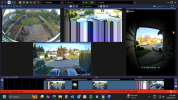
Many years ago I used to have a problem just like that with a Chinese camera that was corrupting its own video stream due to buggy firmware. The only way to fix it was to upgrade the firmware to something with the bug fixed.
Since there are so many things that can possibly go wrong, it is really hard to say exactly what it is. In my particular case, I got lucky, people had identified the bug as something wrong with the firmware's TCP protocol stack I believe, and new firmware was available to fix it because, being a Chinese no-name camera, it used the same chipset as many other Chinese no-name cameras.
The bug mostly affected the camera's i-frames because those are by far the largest percentage of data being transmitted. Anyway, assuming you can't fix this with new firmware right now, there were some tricks that reduced the impact of the bug and the same tricks might work for you with this camera. If I used a lower resolution and/or lower bit rate, that made each video frame smaller (fewer bytes) so there was less chance of a frame getting corrupted, and when there was corruption, it was more likely to affect only a smaller portion of the video at the bottom of the frame (the corrupted area would start further down). Changing the i-frame interval also affected the corruption behavior of course, because each i-frame essentially resets the video stream so if you have more i-frames, the corruption pattern has more opportunities to appear/disappear/change. If I recall, with my camera the corruption got more frequent during the day and much less frequent at night when it switched to black and white because the frames were smaller.
Some other things to try:
- Enable hardware accelerated decoding in Blue Iris for that camera, if supported by your system.
- Disable hardware accelerated decoding in Blue Iris if it is enabled for that camera.
- Try a different wifi access point if you have one, in case the issue is actually wifi-related.
- You could also play with the "Use RTP/UDP ports" checkbox in Blue Iris's Network IP camera configuration panel, on the offchance you can get the stream to come through UDP using this. The idea is maybe using the different protocol will yield different results. Refer to the Wyze RTSP firmware configuration to see if you can find anything related to "RTP" or "UDP" ports there. It is unlikely to actually be supported, but worth a look.