Vikylin and Dahua compatibility issues with NVR

Nov 23, 2019
24
7
US
Purchased a Vikylin PTZ camera with the understanding I could use it with my Dahua NVR and DMSS App. So far, that isn't the case. I can see the video stream but I have zero PTZ function within the DMSS App, anyone have any solutions or suggestions?
 
Purchased a Vikylin PTZ camera with the understanding I could use it with my Dahua NVR and DMSS App. So far, that isn't the case. I can see the video stream but I have zero PTZ function within the DMSS App, anyone have any solutions or suggestions?
Have you logged into the PTZ's embeded webGUI, enabled ONVIF and created a username and password for the ONVIF user?
 
Have you logged into the PTZ's embeded webGUI, enabled ONVIF and created a username and password for the ONVIF user?

You are 100% correct, I was finally able to get it setup and operational late last night. I wasn't clear what the ONVIF user functionality did but it worked and everything is operational in the DMSS App. Thanks!
 
  • Like
Reactions: TonyR
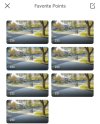
Another question on "Favorite Points" with the PTZ. On my other off-branded cameras I could save new points, edit and so on. This Vikylin has 255 pre-saved points and although it looks like they are being deleted they just come back. It won't let me edit or add new points as it thinks the count is already full.....any ideas?
 

Attachments

  • Screenshot_20260725_124130.jpg
    Screenshot_20260725_124130.jpg
    127.6 KB · Views: 3
Another question on "Favorite Points" with the PTZ. On my other off-branded cameras I could save new points, edit and so on. This Vikylin has 255 pre-saved points and although it looks like they are being deleted they just come back. It won't let me edit or add new points as it thinks the count is already full.....any ideas?
By "points" I asume you're referring to PTZ "presets" and if so, can you log into the camera's embeded webGUI using Internet Explorer and change them?

IE is "hiding" in Win 10 and 11, get back to us if you need to know how to "UNhide" it and run it.
 
By "points" I asume you're referring to PTZ "presets" and if so, can you log into the camera's embeded webGUI using Internet Explorer and change them?

IE is "hiding" in Win 10 and 11, get back to us if you need to know how to "UNhide" it and run it.
Ok, unclear what unhide means but I'm willing to try anything.

Yes, I'm referring to the saved locations, I have other PTZ cameras but I've never had one with 255 pre-saved meaningless locations that I can't delete from within the DMSS App, these Vikylin cameras are a bit glitchy. Hopefully the webGUI helps remove these saved points. Thanks again.