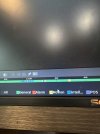
Video skips when motion detected

Dec 22, 2022
16
2
United States
I have an issue where many cameras skip recording for a few seconds after detecting motion, causing the event to be unrecorded. I attached a video of what this looks like. I verified the NVR has adequate resources for the bitrate and the hard drives pass the SMART test. What could be going on here? Is an event interfering with recording? I have the same issues on my Dahua XVR. This doesn’t occur for all cameras or even for each event.
 

Attachments

Does it playback good on the NVR's local HDMI screen?
Usually skipping video is because of a bad HDD, or network constants.
 
I have had that a good many times not just with mine but remotely replaying customers cameras. Sometimes clicking right at the start of the motion or tripwire mark it will play ok. I tend to think it is a problem with the way they coded the software where it puts it also in the area where you can playback by motion only excluding the 24 hour line. From what a Homicide detective told me a few years ago it writes a file for playback and in the past when I used a DVR it seemed ok and no skipping when a motion mark was played on 24 hour playback and only seemed to do this on network cameras and NVRs. If you download the footage then it almost always never seems to skip and if it does then there most likely was a network hop of some type maybe a lag transferring the data to HDD.
 
Does it playback good on the NVR's local HDMI screen?
Usually skipping video is because of a bad HDD, or network constants.

This

I’ve seen it recently in two situations

1- a remote NVR where the problem seems to be the upload, ie the Providers network constraint

2- and I’ve seen this sporadically across many cameras for years: When both an IVS rule and MD are enabled and trip essentially simultaneously
 
  • Like
Reactions: JDreaming
The Dahua NVRs have a (IMO) architecture design flaw where the NVR creates a new video file when an event occurs. If the NVR is recording continuously, it's humming along recording video into a file. Then when an event occurs, it closes the existing video file, creates a new one, and records video into it. When the event ends, the same sequence happens again. My NVR is very old now, close to 10 years. With its original firmware the problem was very pronounced, where whatever triggered an event was totally skipped over in the playback. The most important thing to see wasn't recorded! Over a few firmware updates the problem got incrementally better, to the point where it's not too horrible with the version I run now, still very old. Maybe this is what you're seeing, maybe not. If it is, my experience is that the severity varies with different firmware versions, but seriously, I would expect it would have been totally fixed years ago.

 
  • Like
Reactions: JDreaming
This

I’ve seen it recently in two situations

1- a remote NVR where the problem seems to be the upload, ie the Providers network constraint

2- and I’ve seen this sporadically across many cameras for years: When both an IVS rule and MD are enabled and trip essentially simultaneously
This would possibly be the issue. The recordings where it skipped were showing General, Motion, and IVS events at once.
 

Attachments

  • image.jpg
    image.jpg
    1.3 MB · Views: 4
  • Like
Reactions: bigredfish
This would possibly be the issue. The recordings where it skipped were showing General, Motion, and IVS events at once.

Not to get too far in the weeds on it because I have yet to test it definitively, but it seems to make a difference what starts the event recording.
If its MD>>then IVS I get the skip sometimes (as yours shows)
If its IVS>> then MD it doesnt seem to be a problem

Its not consistent so there must be another trigger

Of course there's no practical way to control that, I use MD sparingly as a backup to IVS at night on a few very dark scenes, small blocks, so as not to miss an important event.
 
  • Like
Reactions: JDreaming