Using a mask for motion detection but have AI analyze entire scene?

biggen

Known around here
May 6, 2018
2,891
3,321
Just figured out that if you use zone/hotspot in BI, then AI can only "see" what you have masked in the zone. I was under the assumption that you could use a mask to detect only a certain area of the scene but then apply AI to the entire scene when it comes to confirming alerts but this is not how it works.


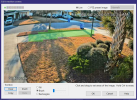
Is there anyway to do the above? I have a scene where I only want to detect people walking on the sidewalk and use AI to confirm them. I don't want BI to detect motion on the roadway as that is an unnecessary use of AI and CPU cycles. Here is what I have setup in BI. AI can only "see" what is in the green area which means it only has legs and feet to get a confirmation which is less than ideal.
1770385016551.png
 
Last edited:
Just figured out that if you use zone/hotspot in BI, then AI can only "see" what you have masked in the zone. I was under the assumption that you could use a mask to detect only a certain area of the scene but then apply AI to the entire scene when it comes to confirming alerts but this is not how it works.


Is there anyway to do the above? I have a scene where I only want to detect people walking on the sidewalk and use AI to confirm them. I don't want BI to detect motion on the roadway as that is an unnecessary use of AI and CPU cycles. Here is what I have setup in BI. AI can only "see" what is in the green area which means it only has legs and feet to get a confirmation which is less than ideal.

View attachment 237715
Yes, you need at least another zone that covers the rest of the scene (I use "G" for general), then trigger on the "A" zone, but have AI analyse both zones. (A and G). See the BI help file for various combinations of syntax for zone crossings.
 
  • Like
Reactions: Bruce_H and biggen
or let the camera do the AI work and just select person. Assuming that cam has AI capabilities.
 
or let the camera do the AI work and just select person. Assuming that cam has AI capabilities.
Yeah, I do a mixture of that. IVS sucks at night from my testing and years using Dahua. Hit rate is 50/50 at night. It's spot on during the day though.
 
  • Like
Reactions: Tinman
Yeah, I do a mixture of that. IVS sucks at night from my testing and years using Dahua. Hit rate is 50/50 at night. It's spot on during the day though.
I have the opposite experience with Dahau (in-camera) IVS: it is unbelievably accurate at night, often finding distant people deep in the shadows that BI motion detection could never hope to find, and the AI would likely reject even if the BI motion detection did pick them up.
Unfortunately, I would also like to capture animals at night, so I do still run BI motion detection in conjunction with IVS, as my cameras are S2 5442s, with no firmware available with animal detection.
 
  • Like
Reactions: biggen
Yeah, I do a mixture of that. IVS sucks at night from my testing and years using Dahua. Hit rate is 50/50 at night. It's spot on during the day though.

Which camera are you using?

My 5442 series cameras have been incredible at night - are you on default auto settings?

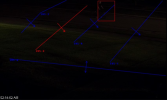
Mine works at night during a blizzard:

1770396993240.png

I will preface this next example with this camera is dialed in to this location for when the flood lights come on, so that is why the picture is so dark.

So I have several IVS tripwires on this camera instead of an intrusion because this camera also acts as a spotter cam for my PTZ and I only wanted to spot it of people heading towards and not away. Obviously at the street, this camera is not being used for IDENTIFY purposes.

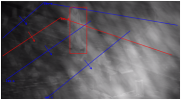
Here is a middle of the night capture (the red and blue lines are the IVS rules and when it triggered). My non AI cameras totally missed this event using motion detection, including my overview when this person was in front of my house and was lit better from the lights off my house. The middle of the night, 50+ feet away from the overview cams, and dark clothing got right past the BI motion that I have fairly sensitive. So since BI motion didn't pick it up, obviously neither did DeepStack. In playback tuning, DeepStack dark model did pick it up, but we all know that tuning and live DS are two different things at the moment.

1770396792017.png
 
Which camera are you using?

My 5442 series cameras have been incredible at night - are you on default auto settings?

Mine works at night during a blizzard:

View attachment 237735

I will preface this next example with this camera is dialed in to this location for when the flood lights come on, so that is why the picture is so dark.

So I have several IVS tripwires on this camera instead of an intrusion because this camera also acts as a spotter cam for my PTZ and I only wanted to spot it of people heading towards and not away. Obviously at the street, this camera is not being used for IDENTIFY purposes.

Here is a middle of the night capture (the red and blue lines are the IVS rules and when it triggered). My non AI cameras totally missed this event using motion detection, including my overview when this person was in front of my house and was lit better from the lights off my house. The middle of the night, 50+ feet away from the overview cams, and dark clothing got right past the BI motion that I have fairly sensitive. So since BI motion didn't pick it up, obviously neither did DeepStack. In playback tuning, DeepStack dark model did pick it up, but we all know that tuning and live DS are two different things at the moment.

View attachment 237734
It's a 4k-T cam. No, its not auto. Settings are dialed in. It's never been very good at IVS at that distance to the sidewalk at night for me.
 
I ended up just using dumb motion detection in the camera itself in a zone that covers the sidewalk only. Then I trigger BI via ONVIF with that zone and BI can confirm the alert with AI to determine if it is a human or not. Working great so far and easy to setup.