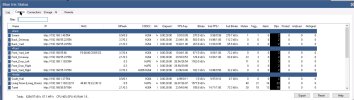
Hello all, I have been running into an issue with two of my cameras taking up a large amount of space on my drive recording video. the two cameras in question are a couple of older USB cameras that are connected to another PC and are being broadcasted over lan via yawcam app. what I am seeing is a single video file (bvr) taking up 4gb within about 5 minutes and filling up my drive. What I believe I am running into is the app yawcam is not able to dial down the resolution and video quality being broadcasted to BI.
I am on the hunt for another streaming service for these two cameras that can dial back these settings. I have tried both VLC and OBS studio and can't seem to get them to work at all. was thinking about trying Crowsnest which is used mainly on 3D printers running klipper, but it has the ability to set the desired video resolution and frame rates on the camera feed. Not unless there is some sort of setting in BI I'm missing that can be changed so that the recorded file is not so large.
in BI settings I have all cameras set to cut the video files on 1 hour increments or when they reach 4gb in size, all of my other "real" ip cameras rarely reach that file size within an hour unless there is a high amount of activity (motion)
with a total of 11 cameras recording 24/7 I used to be able to store about 3-4 days of footage on the BI PC at one time but now I can't even store a full days worth, on top of lately BI has been randomly shutting down when it goes to clearing space or moving some of the footage to an external storage, it looses or corrupts files and the internal drive will fill up stopping all recording on all cameras.
The two USB cameras are recording in the inside of the house and don't have any alerts set, they are mainly for viewing in the timeline when I want to monitor my pets or if someone from outside comes to the door and I want to see what's happening as a visitor enters. neither of these cameras need to have a high resolution or video quality.
if anyone has any suggestions for a simple camera streaming app that can broadcast over lan or if there are settings in BI I am missing for recording quality Please let me know. I would really appreciate it.
I am on the hunt for another streaming service for these two cameras that can dial back these settings. I have tried both VLC and OBS studio and can't seem to get them to work at all. was thinking about trying Crowsnest which is used mainly on 3D printers running klipper, but it has the ability to set the desired video resolution and frame rates on the camera feed. Not unless there is some sort of setting in BI I'm missing that can be changed so that the recorded file is not so large.
in BI settings I have all cameras set to cut the video files on 1 hour increments or when they reach 4gb in size, all of my other "real" ip cameras rarely reach that file size within an hour unless there is a high amount of activity (motion)
with a total of 11 cameras recording 24/7 I used to be able to store about 3-4 days of footage on the BI PC at one time but now I can't even store a full days worth, on top of lately BI has been randomly shutting down when it goes to clearing space or moving some of the footage to an external storage, it looses or corrupts files and the internal drive will fill up stopping all recording on all cameras.
The two USB cameras are recording in the inside of the house and don't have any alerts set, they are mainly for viewing in the timeline when I want to monitor my pets or if someone from outside comes to the door and I want to see what's happening as a visitor enters. neither of these cameras need to have a high resolution or video quality.
if anyone has any suggestions for a simple camera streaming app that can broadcast over lan or if there are settings in BI I am missing for recording quality Please let me know. I would really appreciate it.