It has been a while since I have posted here, but I wanted to share something that may help others running UniFi, Blue Iris, and Roku for camera viewing.
I recently upgraded my network to a UniFi based prosumer setup. As part of tightening security, I enabled Intrusion Detection and set it to Notify and Block. For several weeks during testing, I had IDS set to Notify only and everything functioned normally. The problem appeared only after enabling the Block feature.
Almost immediately, my Roku streaming through the IP Cam Pro app began failing. The stream would play for roughly 10 seconds and then stop. Changing cameras produced the same result, making it look like the Roku app was malfunctioning.
What made this tricky was that Blue Iris streams worked perfectly on desktops, laptops, and mobile devices, both on WiFi and LTE. That ruled out Blue Iris itself and pointed toward the network.
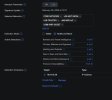
The root cause turned out to be UniFi IDS blocking traffic from the NVR once Block mode was enabled. The fix was to whitelist the NVR’s IP address in the IDS settings. As soon as I did that, the Roku streaming returned to normal.
If you are enabling IDS with blocking on a UniFi router and your Roku camera streams suddenly fail, check whether your NVR needs to be excluded.
Security features are important, but sometimes they need a bit of tuning to work smoothly with surveillance systems.
Hope this helps someone down the road.
Miguel
I recently upgraded my network to a UniFi based prosumer setup. As part of tightening security, I enabled Intrusion Detection and set it to Notify and Block. For several weeks during testing, I had IDS set to Notify only and everything functioned normally. The problem appeared only after enabling the Block feature.
Almost immediately, my Roku streaming through the IP Cam Pro app began failing. The stream would play for roughly 10 seconds and then stop. Changing cameras produced the same result, making it look like the Roku app was malfunctioning.
What made this tricky was that Blue Iris streams worked perfectly on desktops, laptops, and mobile devices, both on WiFi and LTE. That ruled out Blue Iris itself and pointed toward the network.
The root cause turned out to be UniFi IDS blocking traffic from the NVR once Block mode was enabled. The fix was to whitelist the NVR’s IP address in the IDS settings. As soon as I did that, the Roku streaming returned to normal.
If you are enabling IDS with blocking on a UniFi router and your Roku camera streams suddenly fail, check whether your NVR needs to be excluded.
Security features are important, but sometimes they need a bit of tuning to work smoothly with surveillance systems.
Hope this helps someone down the road.
Miguel