Hello everyone,
I’m experiencing a strange issue with Blue Iris UI3 on Android. UI3 version: 320, BI version: 6.0.5.1
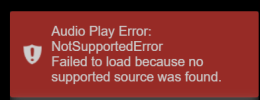
On Android, UI3 initially works fine and displays the list of cameras. However, after some time of viewing, the screen suddenly turns completely white. The only thing visible is a small red error box in the bottom-right corner, with a message that looks like a decoding error (something related to decoder / playback). Unfortunately, I didn’t manage to take a screenshot before it disappeared.
This behavior started appearing in recent Blue Iris versions — I don’t remember seeing it before.
Has anyone else encountered a similar issue?
Thanks in advance for any insights.
I’m experiencing a strange issue with Blue Iris UI3 on Android. UI3 version: 320, BI version: 6.0.5.1
On Android, UI3 initially works fine and displays the list of cameras. However, after some time of viewing, the screen suddenly turns completely white. The only thing visible is a small red error box in the bottom-right corner, with a message that looks like a decoding error (something related to decoder / playback). Unfortunately, I didn’t manage to take a screenshot before it disappeared.
This behavior started appearing in recent Blue Iris versions — I don’t remember seeing it before.
Has anyone else encountered a similar issue?
Thanks in advance for any insights.