
I have a dedicated PC that runs two monitors with two separate UI3 sessions. The one is a standard 16x9 monitor, standing on it's edge (tall / portrait rather than wide / landscape [so I guess 9x16]) with 4 wide cameras across it, and that works fine; four even slots stretched to fill the monitor. However the other is an ultra wide that I want to split into 8 equal slots for those 8 cameras. I had the same setup with smart PSS, which just lets you select a grid and fill it. Blue Iris exceeds PSS in EVERY way, but I just haven't figured out how to make this work right.
With my setup now, the lower left camera I have to set to 16x9 ratio (in the camera group on the server) in order to get the grid right. That is what you see below. If I set it to 'auto' so it will fill the entire grid square, it changes the geometry of the whole grid, where the top row gets shorter and the bottom row shifts (as seen in the Third photo).
Any suggestions on what the easiest way to get a simple grid on the screen with the cameras filling each grid square? Basically the first picture, without the black bars above and below the lower left camera would be perfect, but I can't seem to make it happen.
Thanks for any thoughts or input.
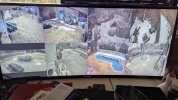
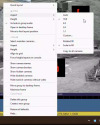
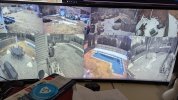
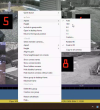
With my setup now, the lower left camera I have to set to 16x9 ratio (in the camera group on the server) in order to get the grid right. That is what you see below. If I set it to 'auto' so it will fill the entire grid square, it changes the geometry of the whole grid, where the top row gets shorter and the bottom row shifts (as seen in the Third photo).
Any suggestions on what the easiest way to get a simple grid on the screen with the cameras filling each grid square? Basically the first picture, without the black bars above and below the lower left camera would be perfect, but I can't seem to make it happen.
Thanks for any thoughts or input.