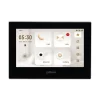
A number of years ago, I purchased the VTO/VTH combo package from @EMPIRETECANDY Andy as a cool toy.
This is a Villa Intercom station & display, NOT a doorbell unit: VTO 2202F-P (P=POE hardwired, not WiFi) and the VTH model 2421F-P (hardwired, not WiFi)
The VTO is what sits outside by the front door that people press to trigger the VTH inside.
In my situation, between Home Assistant with sound notifications + Blue Iris ability to work with Home Assistant, I didn't need a doorbell unit as I have both Z-Wave speakers + a couple desktop Sonos speakers that do the job of making ding dong noises.
Thinking I best have additional VTH displays throughout the house, I purchased 2 additional VTH's for a total of 3. #1 would be in the Main Bedroom, #2 would be in Kitchen, #3 would be in my woodworking shop. If I really wanted to, I could have 5 more VTH displays in each room in the house. If I had a large family, I would do just that.
However, at the time of receiving these devices, my Tire Slasher security event happened, I had NO time to figure out how to configure these as I had more pressing matters to deal with. When I did try to, nothing worked as it should. There were very little instructions/videos out there 4 years ago to configure the VTO's/VTH's as things can get complicated. Basically, I had the VTO unit outside by the door connected to Blue Iris as a camera (it does have a fisheye camera) but the VTH's collected dust. Even tried to do a firmware update on a VTH and ended up bricking it (white screen flash every 5 seconds on bootup, meaning no IP configuration access into it). So I just now have 2 working VTH's.
Today, I wanted to tackle these 2 VTH's.
First thing, update the firmware from Dahua International for the latest / greatest as of today. I actually did 1 older firmware update a couple years ago and it worked but.... didn't continue with the second VTH or bother to configure everything correctly.
But still was having issues. Just purchased a new Ubiquiti Ultra gateway router and have been changing IP schemes all over the place (including my Dahua IP cameras). When I plugged in the VTH's, they wanted the old static IP network that is no longer there. Spent a good 2-3 hours figuring out how to factory reset. VTH's have factory reset button on the backside while the VTO has a button to press 5, 10, or 15 times (Internet gives different accounts).
The using the 4 year old Config Tool, more issues. The new VTO/VTH firmware requires 8 digit passwords with numbers, letters, and symbols. But this Config Tool would only allow input of 6 numbers! So had hell of a time changing any type of configuration without the inability to have Config Tool supply the alphanumeric passwords! Figured out, latest/greatest Config Tool allows alphanumeric input. So that took a good 3-4 hours of trial & error.
Finally, some good info out there. Though most documents/videos relate to the older VTH firmware that had the display looking something like an Atari 8-bit display. The newer VTH firmware has a more pleasant home villa look. And the different versions make a HUGE difference in configurations.
The video I came across is 3 years old on YouTube, but it works 100%:
I followed this to the Tee, and whalla... VTO signals both VTH's with video & sound 100%. I can now add in my front yard PTZ to "monitor" if the need arises.
Next up, probably purchase a couple more VTH's. I think different models so I can get the latest/greatest versions.
Also, I have a test Dahua NVR to install in my home to work side-by-side with my Blue Iris machine (for business purposes). I am thinking to 'share' the VTO/VTH's between Blue Iris & Dahua NVR. And then have the Dahua NVR take care of the sending notifications, video, audio to my smartphone DMSS app.
Old VTH display:
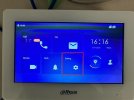
new VTH display:
This is a Villa Intercom station & display, NOT a doorbell unit: VTO 2202F-P (P=POE hardwired, not WiFi) and the VTH model 2421F-P (hardwired, not WiFi)
The VTO is what sits outside by the front door that people press to trigger the VTH inside.
In my situation, between Home Assistant with sound notifications + Blue Iris ability to work with Home Assistant, I didn't need a doorbell unit as I have both Z-Wave speakers + a couple desktop Sonos speakers that do the job of making ding dong noises.
Thinking I best have additional VTH displays throughout the house, I purchased 2 additional VTH's for a total of 3. #1 would be in the Main Bedroom, #2 would be in Kitchen, #3 would be in my woodworking shop. If I really wanted to, I could have 5 more VTH displays in each room in the house. If I had a large family, I would do just that.
However, at the time of receiving these devices, my Tire Slasher security event happened, I had NO time to figure out how to configure these as I had more pressing matters to deal with. When I did try to, nothing worked as it should. There were very little instructions/videos out there 4 years ago to configure the VTO's/VTH's as things can get complicated. Basically, I had the VTO unit outside by the door connected to Blue Iris as a camera (it does have a fisheye camera) but the VTH's collected dust. Even tried to do a firmware update on a VTH and ended up bricking it (white screen flash every 5 seconds on bootup, meaning no IP configuration access into it). So I just now have 2 working VTH's.
Today, I wanted to tackle these 2 VTH's.
First thing, update the firmware from Dahua International for the latest / greatest as of today. I actually did 1 older firmware update a couple years ago and it worked but.... didn't continue with the second VTH or bother to configure everything correctly.
But still was having issues. Just purchased a new Ubiquiti Ultra gateway router and have been changing IP schemes all over the place (including my Dahua IP cameras). When I plugged in the VTH's, they wanted the old static IP network that is no longer there. Spent a good 2-3 hours figuring out how to factory reset. VTH's have factory reset button on the backside while the VTO has a button to press 5, 10, or 15 times (Internet gives different accounts).
The using the 4 year old Config Tool, more issues. The new VTO/VTH firmware requires 8 digit passwords with numbers, letters, and symbols. But this Config Tool would only allow input of 6 numbers! So had hell of a time changing any type of configuration without the inability to have Config Tool supply the alphanumeric passwords! Figured out, latest/greatest Config Tool allows alphanumeric input. So that took a good 3-4 hours of trial & error.
Finally, some good info out there. Though most documents/videos relate to the older VTH firmware that had the display looking something like an Atari 8-bit display. The newer VTH firmware has a more pleasant home villa look. And the different versions make a HUGE difference in configurations.
The video I came across is 3 years old on YouTube, but it works 100%:
I followed this to the Tee, and whalla... VTO signals both VTH's with video & sound 100%. I can now add in my front yard PTZ to "monitor" if the need arises.
Next up, probably purchase a couple more VTH's. I think different models so I can get the latest/greatest versions.
Also, I have a test Dahua NVR to install in my home to work side-by-side with my Blue Iris machine (for business purposes). I am thinking to 'share' the VTO/VTH's between Blue Iris & Dahua NVR. And then have the Dahua NVR take care of the sending notifications, video, audio to my smartphone DMSS app.
Old VTH display:
new VTH display: