Is there anyway to remove 'text overlays' that are on the video screen that are on the camera when purchased?
The camera is from EmpireTech from 'Andy'.
Thanks for your reply, bigredfish. I can't find the path for 'image/encode settings'.
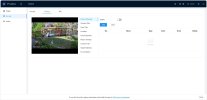
Under the 'Video' tab, dwn to the bottom left is 'Edit overlays live' but going there
the overlays that came with the camera are not selectable. they are greyed out.
I can add overlays but so far can't erase the mfg overlays within the 'Video' tab.
Would you explain with a little more detail....Please!
The newer software overlay settings can be found inder CAMERA - ENCOD - OVER:AY like the example above from bigredfish.
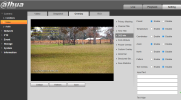
The older software settings are found under the video tab as shown in this example
this is as far as I have got. nothing gets deleted when I click the 'Enable' button to off
the 2 overlays stay where they are
what must I do to actually delete them...so that I can place what & where I want using BlueIris?
Some browsers will not show the menus correctly nor allow some changes. Which one are you using?
I have no problems using Brave and Internet Explorer.
I use BI for most overlays also.
edited: out of curiosity I just tried Edge and it allowed saving overlay changes on a newer camera. Ya never know.
I think that I have finally got rid of the 2 overlays. Logged on but spent so much time that it had logged me off without notification! A big thanks to all that replied and helped me with this problem! I've never had overlays from the factory and never knew that they could be so much of a problem!
Thanks to 'bigredfish' and 'Broachoski' for your time spent helping me!