T-Mobile 5G Home Internet AND Blue Iris

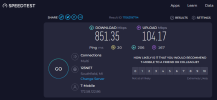
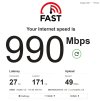
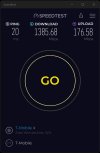
Two years and 2 months later. Still about as happy as can be with this service. They certainly haven't oversold it in my area. That said, if you're in a crappy area for it, you're going to get crap speeds. Just the nature of the beast.
Screenshot 2024-02-06 082715.jpg
 
Two years and 2 months later. Still about as happy as can be with this service. They certainly haven't oversold it in my area. That said, if you're in a crappy area for it, you're going to get crap speeds. Just the nature of the beast.

View attachment 185374
Definitely got the tower to yourself! Are you using the T-Mobile gateway included with the service?
 
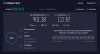
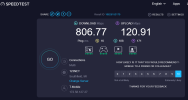
Almost 3 years now, wow!! I'm still using the original equipment and it's all been super stable PLUS the price is locked in for life ($55/month it would be $50/month if I'd allow them to take it directly from my bank account, heh...) with no data cap. What more can I ask? Just tried the speedtest for the first time in many months, this time in what would be considered "high usage" time...

Screenshot 2024-11-27 102403.png
 
You must be in a pretty sweet spot in relation to the tower. I have been using TMHI since the early days. I jumped on their $25.00/month promo when it came out later and had two lines for awhile. I waited the appropriate amount of time and then cancelled my $50.00/month line. I love TMHI.


speed.jpg
 
  • Like
  • Wow
Reactions: looney2ns and TonyR
That is awesome performance for a tiny indoor antenna. Starlink and fixed wireless ISPs with their bulky antennas could only dream of delivering that, and they charge way more too.
Mine is slightly modified. :p Connecting at 2 X N41 stand alone bands.
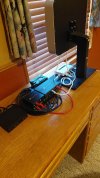
20241127_105544.jpg
 
Last edited:
  • Like
  • Love
Reactions: looney2ns and TonyR
My Verizon 5g Home internet was decent... but speeds were never like that!
For being in a Metropolitan area, next to a Freeway. It was a strong signal,
we had about 290 down and 26 Mbps Up.
Recently the hood got Fiber. we signed up for 300 up 300 down. getting all that. 320 down and 311 up.
 
I wish I had that luck with my connection. Originally I got roughly 750 down and 400 up consistently. I guess my neighbors have jumped onto T-mobile also. I get 400 down and only 20-50 up. I did connect an external waveform antenna to the modem and went into the menu to change to external antenna. Didn't help. I am not disappointed with the download speeds but the upload speeds kill the experience when trying to VPN home or trying to pull camera streams when away.
 
I wish I had that luck with my connection. Originally I got roughly 750 down and 400 up consistently. I guess my neighbors have jumped onto T-mobile also. I get 400 down and only 20-50 up. I did connect an external waveform antenna to the modem and went into the menu to change to external antenna. Didn't help. I am not disappointed with the download speeds but the upload speeds kill the experience when trying to VPN home or trying to pull camera streams when away.

20-50 Mbps is a lot more than enough for good remote camera viewing. The performance issue is probably just from bad latency and/or packet loss. Unless your VPN solution is relayed through a third party that isn't performing well.
 
  • Like
Reactions: looney2ns
My RM551 in a M.2 to ethernet sled is still going strong with the $10.00 tablet SIM. Not sure if I had a tower upgrade or not but I'm now getting four times carrier aggregation with four 5G stand alone bands. 2026-10-12 07 36 15.jpg
 
  • Like
Reactions: TonyR
My RM551 in a M.2 to ethernet sled is still going strong with the $10.00 tablet SIM. Not sure if I had a tower upgrade or not but I'm now getting four times carrier aggregation with four 5G stand alone bands.

That is awesome getting 4 bands connected at once. At one remote location I have, AT&T was the only provider with good speed and they started offering a regular home internet package there ~($60/mo). It is a heavily wooded area otherwise I'd have done starlink instead.

Anyway the AT&T modem that came with their home internet service will only connect to 1 band at a time, and the band it prefers gives about 400 Mbps download with 1 Mbps upload. No typo there. I'm not sure how they even pull this off because I thought more than 1 Mbps upload was required to hit 400 Mbps download over TCP connections, due to all the acknowledgement packets that need to go out. So it is pretty bad for camera remote access. But we figured out if we put the modem on the floor, that reduces the signal strength of its preferred band and it frequently moves to a different band that has ~20 Mbps upload, which is much more usable.
 
That is awesome getting 4 bands connected at once. At one remote location I have, AT&T was the only provider with good speed and they started offering a regular home internet package there ~($60/mo). It is a heavily wooded area otherwise I'd have done starlink instead.

Anyway the AT&T modem that came with their home internet service will only connect to 1 band at a time, and the band it prefers gives about 400 Mbps download with 1 Mbps upload. No typo there. I'm not sure how they even pull this off because I thought more than 1 Mbps upload was required to hit 400 Mbps download over TCP connections, due to all the acknowledgement packets that need to go out. So it is pretty bad for camera remote access. But we figured out if we put the modem on the floor, that reduces the signal strength of its preferred band and it frequently moves to a different band that has ~20 Mbps upload, which is much more usable.
I have never used AT&T. Do people use their SIMS in their own devices? With my setup I can do band locking which totally ignores whatever bands you don't want. And, you don't have to mess around with moving the gateway around.