SmartPSS Lite causing hangs or crashes on windows pc running 24/7

drakejest

Young grasshopper
Sep 9, 2022
67
12
Asia
Im using a small dell Optiplex computer to display to a monitor all my 32cameras 24/7. I am using smartPSS Lite in full screen to do, problem is after awhile several hours sometimes days. the windows pc crashes black screen (but display is on, monitor is not showing no display so there is video signal its just black). Tried diagnosing the cause of the crash, but even windows is unable to tell me why.

Are there other programs i can use to display my cameras onto a monitor? i think that smartPSS lite is just bad, currently im testing out the old SmartPSS to see if it still crashes.
 
I've used smartPSS and lite on several machines over 8 years. Sometimes smartPSS would crash, especially the older versions, but I've never once associated a windows crash with any of them.
 
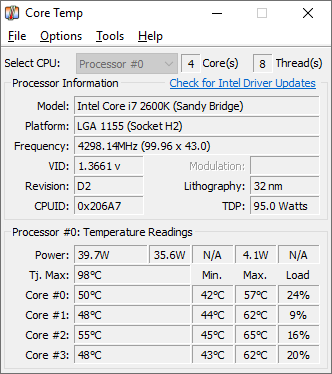
Maybe your hardware is experiencing a thermal issue ( the PC) gets stressed out with 32 streams 24/7 before the CPU/GPU hits a critical temp. Make sure everything is running cool. look up your processor on intel site and see what version of Graphics hardware your running, and see if there are any older or newer drivers for it.
Some pc's will report there temps in a utility software.


1773815897657.png
 
Maybe your hardware is experiencing a thermal issue ( the PC) gets stressed out with 32 streams 24/7 before the CPU/GPU hits a critical temp. Make sure everything is running cool. look up your processor on intel site and see what version of Graphics hardware your running, and see if there are any older or newer drivers for it.
Some pc's will report there temps in a utility software.


View attachment 240201
Trust me when i say i checked everything, I ran temp logs never went past 60C moments at the crash (CPU was stable at 75C but it should have no problem with that) replaced and reformatted the NVME SSD, replaced the ram, replaced the powersupply. The only thing left is the CPU and motherboard. The crash is so bad that windows is unable to dump any logs of it (which makes it very likely hardware problem).

What is weird that just the computer idling, just turned on doing nothing but showing the desktop, it doesn't crash. So its something do with what im doing and the only culprit is smart PSS, though i cant definitely say its the program, because it might as well be what the program is demanding from the hardware. I actually ordered another identical model so i can definitely say that its really the hardware, because if i get the same behavior on the second machine, then something is wrong.
 
  • Like
Reactions: Flintstone61
I;m not computer guru so most specs turn into gobblety gook mush, but I;m running an older Win 11Pro HP laptop
12th Gen Intel(R) Core(TM) i7-1255U
16 GB RAM

I run SmartPSS Lite (newish version) all day in the background,. Sometimes I'll forget to turn it off overnight.
Worst that happens is it shows no video for a few seconds, then will reboot itself. Never a Windows crash

In can't recall ever running it for a week straight though
 
  • Like
Reactions: tigerwillow1
how long do you usually run the smartPSS app ? i was wondering if what im trying to do is too demanding for the app.
Until about 2 years ago when I switched to BI for viewing, I ran smartPSS continuously until it crashed. The computer was on all day and hibernated overnight. What I'm calling a crash would sometimes be a popup saying the program malfunctioned, but more often it just silently terminated. One thing I noticed sometimes was smartPSS gobbling up most of the system memory, a memory leak I presume. In these cases I shut it down and restarted it. Since I view now with BI, I run smartPSS only for short periods as needed.