Review - EmpireTech IPC-T54PRO-AS 1/1.8" CMOS 4MP WizColor

wopi82

IPCT Contributor
Feb 9, 2017
120
822
Poland
Hi everyone, here is a review of the new IP camera I purchased from Andy, the T54PRO-AS, which is likely a sibling model to Dahua’s recent HDW5459H-ASE-PV-PRO. It features a 4-megapixel sensor paired with an f/1.0 lens. The camera supports Smart Dual Light (IR + warm light) and includes a removable IR filter, enabling VIS+NIR imaging — a combination that until recently was rare in cameras equipped with f/1.0 lenses. This review will cover only the aspects of image quality. I will not discuss UI features, dual light or sound quality.

It has been four years since my last review here, and during that time, I didn’t feel there was any compelling reason to buy or test new models. In recent years, Dahua’s IP camera lineup has shown minimal progress in CMOS sensor technology. Image quality improvements have been marginal, and many models still rely on hardware similar to earlier generations. The main area of development has been software, particularly AI functions. Dahua has focused heavily on advanced analytics, object detection, behavior recognition, and intelligent event filtering. While these AI features add value and improve usability, core imaging performance has remained largely unchanged.

When I saw the new 5459PRO series, I decided to give it a try. The combination of an ICR mechanism with an f/1.0 lens was especially tempting. My goal was to replace my older 5442TM-AS-LED model with a 2.8 mm lens, so I ordered the same focal length in the new T54PRO. Here are my observations.

The first thing that stood out to me was the noticeably lower image resolution produced by the T54PRO (PRO) compared with the 5442TM-AS-LED (5442) and the 5442T-ZE, both of which I also own. All three cameras use a 4-megapixel 1/1.8” CMOS sensor. The two 5442 models deliver identical image quality in terms of resolution, dynamic range, and color rendition. The PRO, however, behaves differently.


Interestingly, the PRO offers clearly better dynamic range than the 5442. As shown in the images below, it almost appears as if WDR was enabled on the PRO — the sky is not blown out, and shadows are noticeably brighter than in the 5442 image. However, despite this advantage, the PRO’s level of detail is worse. The image looks sort of plastic.
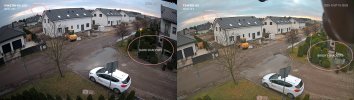
dynamic-range.jpg

Initially, I thought this was simply a matter of tweaking image settings or video compression, but no matter how much I adjusted, the resolution never improved.

Switching from the standard image mode to WDR makes the resolution even worse, causing straight lines to appear jagged. While the 5442 models also exhibit minor jagging, it is far more pronounced in the PRO. I contacted Andy, who forwarded the information to Dahua. I tested four different firmware versions. With the first firmware, the image quality was so poor that it resembled a Full HD stream upscaled to 4 MP. The latest firmware brings some improvement, but only slightly.
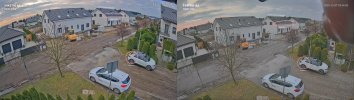
WDR-jagged.jpg

Now, onto the colors. Unfortunately, things don’t look good here either. In the first firmware version, the camera struggled with white balance and WDR. The image was oversaturated at night and overly blue during the day. These issues have been partly fixed, but the camera still has problems with accurate color rendition. Subtle color differences are blended into a single shade. With the 5442, I have nothing to complain about — what I see with the naked eye is exactly what I get in the image.
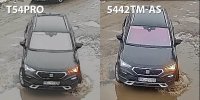
color1.jpg

For example, the purple tint from the IR coating on the car’s windshield, clearly visible on the 5442, is completely missing on the PRO. My jacket in the video is dark blue. The person with a dog in the video is also dressed in dark blue. While the 5442 delivers accurate, vivid colors with proper balance and natural tones, the PRO struggles to reproduce the full color spectrum, resulting in a less realistic and less reliable image. Adjusting the color or white balance settings does not help. In WDR mode, highlights are often oversaturated with false color.

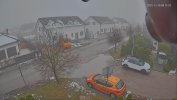
Look at the example below. The PRO’s image appears almost desaturated, with only orange, green, and some red standing out. Ground surfaces, buildings, and distant objects look washed out of color. And yes, it was foggy during testing, but even under the same conditions, the 5442 still captures the green color of my neighbor’s thuja fence (left side of the image), while the PRO does not. It simply lacks color fidelity.
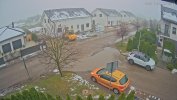
WDR-5442TM-AS.jpg
WDR-T54PRO.jpg

Now let’s move on to the night performance. This is where the PRO should, in theory, excel — it has an f/1.0 lens and an ICR. Right?

Wrong.

The sensor produces a significant amount of noise. Noise reduction works hard to suppress it, especially in the latest firmware, but the noise is present across the entire gain range. On the 5442, if I set the gain to 0, noise is barely visible. It’s so low that I can turn noise reduction off and the image still looks fine. On the PRO, gain 0 already looks rough. In fact, the PRO is as noisy at gain 0 as 5442 at gain 50.

gain-comparison--COLOR.gif

Noise levels, captured using the Region of Interest function, to avoid compression influence.

At higher gain levels, the 5442’s image becomes soft, while the PRO maintains its “clarity.” Keep in mind the 5442 uses an f/1.6 lens, while the PRO has an f/1.0 lens. Static night image looks very nice in PRO. But here’s the catch: 3D noise reduction is a temporal NR method. It works by blending consecutive video frames and averaging out the noise pattern. The higher the NR level, the more frames it blends. This works perfectly as long as the frames are similar to one another. Once there’s motion in the scene, 3D NR becomes far less effective.

This is exactly what happens with the PRO. Static scenes look very good — you can clearly see details even in the darkest areas. But when a car passes by, noise immediately starts creeping in. When compared with the 5442, the two cameras end up showing a similar amount of detail, despite the PRO’s theoretically superior optics. Because of the persistent noise, the PRO ultimately offers almost no real advantage over the 5442. Even during the daytime, you can notice noise creeping in. In the example video above, look at the backing up BMW. There is noise on the back windshield, while 5442 remains clean.

While examining the noise performance, I noticed a few additional details. When both cameras are set to gain 100, they reach a similar level of image brightness. In theory, the PRO model — equipped with an f/1.0 lens — should deliver a noticeably brighter image compared to the 5442 with its f/1.6 lens. However, it turns out that the PRO’s maximum ISO peaks at roughly ISO 80,000, while 5442 reaches ISO 204,800. I included this camera on the ISO chart from my 4K-X review, and the comparison makes this limitation more apparent.

ISO-chart-54PRO.jpg

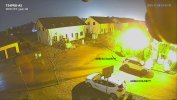
Another noteworthy observation is how each camera adjusts brightness across the gain range. The 5442 behaves in a more linear fashion from gain 0 to 100, while the PRO does not. Between 0 and 40, the change in brightness is minimal. Then there’s a sudden jump between 40 and 60, followed by a much steeper increase from 60 to 100. Beyond gain 60, the PRO also begins to struggle with color balance. At gain 80, for example, a strong green cast appears around the street lamp.
green-cast.jpg

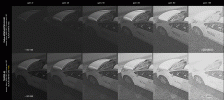
So, how about the VIS+NIR mode? Could things be better there? After switching to black-and-white mode (with the IR filter removed), the sensitivity drops by roughly half for the max gain value. In practical terms, this means the image brightness decreases by about 1 exposure value (1EV), so it appears as though only 50% of the light reaches the sensor. As a result, the image does not become brighter after the IR filter is removed; it simply becomes less noisy. And yes, the image looks very clean. This is the only situation it really outperforms 5442 in terms of noise level. In BW mode, the PRO reaches a maximum of ISO 40,000.
gain-comparison--BLACK.gif

This behavior is similar to what I observed in the 4K-X camera I reviewed four years ago. The difference is that the 4K-X did not have an ICR, so switching to black-and-white mode did not provide VIS+NIR; it was still only VIS. And so, the image was darker. In PRO, we have a 1EV sensitivity drop, but at the same time, there is NIR available. The street lamp in front of the house is a high-pressure sodium lamp. It radiates a lot of NIR. As a result, the image remains almost at the same level of brightness. There is also no focus shift between the visible and IR wavelengths. Everything remains perfectly aligned, whereas the 5442 shows slight misalignment under the same conditions.

One more thing worth mentioning: after the latest firmware update, a new AI-ISP option appeared in the web interface. According to Dahua, this so-called Artificial Intelligence Image Signal Processor is designed to significantly improve nighttime image quality. I tested it several times — rebooting the camera between changes — but I couldn’t see any noticeable difference in the image at all.

My conclusion? The T54PRO’s interface is packed with features, and its AI capabilities are significantly more advanced than those in the 5442 series. The camera can detect every moving object, classify it, and save a cropped image, which is really cool. But in terms of image quality, I feel Dahua has taken a step back. If this was the Lite series camera, I wouldn’t be concerned. But this is a WizMind 5 Series camera with “PRO” in its name. Unfortunately, the image quality doesn’t feel pro at all.

In my personal view, the global political situation of recent years has significantly influenced Dahua’s hardware development strategy. Dahua was forced to transition away from using CMOS sensors sourced from the United States or Japan and instead rely on its own in-house solutions. This might be the reason behind this step back. Again, this is only my speculation.
 
Hi everyone, here is a review of the new IP camera I purchased from Andy, the T54PRO-AS, which is likely a sibling model to Dahua’s recent HDW5459H-ASE-PV-PRO. It features a 4-megapixel sensor paired with an f/1.0 lens. The camera supports Smart Dual Light (IR + warm light) and includes a removable IR filter, enabling VIS+NIR imaging — a combination that until recently was rare in cameras equipped with f/1.0 lenses. This review will cover only the aspects of image quality. I will not discuss UI features, dual light or sound quality.

It has been four years since my last review here, and during that time, I didn’t feel there was any compelling reason to buy or test new models. In recent years, Dahua’s IP camera lineup has shown minimal progress in CMOS sensor technology. Image quality improvements have been marginal, and many models still rely on hardware similar to earlier generations. The main area of development has been software, particularly AI functions. Dahua has focused heavily on advanced analytics, object detection, behavior recognition, and intelligent event filtering. While these AI features add value and improve usability, core imaging performance has remained largely unchanged.

When I saw the new 5459PRO series, I decided to give it a try. The combination of an ICR mechanism with an f/1.0 lens was especially tempting. My goal was to replace my older 5442TM-AS-LED model with a 2.8 mm lens, so I ordered the same focal length in the new T54PRO. Here are my observations.

The first thing that stood out to me was the noticeably lower image resolution produced by the T54PRO (PRO) compared with the 5442TM-AS-LED (5442) and the 5442T-ZE, both of which I also own. All three cameras use a 4-megapixel 1/1.8” CMOS sensor. The two 5442 models deliver identical image quality in terms of resolution, dynamic range, and color rendition. The PRO, however, behaves differently.


Interestingly, the PRO offers clearly better dynamic range than the 5442. As shown in the images below, it almost appears as if WDR was enabled on the PRO — the sky is not blown out, and shadows are noticeably brighter than in the 5442 image. However, despite this advantage, the PRO’s level of detail is worse. The image looks sort of plastic.

View attachment 234216

Initially, I thought this was simply a matter of tweaking image settings or video compression, but no matter how much I adjusted, the resolution never improved.

Switching from the standard image mode to WDR makes the resolution even worse, causing straight lines to appear jagged. While the 5442 models also exhibit minor jagging, it is far more pronounced in the PRO. I contacted Andy, who forwarded the information to Dahua. I tested four different firmware versions. With the first firmware, the image quality was so poor that it resembled a Full HD stream upscaled to 4 MP. The latest firmware brings some improvement, but only slightly.

View attachment 234220

Now, onto the colors. Unfortunately, things don’t look good here either. In the first firmware version, the camera struggled with white balance and WDR. The image was oversaturated at night and overly blue during the day. These issues have been partly fixed, but the camera still has problems with accurate color rendition. Subtle color differences are blended into a single shade. With the 5442, I have nothing to complain about — what I see with the naked eye is exactly what I get in the image.

View attachment 234215

For example, the purple tint from the IR coating on the car’s windshield, clearly visible on the 5442, is completely missing on the PRO. My jacket in the video is dark blue. The person with a dog in the video is also dressed in dark blue. While the 5442 delivers accurate, vivid colors with proper balance and natural tones, the PRO struggles to reproduce the full color spectrum, resulting in a less realistic and less reliable image. Adjusting the color or white balance settings does not help. In WDR mode, highlights are often oversaturated with false color.

Look at the example below. The PRO’s image appears almost desaturated, with only orange, green, and some red standing out. Ground surfaces, buildings, and distant objects look washed out of color. And yes, it was foggy during testing, but even under the same conditions, the 5442 still captures the green color of my neighbor’s thuja fence (left side of the image), while the PRO does not. It simply lacks color fidelity.


View attachment 234219
View attachment 234221

Now let’s move on to the night performance. This is where the PRO should, in theory, excel — it has an f/1.0 lens and an ICR. Right?

Wrong.

The sensor produces a significant amount of noise. Noise reduction works hard to suppress it, especially in the latest firmware, but the noise is present across the entire gain range. On the 5442, if I set the gain to 0, noise is barely visible. It’s so low that I can turn noise reduction off and the image still looks fine. On the PRO, gain 0 already looks rough. In fact, the PRO is as noisy at gain 0 as 5442 at gain 50.

View attachment 234222

Noise levels, captured using the Region of Interest function, to avoid compression influence.

At higher gain levels, the 5442’s image becomes soft, while the PRO maintains its “clarity.” Keep in mind the 5442 uses an f/1.6 lens, while the PRO has an f/1.0 lens. Static night image looks very nice in PRO. But here’s the catch: 3D noise reduction is a temporal NR method. It works by blending consecutive video frames and averaging out the noise pattern. The higher the NR level, the more frames it blends. This works perfectly as long as the frames are similar to one another. Once there’s motion in the scene, 3D NR becomes far less effective.

This is exactly what happens with the PRO. Static scenes look very good — you can clearly see details even in the darkest areas. But when a car passes by, noise immediately starts creeping in. When compared with the 5442, the two cameras end up showing a similar amount of detail, despite the PRO’s theoretically superior optics. Because of the persistent noise, the PRO ultimately offers almost no real advantage over the 5442. Even during the daytime, you can notice noise creeping in. In the example video above, look at the backing up BMW. There is noise on the back windshield, while 5442 remains clean.

While examining the noise performance, I noticed a few additional details. When both cameras are set to gain 100, they reach a similar level of image brightness. In theory, the PRO model — equipped with an f/1.0 lens — should deliver a noticeably brighter image compared to the 5442 with its f/1.6 lens. However, it turns out that the PRO’s maximum ISO peaks at roughly ISO 80,000, while 5442 reaches ISO 204,800. I included this camera on the ISO chart from my 4K-X review, and the comparison makes this limitation more apparent.

View attachment 234218

Another noteworthy observation is how each camera adjusts brightness across the gain range. The 5442 behaves in a more linear fashion from gain 0 to 100, while the PRO does not. Between 0 and 40, the change in brightness is minimal. Then there’s a sudden jump between 40 and 60, followed by a much steeper increase from 60 to 100. Beyond gain 60, the PRO also begins to struggle with color balance. At gain 80, for example, a strong green cast appears around the street lamp.

View attachment 234217

So, how about the VIS+NIR mode? Could things be better there? After switching to black-and-white mode (with the IR filter removed), the sensitivity drops by roughly half for the max gain value. In practical terms, this means the image brightness decreases by about 1 exposure value (1EV), so it appears as though only 50% of the light reaches the sensor. As a result, the image does not become brighter after the IR filter is removed; it simply becomes less noisy. And yes, the image looks very clean. This is the only situation it really outperforms 5442 in terms of noise level. In BW mode, the PRO reaches a maximum of ISO 40,000.

View attachment 234223

This behavior is similar to what I observed in the 4K-X camera I reviewed four years ago. The difference is that the 4K-X did not have an ICR, so switching to black-and-white mode did not provide VIS+NIR; it was still only VIS. And so, the image was darker. In PRO, we have a 1EV sensitivity drop, but at the same time, there is NIR available. The street lamp in front of the house is a high-pressure sodium lamp. It radiates a lot of NIR. As a result, the image remains almost at the same level of brightness. There is also no focus shift between the visible and IR wavelengths. Everything remains perfectly aligned, whereas the 5442 shows slight misalignment under the same conditions.

One more thing worth mentioning: after the latest firmware update, a new AI-ISP option appeared in the web interface. According to Dahua, this so-called Artificial Intelligence Image Signal Processor is designed to significantly improve nighttime image quality. I tested it several times — rebooting the camera between changes — but I couldn’t see any noticeable difference in the image at all.

My conclusion? The T54PRO’s interface is packed with features, and its AI capabilities are significantly more advanced than those in the 5442 series. The camera can detect every moving object, classify it, and save a cropped image, which is really cool. But in terms of image quality, I feel Dahua has taken a step back. If this was the Lite series camera, I wouldn’t be concerned. But this is a WizMind 5 Series camera with “PRO” in its name. Unfortunately, the image quality doesn’t feel pro at all.

In my personal view, the global political situation of recent years has significantly influenced Dahua’s hardware development strategy. Dahua was forced to transition away from using CMOS sensors sourced from the United States or Japan and instead rely on its own in-house solutions. This might be the reason behind this step back. Again, this is only my speculation.

Dahua should compensate all buyers of pro cameras.
 
Hi everyone, here is a review of the new IP camera I purchased from Andy, the T54PRO-AS, which is likely a sibling model to Dahua’s recent HDW5459H-ASE-PV-PRO. It features a 4-megapixel sensor paired with an f/1.0 lens. The camera supports Smart Dual Light (IR + warm light) and includes a removable IR filter, enabling VIS+NIR imaging — a combination that until recently was rare in cameras equipped with f/1.0 lenses. This review will cover only the aspects of image quality. I will not discuss UI features, dual light or sound quality.

It has been four years since my last review here, and during that time, I didn’t feel there was any compelling reason to buy or test new models. In recent years, Dahua’s IP camera lineup has shown minimal progress in CMOS sensor technology. Image quality improvements have been marginal, and many models still rely on hardware similar to earlier generations. The main area of development has been software, particularly AI functions. Dahua has focused heavily on advanced analytics, object detection, behavior recognition, and intelligent event filtering. While these AI features add value and improve usability, core imaging performance has remained largely unchanged.

When I saw the new 5459PRO series, I decided to give it a try. The combination of an ICR mechanism with an f/1.0 lens was especially tempting. My goal was to replace my older 5442TM-AS-LED model with a 2.8 mm lens, so I ordered the same focal length in the new T54PRO. Here are my observations.

The first thing that stood out to me was the noticeably lower image resolution produced by the T54PRO (PRO) compared with the 5442TM-AS-LED (5442) and the 5442T-ZE, both of which I also own. All three cameras use a 4-megapixel 1/1.8” CMOS sensor. The two 5442 models deliver identical image quality in terms of resolution, dynamic range, and color rendition. The PRO, however, behaves differently.


Interestingly, the PRO offers clearly better dynamic range than the 5442. As shown in the images below, it almost appears as if WDR was enabled on the PRO — the sky is not blown out, and shadows are noticeably brighter than in the 5442 image. However, despite this advantage, the PRO’s level of detail is worse. The image looks sort of plastic.

View attachment 234216

Initially, I thought this was simply a matter of tweaking image settings or video compression, but no matter how much I adjusted, the resolution never improved.

Switching from the standard image mode to WDR makes the resolution even worse, causing straight lines to appear jagged. While the 5442 models also exhibit minor jagging, it is far more pronounced in the PRO. I contacted Andy, who forwarded the information to Dahua. I tested four different firmware versions. With the first firmware, the image quality was so poor that it resembled a Full HD stream upscaled to 4 MP. The latest firmware brings some improvement, but only slightly.

View attachment 234220

Now, onto the colors. Unfortunately, things don’t look good here either. In the first firmware version, the camera struggled with white balance and WDR. The image was oversaturated at night and overly blue during the day. These issues have been partly fixed, but the camera still has problems with accurate color rendition. Subtle color differences are blended into a single shade. With the 5442, I have nothing to complain about — what I see with the naked eye is exactly what I get in the image.

View attachment 234215

For example, the purple tint from the IR coating on the car’s windshield, clearly visible on the 5442, is completely missing on the PRO. My jacket in the video is dark blue. The person with a dog in the video is also dressed in dark blue. While the 5442 delivers accurate, vivid colors with proper balance and natural tones, the PRO struggles to reproduce the full color spectrum, resulting in a less realistic and less reliable image. Adjusting the color or white balance settings does not help. In WDR mode, highlights are often oversaturated with false color.

Look at the example below. The PRO’s image appears almost desaturated, with only orange, green, and some red standing out. Ground surfaces, buildings, and distant objects look washed out of color. And yes, it was foggy during testing, but even under the same conditions, the 5442 still captures the green color of my neighbor’s thuja fence (left side of the image), while the PRO does not. It simply lacks color fidelity.


View attachment 234219
View attachment 234221

Now let’s move on to the night performance. This is where the PRO should, in theory, excel — it has an f/1.0 lens and an ICR. Right?

Wrong.

The sensor produces a significant amount of noise. Noise reduction works hard to suppress it, especially in the latest firmware, but the noise is present across the entire gain range. On the 5442, if I set the gain to 0, noise is barely visible. It’s so low that I can turn noise reduction off and the image still looks fine. On the PRO, gain 0 already looks rough. In fact, the PRO is as noisy at gain 0 as 5442 at gain 50.

View attachment 234222

Noise levels, captured using the Region of Interest function, to avoid compression influence.

At higher gain levels, the 5442’s image becomes soft, while the PRO maintains its “clarity.” Keep in mind the 5442 uses an f/1.6 lens, while the PRO has an f/1.0 lens. Static night image looks very nice in PRO. But here’s the catch: 3D noise reduction is a temporal NR method. It works by blending consecutive video frames and averaging out the noise pattern. The higher the NR level, the more frames it blends. This works perfectly as long as the frames are similar to one another. Once there’s motion in the scene, 3D NR becomes far less effective.

This is exactly what happens with the PRO. Static scenes look very good — you can clearly see details even in the darkest areas. But when a car passes by, noise immediately starts creeping in. When compared with the 5442, the two cameras end up showing a similar amount of detail, despite the PRO’s theoretically superior optics. Because of the persistent noise, the PRO ultimately offers almost no real advantage over the 5442. Even during the daytime, you can notice noise creeping in. In the example video above, look at the backing up BMW. There is noise on the back windshield, while 5442 remains clean.

While examining the noise performance, I noticed a few additional details. When both cameras are set to gain 100, they reach a similar level of image brightness. In theory, the PRO model — equipped with an f/1.0 lens — should deliver a noticeably brighter image compared to the 5442 with its f/1.6 lens. However, it turns out that the PRO’s maximum ISO peaks at roughly ISO 80,000, while 5442 reaches ISO 204,800. I included this camera on the ISO chart from my 4K-X review, and the comparison makes this limitation more apparent.

View attachment 234218

Another noteworthy observation is how each camera adjusts brightness across the gain range. The 5442 behaves in a more linear fashion from gain 0 to 100, while the PRO does not. Between 0 and 40, the change in brightness is minimal. Then there’s a sudden jump between 40 and 60, followed by a much steeper increase from 60 to 100. Beyond gain 60, the PRO also begins to struggle with color balance. At gain 80, for example, a strong green cast appears around the street lamp.

View attachment 234217

So, how about the VIS+NIR mode? Could things be better there? After switching to black-and-white mode (with the IR filter removed), the sensitivity drops by roughly half for the max gain value. In practical terms, this means the image brightness decreases by about 1 exposure value (1EV), so it appears as though only 50% of the light reaches the sensor. As a result, the image does not become brighter after the IR filter is removed; it simply becomes less noisy. And yes, the image looks very clean. This is the only situation it really outperforms 5442 in terms of noise level. In BW mode, the PRO reaches a maximum of ISO 40,000.

View attachment 234223

This behavior is similar to what I observed in the 4K-X camera I reviewed four years ago. The difference is that the 4K-X did not have an ICR, so switching to black-and-white mode did not provide VIS+NIR; it was still only VIS. And so, the image was darker. In PRO, we have a 1EV sensitivity drop, but at the same time, there is NIR available. The street lamp in front of the house is a high-pressure sodium lamp. It radiates a lot of NIR. As a result, the image remains almost at the same level of brightness. There is also no focus shift between the visible and IR wavelengths. Everything remains perfectly aligned, whereas the 5442 shows slight misalignment under the same conditions.

One more thing worth mentioning: after the latest firmware update, a new AI-ISP option appeared in the web interface. According to Dahua, this so-called Artificial Intelligence Image Signal Processor is designed to significantly improve nighttime image quality. I tested it several times — rebooting the camera between changes — but I couldn’t see any noticeable difference in the image at all.

My conclusion? The T54PRO’s interface is packed with features, and its AI capabilities are significantly more advanced than those in the 5442 series. The camera can detect every moving object, classify it, and save a cropped image, which is really cool. But in terms of image quality, I feel Dahua has taken a step back. If this was the Lite series camera, I wouldn’t be concerned. But this is a WizMind 5 Series camera with “PRO” in its name. Unfortunately, the image quality doesn’t feel pro at all.

In my personal view, the global political situation of recent years has significantly influenced Dahua’s hardware development strategy. Dahua was forced to transition away from using CMOS sensors sourced from the United States or Japan and instead rely on its own in-house solutions. This might be the reason behind this step back. Again, this is only my speculation.


Good to see you again, welcome back!

Thank you for putting the technical descriptions to what we’ve all seen and reported in a number of threads.

Completely concur with your evaluation and findings.

Part of the image quality issue does seem to be with the AI-ISP as controls act somewhat differently with it off, but I believe the majority of the problem is with a subpar sensor that improved firmware may be able to mask better but ultimately will fail in matching the overall quality of that used in the 5442 S3 series
 
Good to see you again, welcome back!

Thank you for putting the technical descriptions to what we’ve all seen and reported in a number of threads.

Completely concur with your evaluation and findings.

Part of the image quality issue does seem to be with the AI-ISP as controls act somewhat differently with it off, but I believe the majority of the problem is with a subpar sensor that improved firmware may be able to mask better but ultimately will fail in matching the overall quality of that used in the 5442 S3 series
Loved wopi82's review on Color 4K-X few years ago, too. I wish he post more often. :)
 
Hi everyone, here is a review of the new IP camera I purchased from Andy, the T54PRO-AS, which is likely a sibling model to Dahua’s recent HDW5459H-ASE-PV-PRO. It features a 4-megapixel sensor paired with an f/1.0 lens. The camera supports Smart Dual Light (IR + warm light) and includes a removable IR filter, enabling VIS+NIR imaging — a combination that until recently was rare in cameras equipped with f/1.0 lenses. This review will cover only the aspects of image quality. I will not discuss UI features, dual light or sound quality.

It has been four years since my last review here, and during that time, I didn’t feel there was any compelling reason to buy or test new models. In recent years, Dahua’s IP camera lineup has shown minimal progress in CMOS sensor technology. Image quality improvements have been marginal, and many models still rely on hardware similar to earlier generations. The main area of development has been software, particularly AI functions. Dahua has focused heavily on advanced analytics, object detection, behavior recognition, and intelligent event filtering. While these AI features add value and improve usability, core imaging performance has remained largely unchanged.

When I saw the new 5459PRO series, I decided to give it a try. The combination of an ICR mechanism with an f/1.0 lens was especially tempting. My goal was to replace my older 5442TM-AS-LED model with a 2.8 mm lens, so I ordered the same focal length in the new T54PRO. Here are my observations.

The first thing that stood out to me was the noticeably lower image resolution produced by the T54PRO (PRO) compared with the 5442TM-AS-LED (5442) and the 5442T-ZE, both of which I also own. All three cameras use a 4-megapixel 1/1.8” CMOS sensor. The two 5442 models deliver identical image quality in terms of resolution, dynamic range, and color rendition. The PRO, however, behaves differently.


Interestingly, the PRO offers clearly better dynamic range than the 5442. As shown in the images below, it almost appears as if WDR was enabled on the PRO — the sky is not blown out, and shadows are noticeably brighter than in the 5442 image. However, despite this advantage, the PRO’s level of detail is worse. The image looks sort of plastic.

View attachment 234216

Initially, I thought this was simply a matter of tweaking image settings or video compression, but no matter how much I adjusted, the resolution never improved.

Switching from the standard image mode to WDR makes the resolution even worse, causing straight lines to appear jagged. While the 5442 models also exhibit minor jagging, it is far more pronounced in the PRO. I contacted Andy, who forwarded the information to Dahua. I tested four different firmware versions. With the first firmware, the image quality was so poor that it resembled a Full HD stream upscaled to 4 MP. The latest firmware brings some improvement, but only slightly.

View attachment 234220

Now, onto the colors. Unfortunately, things don’t look good here either. In the first firmware version, the camera struggled with white balance and WDR. The image was oversaturated at night and overly blue during the day. These issues have been partly fixed, but the camera still has problems with accurate color rendition. Subtle color differences are blended into a single shade. With the 5442, I have nothing to complain about — what I see with the naked eye is exactly what I get in the image.

View attachment 234215

For example, the purple tint from the IR coating on the car’s windshield, clearly visible on the 5442, is completely missing on the PRO. My jacket in the video is dark blue. The person with a dog in the video is also dressed in dark blue. While the 5442 delivers accurate, vivid colors with proper balance and natural tones, the PRO struggles to reproduce the full color spectrum, resulting in a less realistic and less reliable image. Adjusting the color or white balance settings does not help. In WDR mode, highlights are often oversaturated with false color.

Look at the example below. The PRO’s image appears almost desaturated, with only orange, green, and some red standing out. Ground surfaces, buildings, and distant objects look washed out of color. And yes, it was foggy during testing, but even under the same conditions, the 5442 still captures the green color of my neighbor’s thuja fence (left side of the image), while the PRO does not. It simply lacks color fidelity.


View attachment 234219
View attachment 234221

Now let’s move on to the night performance. This is where the PRO should, in theory, excel — it has an f/1.0 lens and an ICR. Right?

Wrong.

The sensor produces a significant amount of noise. Noise reduction works hard to suppress it, especially in the latest firmware, but the noise is present across the entire gain range. On the 5442, if I set the gain to 0, noise is barely visible. It’s so low that I can turn noise reduction off and the image still looks fine. On the PRO, gain 0 already looks rough. In fact, the PRO is as noisy at gain 0 as 5442 at gain 50.

View attachment 234222

Noise levels, captured using the Region of Interest function, to avoid compression influence.

At higher gain levels, the 5442’s image becomes soft, while the PRO maintains its “clarity.” Keep in mind the 5442 uses an f/1.6 lens, while the PRO has an f/1.0 lens. Static night image looks very nice in PRO. But here’s the catch: 3D noise reduction is a temporal NR method. It works by blending consecutive video frames and averaging out the noise pattern. The higher the NR level, the more frames it blends. This works perfectly as long as the frames are similar to one another. Once there’s motion in the scene, 3D NR becomes far less effective.

This is exactly what happens with the PRO. Static scenes look very good — you can clearly see details even in the darkest areas. But when a car passes by, noise immediately starts creeping in. When compared with the 5442, the two cameras end up showing a similar amount of detail, despite the PRO’s theoretically superior optics. Because of the persistent noise, the PRO ultimately offers almost no real advantage over the 5442. Even during the daytime, you can notice noise creeping in. In the example video above, look at the backing up BMW. There is noise on the back windshield, while 5442 remains clean.

While examining the noise performance, I noticed a few additional details. When both cameras are set to gain 100, they reach a similar level of image brightness. In theory, the PRO model — equipped with an f/1.0 lens — should deliver a noticeably brighter image compared to the 5442 with its f/1.6 lens. However, it turns out that the PRO’s maximum ISO peaks at roughly ISO 80,000, while 5442 reaches ISO 204,800. I included this camera on the ISO chart from my 4K-X review, and the comparison makes this limitation more apparent.

View attachment 234218

Another noteworthy observation is how each camera adjusts brightness across the gain range. The 5442 behaves in a more linear fashion from gain 0 to 100, while the PRO does not. Between 0 and 40, the change in brightness is minimal. Then there’s a sudden jump between 40 and 60, followed by a much steeper increase from 60 to 100. Beyond gain 60, the PRO also begins to struggle with color balance. At gain 80, for example, a strong green cast appears around the street lamp.

View attachment 234217

So, how about the VIS+NIR mode? Could things be better there? After switching to black-and-white mode (with the IR filter removed), the sensitivity drops by roughly half for the max gain value. In practical terms, this means the image brightness decreases by about 1 exposure value (1EV), so it appears as though only 50% of the light reaches the sensor. As a result, the image does not become brighter after the IR filter is removed; it simply becomes less noisy. And yes, the image looks very clean. This is the only situation it really outperforms 5442 in terms of noise level. In BW mode, the PRO reaches a maximum of ISO 40,000.

View attachment 234223

This behavior is similar to what I observed in the 4K-X camera I reviewed four years ago. The difference is that the 4K-X did not have an ICR, so switching to black-and-white mode did not provide VIS+NIR; it was still only VIS. And so, the image was darker. In PRO, we have a 1EV sensitivity drop, but at the same time, there is NIR available. The street lamp in front of the house is a high-pressure sodium lamp. It radiates a lot of NIR. As a result, the image remains almost at the same level of brightness. There is also no focus shift between the visible and IR wavelengths. Everything remains perfectly aligned, whereas the 5442 shows slight misalignment under the same conditions.

One more thing worth mentioning: after the latest firmware update, a new AI-ISP option appeared in the web interface. According to Dahua, this so-called Artificial Intelligence Image Signal Processor is designed to significantly improve nighttime image quality. I tested it several times — rebooting the camera between changes — but I couldn’t see any noticeable difference in the image at all.

My conclusion? The T54PRO’s interface is packed with features, and its AI capabilities are significantly more advanced than those in the 5442 series. The camera can detect every moving object, classify it, and save a cropped image, which is really cool. But in terms of image quality, I feel Dahua has taken a step back. If this was the Lite series camera, I wouldn’t be concerned. But this is a WizMind 5 Series camera with “PRO” in its name. Unfortunately, the image quality doesn’t feel pro at all.

In my personal view, the global political situation of recent years has significantly influenced Dahua’s hardware development strategy. Dahua was forced to transition away from using CMOS sensors sourced from the United States or Japan and instead rely on its own in-house solutions. This might be the reason behind this step back. Again, this is only my speculation.


5xPRO cams have two NEW video image processing STAGES..

One is AI-ISP with AI based 2D & 3D noise reduction.. Problematic but now can be disabled...

Second I call "always HDR" - which is strong local (per image region) gamma manipulation with 3D LUT color mapping and auto brightness algorithm.

This algorithm is responsible for no difference in image brightness at low or high gain levels..

This algorithm can't be disabled for now (can't be replaced with old original Dahua algorithm) and It can be a source of extra noise..

Always HDR with auto brightness algorithms makes this low gain images much brighter but also makes noise much more visible.. Your images shows that...

I suspect that Dahua's classic image brightness analysis, which controls the sensor's gain and exposure time, is ran after "always HDR" stage, which brighten up image.

This causes the camera to prefer exposure times that are too short (even at day), which leads to extra noise, which is then amplified by always HDR brighten up algorithm.
 
Interestingly, the PRO offers clearly better dynamic range than the 5442. As shown in the images below, it almost appears as if WDR was enabled on the PRO — the sky is not blown out, and shadows are noticeably brighter than in the 5442 image. However, despite this advantage, the PRO’s level of detail is worse. The image looks sort of plastic.


Another noteworthy observation is how each camera adjusts brightness across the gain range. The 5442 behaves in a more linear fashion from gain 0 to 100, while the PRO does not. Between 0 and 40, the change in brightness is minimal. Then there’s a sudden jump between 40 and 60, followed by a much steeper increase from 60 to 100. Beyond gain 60, the PRO also begins to struggle with color balance. At gain 80, for example, a strong green cast appears around the street lamp.

First, GREAT to read your review @wopi82 ... as others have said, I welcome you chiming in more often.

WRT the PRO looking WDR'ish/Plasticy: Did you try setting Backlight HLC=1 (yes, just ONE). This can make a surprising difference often times (you'll get "true" black back) - suggests to me that a different image processing path is getting engaged.

WRT Gain Scale being very non-linear: I have the T54PRO-ZE, but presumably similar firmware ... and the "gain scale" has been adjusted back-n-forth ... with there being a firmware release a while back where once you got above 65, it just went crazy ... so that sounds similar to what you are seeing?

BTW, how are you getting the ISO numbers?
Why the heck would they set the base ISO of the PRO to 200/250?!?

I would LOVE it if Dahua would show that ... because then we can set/compare similar settings between camera's ... rather than some arbitrary 0-100 scale (that has changed between firmware) that we don't know if it matches.
 
Last edited:
It has been four years since my last review here, and during that time, I didn’t feel there was any compelling reason to buy or test new models. In recent years, Dahua’s IP camera lineup has shown minimal progress in CMOS sensor technology. Image quality improvements have been marginal, and many models still rely on hardware similar to earlier generations. The main area of development has been software, particularly AI functions. Dahua has focused heavily on advanced analytics, object detection, behavior recognition, and intelligent event filtering. While these AI features add value and improve usability, core imaging performance has remained largely unchanged.

Yea, "core imaging performance" is the foundation ... I hope Dahua Engineers/Management read what you wrote.

And yes, as you point out, unknown how much of this is due to global political situation that hasn't allowed advancement in the base sensor technology.
 
  • Like
Reactions: JDreaming
Good to see you again, welcome back!
Hi bigredfish. It’s been a while :)

Second I call "always HDR" - which is strong local (per image region) gamma manipulation with 3D LUT color mapping and auto brightness algorithm.
That was my first thought when I saw this HDR-like image. The nighttime footage reveals it even more. Shadows are much brighter and noisier. Highlights look much cleaner. It appears that they have increased shadows using a curve adjustment, which can often introduce noise. A common issue with photo/video editing.

First, GREAT to read your review @wopi82 ... as others have said, I welcome you chiming in more often.
I wish he post more often. :)
Thank you :) Would love to, but I can’t afford to buy so many cameras :winktongue:

Did you try setting Backlight HLC=1 (yes, just ONE). This can make a surprising difference often times (you'll get "true" black back)
I did not. Will give it a try :)

BTW, how are you getting the ISO numbers?
I have to assume that the lens is indeed f/1.0. Then I set a specific shutter speed in the camera and compare the image brightness to a photo taken with a DSLR at the same settings. I analyse every part of the image, observing when certain objects get blown out or how shadows behave. This way, I can calculate an adequate ISO level. It’s not super precise, but I would say roughly half-stop accurate. You can see such a comparison in my 4K-X review.

Why the heck would they set the base ISO of the PRO to 200/250?!?
This might be due to, what steve1225 said:
Second I call "always HDR" - which is strong local (per image region) gamma manipulation with 3D LUT color mapping and auto brightness algorithm.

This algorithm is responsible for no difference in image brightness at low or high gain levels..
So natively it might be ISO100, but it is altered with a LUT adjustment. Also, not every sensor starts from ISO100. There were digital cameras with a base ISO of 200. If you switch some photo/video gear to VIDEO mode, the base ISO is set at 800.
 
Thank you @wopi82 for the detailed and informative reply to various comments from folks.

Yea, I remember your ISO stuff from the 4K-X review ... I thought maybe they made this easier ... since comparing against "reference" images is a lot of work, especially if you are looking at "adjusted" images rather than as-shot. I really respect the effort you put into this, since when I recently analyzed FOV/Aperture for the 54PRO-ZE as seen here, it was a bit of work.

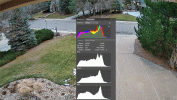
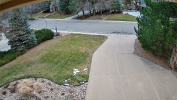
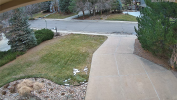
I would be really curious to hear from you what you see/think from the HLC=1 hack (credit to @steve1225) ... I see differences both day and night.
Super simple to do - take a snapshot via the web interface, toggle the setting, and take another snapshot.

Here's an example from this morning (see OFF/ONE on label) - sun is just coming up, but there are clouds.
I overlaid the histogram (basically no true black!) and visually, the "shadow boost" is very noticeable in the trees

2025_12_11_HLC=ONE_OFF.gif
 

Attachments

  • 192.168.1.172_HLC=ONE_ch_1_20251211_072627.png
    192.168.1.172_HLC=ONE_ch_1_20251211_072627.png
    8.4 MB · Views: 0
  • 192.168.1.172_HLC=OFF_ch_1_20251211_072658.png
    192.168.1.172_HLC=OFF_ch_1_20251211_072658.png
    8 MB · Views: 0
Last edited: