Reducing CPU Usage

Arjun

IPCT Contributor
Feb 26, 2017
11,462
14,710
Milky Way
Running 10 cameras at time a time using Direct-to-drive recording and Intel 9500 CPU and 32gb of RAM and latest Windows 11 build installed
Upgraded to BI 6 (latest version as of 1/11/26) and am still experiencing 100% CPU usage (No different from Version 5)
Limited fps to 15 fps for each camera
Motion detection settings are customized
There is also slight noticeable lag - I believe partly attributed by 99% to 100% CPU usage
Been running the machine like for this over a year - but enough is enough; any idea further tweaks I can do to bring CPU usage down? It never used to be this bad lol and all cameras are 4mp or less
 
Shouldn't hardware acceleration be turned on so that the onboard Intel Chipset is utilized to reduce CPU utilization?
Can you please post screenshots?
Also if I use substreams, how will recording quality be affected?
I am only using the built-in Windows Defender Antivirus
 
NVRs have been using substreams for years, it was a big game changer once it was added to BI. If using substreams resulted in missed triggers and alerts, none of us would be using it. It is a huge CPU saver. You can tell it to record 24/7 mainstream or just mainstream when triggered. But let the heavy lifting BI does for motion detection and other things to the substreams.


And have you excluded BI from the built-in Windows Defender Antivirus?


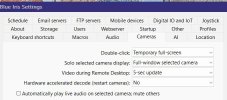
As far as using hardware decoding is concerned, around the time AI was introduced in BI, many here had their system become unstable with hardware acceleration (hardware decode) (Quick Sync) on (even if not using DeepStack or CodeProject). Some have also been fine. I started to see errors when I was using hardware acceleration several updates into when AI was added.

This hits everyone at a different point. Some had their system go wonky immediately, some it was after a specific update, and some still don't have a problem, but the trend is showing running hardware acceleration will result in a problem at some point.

However, with substreams being introduced, the CPU% needed to offload video to a GPU (internal or external) is more than the CPU% savings seen by offloading to a GPU. Especially after about 12 cameras, the CPU goes up by using hardware acceleration. The wiki points this out as well.

Plus substreams opens up the possibility for older machines to be just fine, along with non-intel computers.

My CPU % went down by not using hardware acceleration.

Here is a recent thread where someone turned off hardware acceleration based on my post and their CPU dropped 10-15% and BI became stable.

But if you use HA, use plain intel and not the variants.

Some still don't have a problem, but eventually it may result in a problem.

Here is a sampling of recent threads that turning off HA fixed the issues they were having....

No hardware acceleration with subs?


Hardware decoding just increases GPU usage?


Can't enable HA on one camera + high Bitrate


And as always, YMMV.
 
  • Like
Reactions: Arjun
NVRs have been using substreams for years, it was a big game changer once it was added to BI. If using substreams resulted in missed triggers and alerts, none of us would be using it. It is a huge CPU saver. You can tell it to record 24/7 mainstream or just mainstream when triggered. But let the heavy lifting BI does for motion detection and other things to the substreams.


And have you excluded BI from the built-in Windows Defender Antivirus?


As far as using hardware decoding is concerned, around the time AI was introduced in BI, many here had their system become unstable with hardware acceleration (hardware decode) (Quick Sync) on (even if not using DeepStack or CodeProject). Some have also been fine. I started to see errors when I was using hardware acceleration several updates into when AI was added.

This hits everyone at a different point. Some had their system go wonky immediately, some it was after a specific update, and some still don't have a problem, but the trend is showing running hardware acceleration will result in a problem at some point.

However, with substreams being introduced, the CPU% needed to offload video to a GPU (internal or external) is more than the CPU% savings seen by offloading to a GPU. Especially after about 12 cameras, the CPU goes up by using hardware acceleration. The wiki points this out as well.

Plus substreams opens up the possibility for older machines to be just fine, along with non-intel computers.

My CPU % went down by not using hardware acceleration.

Here is a recent thread where someone turned off hardware acceleration based on my post and their CPU dropped 10-15% and BI became stable.

But if you use HA, use plain intel and not the variants.

Some still don't have a problem, but eventually it may result in a problem.

Here is a sampling of recent threads that turning off HA fixed the issues they were having....

No hardware acceleration with subs?


Hardware decoding just increases GPU usage?


Can't enable HA on one camera + high Bitrate


And as always, YMMV.
Interesting...haven't had the time to experiment with the settings to that extent, is there anyway I can copy and paste your configuration?
 
You have substream going on every camera?

For the exclusions - put everything BI related, so the BI folder and the video folders (NEW, STORED, whatever else you called them).
 
  • Like
Reactions: Flintstone61
You have substream going on every camera?

For the exclusions - put everything BI related, so the BI folder and the video folders (NEW, STORED, whatever else you called them).
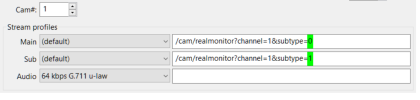
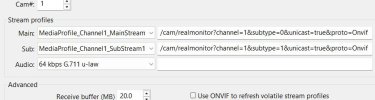
I'm not sure if substreams are loading properly - the path is different from your's
 
I'm not sure if substreams are loading properly - the path is different from your's

Some of mine look like yours - depends on the camera.

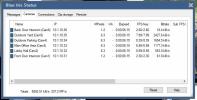
Post the BI camera status screenshot showing the total MP/s. It would look something like this example I found with a search (too lazy to screenshot mine LOL):

1768156812069.png
 
  • Like
Reactions: Arjun