Quick question about camera status window

oldspyguy

Young grasshopper
Jan 8, 2026
39
15
Cold North
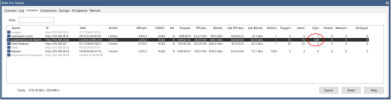
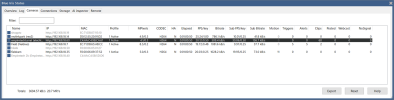
Under MPixels what is the second number represent?
"Fieldcam" is a 5MP on a 2.8 sensor I think but shows 0.3, "Fieldreo" is a 8MP on a very small sensor (reolink crap) and shows 0.2
Now heres what I dont get.
The new "Empireteck" is 4MP on a 1.8 sensor but it still shows 0.3?
Also if there is anything elese in that picture that looks wrong please let me know. My first BI server is running great with 12% cpu most of the time. so far lol
Thanks again....
1774452063018.png
 
Under MPixels what is the second number represent?
"Fieldcam" is a 5MP on a 2.8 sensor I think but shows 0.3, "Fieldreo" is a 8MP on a very small sensor (reolink crap) and shows 0.2
Now heres what I dont get.
The new "Empireteck" is 4MP on a 1.8 sensor but it still shows 0.3?
Also if there is anything elese in that picture that looks wrong please let me know. My first BI server is running great with 12% cpu most of the time. so far lol
Thanks again....

View attachment 240593
A quick click on the help button gives this info, but does not clarify what the second number refers to, I am pretty sure that it is not the sensor size, as one of my cheap camera's is 0.9 and my higher resolution cameras are 0.3

Pixels
This is the number of picture elements in each image—the width multiplied by the height.
The value is given in MP (megapixels or millions of pixels). You may click the Pixels
column header to switch between MP and XxY resolution formats.
 
Under MPixels what is the second number represent?
"Fieldcam" is a 5MP on a 2.8 sensor I think but shows 0.3, "Fieldreo" is a 8MP on a very small sensor (reolink crap) and shows 0.2
Now heres what I dont get.
The new "Empireteck" is 4MP on a 1.8 sensor but it still shows 0.3?
Also if there is anything elese in that picture that looks wrong please let me know. My first BI server is running great with 12% cpu most of the time. so far lol
Thanks again....

View attachment 240593
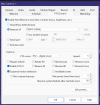
The key rate for both your main and sub are not 1.0, you would have to go into the camera web page and adjust the setting on each camera, something like shown below, you want to have the I Frame interval set the same as the FPS, I have been told that a good number is 15 for the FPS and the IFrame setting, I also note that you are using hardware acceleration on your cameras, it has been suggested to me that it is not needed and may put more load on your CPU than leaving it off, it is worth trying to see if it does reduce your CPU load!
1774461614748.png
 
  • Like
Reactions: oldspyguy
The key rate for both your main and sub are not 1.0, you would have to go into the camera web page and adjust the setting on each camera, something like shown below, you want to have the I Frame interval set the same as the FPS, I have been told that a good number is 15 for the FPS and the IFrame setting, I also note that you are using hardware acceleration on your cameras, it has been suggested to me that it is not needed and may put more load on your CPU than leaving it off, it is worth trying to see if it does reduce your CPU load!
View attachment 240597

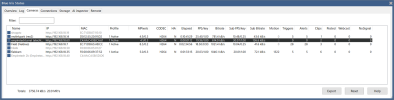
Thats better , One thing though and it might be related to the key rate?

Why does the empiretech turret have soooo many clips compared to the others????
Thanks again
1774467531854.png
 
Thats better , One thing though and it might be related to the key rate?

Why does the empiretech turret have soooo many clips compared to the others????
Thanks again
View attachment 240607
Well the answer is probably quite simple, it has detected motion more often than the other cameras, probably due to more moving objects in it's field of view and different settings for the motion sensor, it might also be detecting motion every time you move it, there is a setting to prevent this, look on the PTZ/Control tab for the camera make sure that "Suspend motion detection" is selected, it's explained in the help button
1774471855411.png
 
  • Like
Reactions: oldspyguy
Well the answer is probably quite simple, it has detected motion more often than the other cameras, probably due to more moving objects in it's field of view and different settings for the motion sensor, it might also be detecting motion every time you move it, there is a setting to prevent this, look on the PTZ/Control tab for the camera make sure that "Suspend motion detection" is selected, it's explained in the help button
View attachment 240608
Not it.
Its not PTZ, Motion is off in BI, Motion is off in camera, SMD is off in camera, and they seem to appear even when there is no motion in the activity.
It has a mind of its own it seems.
1774472923316.png