Problem configuring a simple zone crossing

BadBlake

Getting the hang of it
Apr 21, 2016
127
7
Kristiansand, Norway
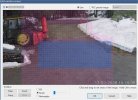
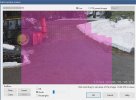
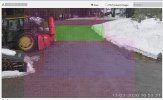
I'm having a hard time configuring Zone Crossing in BI v. 5.9.0.5. I've seen the videos and read the help files but it still doesn't work the way its supposed to. I want to detect when someone comes into my driveway crossing from zone A>B, but for some reason it also triggers from zone B>A. Zone H overlays both zones since there is a small gap between them (as seen in the videos).
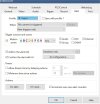
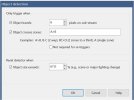
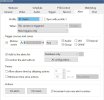
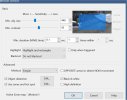
A few screenshots showing my setup.
What's wrong here? Anybody?
 

Attachments
  • zone_A.jpg
    zone_A.jpg
    156.3 KB · Views: 4
  • zone_B.jpg
    zone_B.jpg
    188.3 KB · Views: 3
  • zone_H.jpg
    zone_H.jpg
    173.2 KB · Views: 5
  • Alert_tab.jpg
    Alert_tab.jpg
    91.2 KB · Views: 5
  • objDetect.jpg
    objDetect.jpg
    56.6 KB · Views: 4
  • RecordTAB.jpg
    RecordTAB.jpg
    83.2 KB · Views: 3
  • trigger.jpg
    trigger.jpg
    81.9 KB · Views: 4
Last edited:
At least for testing purposes, try turning off the AI analysis/confirmation just to establish a known baseline that the basic trigger works as expected. I would also lower the contrast significantly in the trigger (I generally run about 17 -18 in the daytime, lowest setting of 12 at night), but lengthen the trigger time to about .4 or .5 seconds.

Once this is confirmed to be working, turn the AI analysis back on: here I would add more analyses to the confirmation (I use about 3 pre-trigger, 12+ post-trigger), and spaced apart every 750ms or 1 second. Unless your objets (people, cars, animals) are moving though the scene impossibly fast, this is appropriate. LPR is a special case and has it's own unique settings (where you will likely need these kind of very "tight" timings that you currently have setup for a more "general purpose" scene).
 
Also turn off the reset when object is 67% - that is to knock out false triggers and you have the opposite going on. None of mine use this.