Optimal camera BI setting

Revan03

n3wb
May 20, 2023
15
5
Čr
Hello,

I would like to ask you for advice with new camera setup. FPS for my new camera Reolink Elite Pro Floodlight is terible.

HW of my server for BI:
i3-9100 (3,6GHz) / 16BG ram / GPU Radeon RX 6700 XT / fast SSD disk
Have in total 4 IP cameras / all in local network trough network cable, no wifi
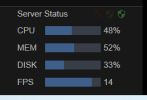
  • In case of my 3 IPC-T54IR-ZE-S3 / have no issue, while watching stream via web interface, CPU load around 50%, FPS stable at 20
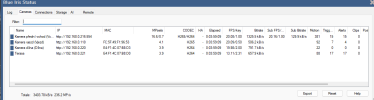
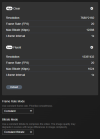
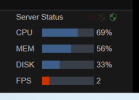
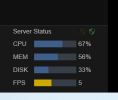
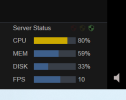
  • In case of my new Reolink Elite Pro Floodlight (16 MP), CPU load 70-85, FPS variating 6 -12 FPS, see screen below.

1773516537374.png


While watching directly in camera in same local network, I see stable fluent stream. So my thinking is, that something limiting me or some setting is wrong.

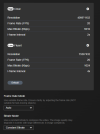
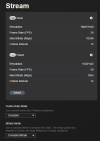
See below camera stream setting: (I changed to CBR)
1773517515260.png


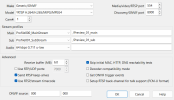
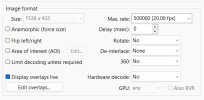
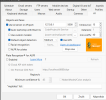
See below my BI setting:
1773517680698.png
1773517728624.png
1773517900100.png
1773518028700.png


Can someone advice, where can be problem, that I see lagging stream with FPS drops? Or what I can try to do. From my point of view, my CPU is not problem, not going above 90% with full quality.
1773518235011.png
 
Make sure the cameras are set to H264, FPS 15, I-Frame 15, CBR! I don't have any REO link cameras, but it is my understanding that they do no perform very well at night with motion! All cameras that are capable of using sub-stream have them turned on, that will really help your CPU load! Perhaps lower the resolution of the sub-stream a bit! Also In the BI status window the FPS/key rate should be "1.00" same with the sub-stream.
 
Welcome to Reolink. It is known they don't play well with BI although it is getting better. Your settings are what they should be, but Reolink isn't honoring them.

Reolink has it set up to be constant when viewing in their platform but will fluctuate going to a VMS like BI or even their own NVR.
 
  • Like
Reactions: Flintstone61
Hello,
thank you for the answer. My observations are below:

- If I go max bitrate, set frame-rate and bitrate to constant, I see biggest FPS drops - why? Camera not delivering or my BI HW is week and not handle?
1773520128861.png

1773520199109.png


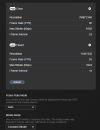
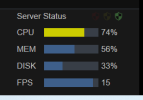
  • If I do setting below (auto frame rate / i frame 2x ), seems to me giving much better FPS stability
  • Still never reach 20 FPS but drops are to 10 FPS, not 2FPS.

1773520410064.png

1773520455687.png


- Lowering resolution (Something I do not want to do) does not help much, maybe I have less CPU load, maybe little-bit more stable FPS, but still not at 20FPS.

1773520757017.png

1773520784455.png
 

Attachments

  • 1773520102141.png
    1773520102141.png
    9.9 KB · Views: 1
Most people are only running cameras at 15FPS, more than enough for security cameras, your choice! If this is for the REOLINK, then @wittaj probably can assist better as I have no REOLINK camera experience!
 
Thank you for advice.

Another observation:

- Setting framerate in camera to 15 FPS / CBR seems doing nothing in BI
-Still seeing FPS variating 10-17 FPS, for sure camera did not limit to 15 FPS

- Lovering substream in camera to lowest setting also not improving main stream FPS
 
The screenshots you shared show Blue Iris is processing 20 FPS but is unable to stream 20 FPS to UI3, which is not a surprise for a 16 megapixel resolution source. Blue Iris normally does transcoding to get the video out to UI3, and it struggles to handle even normal 4K at 30 FPS. Double 4K at 20 FPS would be significantly harder. Blue Iris does try to support hardware acceleration which could help with this if you enabled it, but it is implemented really poorly and probably won't help, if it even works at all. In particular it is hardware accelerated encoding that could help but last I checked it didn't work when enabled. I haven't checked in months though.

The sub stream could be contributing to timing issues too. You could try the sub stream path emptied out in Blue Iris to see if it is better.

But the most foolproof way to get those streams in UI3 to be smooth is to use the "direct-to-wire" function to bypass video transcoding altogether. This will also drastically reduce the CPU usage when you are streaming that camera, and you can and should leave the sub stream enabled for best CPU usage also.
 
  • Exclamation
Reactions: Flintstone61
Thank you for advices, I will play with that at evening and try observe influence when I disable rest of cameras.
So in general, you are saying that issue is my HW / BI possibilities, which is not able to transcode 16MP camera and show in web UI.

I will try that direct to wire function but I am afraid, that I cannot switch in camera from h265 to h264. Main stream is only h265.
 
To be honest guys, using BI many years, considering as big advantage that all is in my house under control, mobile app also working for me.

Using it for my house, almost not need BI program, using mostly web UI trough local PC or just use mobile phone. Nothing special I really need.

Not be able to use newer cameras with bigger resolution starting to be limiting for me.
 
The Reolink looks like its got you chasing your tail all over the place. I'm not versed in Reolink, But as far as i see in the Forums, users have experienced a much different (less control) feature set than Dahua or Hikvsion OEM's.
 
And most here don't chase MP, especially cameras not on ideal MP/sensor ratios, along with using reasonable surveillance camera FPS instead of exceeding cinematic FPS.
 
  • Love
Reactions: Flintstone61
bigger resolution is best for indoor cameras with stable lighting. or very brightly lit outdoor areas.
 
Understand all,

I am also happy with prefered 4MP cameras from this forum. It is good.

But I just wanted to save one camera and see complete area before my house and replace my 4MP cameras to this Reolink.

To be fair, in day condition with this huge resolution I see much more details than before. At night this camera have very good light and even two huge led lights, also replacing my old lamp with simple sensor when arrive at evening.

So, in case of using Reolink app, it is exactly as I wanted, but I dont like to get Reolink free access.

Seems to me only way is to switch to all 4MP cameras and have more od them or change BI.
 
For most of us the bad stuff happens at night, so great day resolution at the expense of night performance is a deal killer to many.

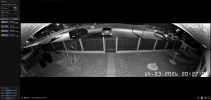
Can you post some objects in motion at night with the Reolink.

Reolink works best with reolink, so if you are happy with quality switch to reolink NVR.
 
  • Like
Reactions: Bruce_H