New to v6 and BI AI, need help

105437

BIT Beta Team
Jun 8, 2015
2,209
1,087
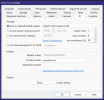
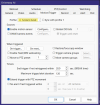
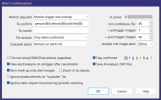
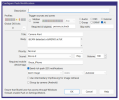
I wanted to experiment with the built-in BI AI. I can't seem to get it to work. Here are my current settings, what am I missing? Much appreciated!

1767819765039.png

1767819144873.png
1767819205830.png
1767819233696.png
1767819253980.png
 
Last edited:
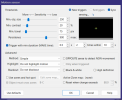
I would suggest that you just get the AI working before you try to get the facial recognition and the license plates working all at the same time! Why put the :80 behind the object names, you already have the "min confidence" set to 80, did you download the required models for built in AI? is your driveway camera a PTZ, if not you do not need the "Extend trigger with PTZ movement". Do you need to have 2 triggers with in 10S on the motion sensor, I would turn on Highlight "Show object rectangles" so that you can see what is happening. In the To Cancel box put in " Do Not Cancel". Do you really need to send 40 post trigger images, I only send 3. You might want to reduce the confidence level until you get it working!

 
Thanks for the reply. I just kept the default for the :80 behind object names. I'll remove that. Models downloaded and it shows that AI is online in my screenshot. This is not a PTZ camera, I'll turn that off. Again, I used defaults for these settings except for faces and plates. I'll make your suggested changes and see how it works. Thanks again.
 
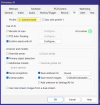
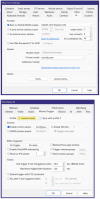
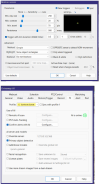
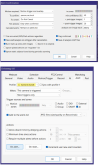
I'm still not having any luck. Here are my latest settings for the built-in AI. I can drive or walk through the FOV of this camera and I get nothing. The camera I'm testing on is a cloned camera that is successfully using the built0in camera AI to trigger ONVIF alerts in BI. In this cloned camera, I have turned off ONVIF events. I'm sure it's something simple I'm missing, thanks for the help!

1767886423566.png

1767886454450.png

1767886485997.png

1767886507544.png
 
I'm still not having any luck. Here are my latest settings for the built-in AI. I can drive or walk through the FOV of this camera and I get nothing. The camera I'm testing on is a cloned camera that is successfully using the built0in camera AI to trigger ONVIF alerts in BI. In this cloned camera, I have turned off ONVIF events. I'm sure it's something simple I'm missing, thanks for the help!

View attachment 235964

View attachment 235965

View attachment 235966

View attachment 235967
You might need to have motion zone configured in "Uses zone and hot spot".
Please try to check "External" box and "Motion zones" with all zones selected (can be fine tuned later) in the Alert tab.
You can use Trigger now function to test if AI server receives requests (in the case of CodeProject setup).
 
Last edited:
  • Like
Reactions: 105437
You might need to have motion zone configured in "Uses zone and hot spot".
Please try to check "External" box and "Motion zones" with all zones selected (can be fine tuned later) in the Alert tab.
You can use Trigger now function to test if AI server receives requests (in the case of CodeProject setup).
That worked, thanks!