IP address setup

Left Coast Geek

Getting comfortable
May 20, 2021
398
402
mid-left coast
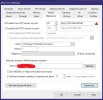
I'm trying to edit the IP address on the Settings / Web server tab, and its insisting my BI host is 192.168.0.204, except its not, it is 192.168.0.93, it simply won't let me edit the IP address on 'Enable the HTTP Server on port: ...

I'm running 6.0.1.x (updating to 6.0.1.13 right now)... ok, 6.0.1.13 didn't resolve this. it won't let me type anything in the IP field, and I have no idea where its getting 192.168.0.204 from.
 
Have you opened a command prompt and run the cmd IPCONFIG to see if you have another adapter on the computer that has that address,
You can not edit that web server address directly; further down on the screen is a box marked "Adapters:" it has a drop down box that you can use to select what ever network adapters BI thinks you have in your computer!
 
  • Like
Reactions: looney2ns
ipconfig and ipcofnig /all only show the one interface (ethernet) and only show the one IP address...

C:\Users\pierce>ipconfig /all

Windows IP Configuration

Host Name . . . . . . . . . . . . : nvr
Primary Dns Suffix . . . . . . . :
Node Type . . . . . . . . . . . . : Hybrid
IP Routing Enabled. . . . . . . . : No
WINS Proxy Enabled. . . . . . . . : No
DNS Suffix Search List. . . . . . : hogranch.com

Ethernet adapter Ethernet:

Connection-specific DNS Suffix . : hogranch.com
Description . . . . . . . . . . . : Intel(R) Ethernet Connection (2) I219-LM
Physical Address. . . . . . . . . : 40-B0-34-F4-62-2D
DHCP Enabled. . . . . . . . . . . : Yes
Autoconfiguration Enabled . . . . : Yes
Link-local IPv6 Address . . . . . : fe80::c5a2:dcf3:675c:a513%4(Preferred)
IPv4 Address. . . . . . . . . . . : 192.168.0.93(Preferred)
Subnet Mask . . . . . . . . . . . : 255.255.255.0
Lease Obtained. . . . . . . . . . : Wednesday, January 7, 2026 4:35:25 PM
Lease Expires . . . . . . . . . . : Thursday, January 8, 2026 3:23:32 PM
Default Gateway . . . . . . . . . : 192.168.0.1
DHCP Server . . . . . . . . . . . : 192.168.0.1
DHCPv6 IAID . . . . . . . . . . . : 54571060
DHCPv6 Client DUID. . . . . . . . : 00-01-00-01-28-43-18-15-40-B0-34-F4-62-2D
DNS Servers . . . . . . . . . . . : 192.168.0.1
NetBIOS over Tcpip. . . . . . . . : Enabled


and, I don't see any other optiosn on the Web Servers for selecting interfaces....

Screenshot 2026-01-07 183216.jpg
 
Last edited:
That is very strange that there would be nothing in the "Adapters" box when you click on the down arrow on the right hand side? does that change if you clear the "Bind exclusively" box? This is running on a regular PC and not some sort of Virtual system?

This is what mine looks like
Screenshot 2026-01-07 220717.png
 
Last edited:
  • Like
Reactions: gwminor48
OH. there it is. silly me. and yes, that fixed it. minor annoyance, the local port has to be the same as the NAT port, so I can't have (wan):8881 forward to (lan):81 but thats not actually a big deal
 
  • Like
Reactions: gwminor48
OH. there it is. silly me. and yes, that fixed it. minor annoyance, the local port has to be the same as the NAT port, so I can't have (wan):8881 forward to (lan):81 but thats not actually a big deal
1) Port forwarding is not recommended.
2) I suggest you redact your WAN IP address in your post #3. :cool:

hog ranch.jpg
 
  • Like
Reactions: Bruce_H