I know there are probably discussions about this all over, but I wanted to share my recent experience and what worked for me, in case anyone else is considering ditching their Ring, Arlo, Nest, etc doorbell.
I have been wanting to get rid of my Ring doorbell for a while, but I just couldn't find any good way to replicate its functionality. I never used the two-way feature, but the motion and visitor notifications were nice, and I just didn't have any other way to replicate that.
I finally decided I would try to replace it with the Reolink POE doorbell, hosted locally, but ran into snags since my camera system doesn't touch the internet. This meant no notifications when someone was at the door.
Something that had also been in the back of my mind was "why do I even need a smart doorbell? I don't use it, use it and only have it for the notifications. I also have 3 different views of my front door, plus 1 on the approach, and all of these have better resolution than the Reolink or Ring..." I thought about it more and started looking into various ways I could make a dumb doorbell smart, and it ended up actually being pretty simple.
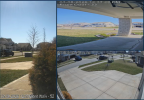
This is the Ring FOV:
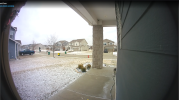
This is the FOV of the T54IR above the doorbell:
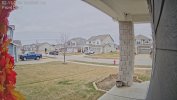
I also have this T54IR above the door:
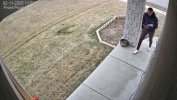
With this one at the front of the porch, looking back at the door:
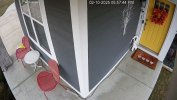
With the FOVs above, I decided I didn't need another camera at the doorbell and had thought up a pretty simple solution to use just a Shelly relay (with an AC to DC converter set to 12vdc) and a standard doorbell to push BI snapshots to my phone.
When the doorbell is pressed it turns the relay on, which rings the chime. When Hubitat sees the relay in the ON state, it sends a trigger to Blue Iris which takes a snapshot. BI then sends that to my phone via Pushover. The notification includes a link to the UI3 feed for the camera, so I can also get a real time look at who rang the doorbell.
To make this happen, the first thing I did was make a clone of the camera I was planning to use. You don't need to add a new camera, just a copy of the original. A copy/clone is needed because you need the trigger to only trigger for snapshots, plus there isn't a way to only send alerts for specific triggers. For this cloned camera, on the Trigger tab, you will want to turn off Motion and ONVIF triggers. On the Record tab, you will want to turn Video off and JPEGs on.
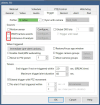
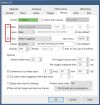
Next, I moved onto pairing the Shelly relay and adding it to Hubitat. From there, I created a rule to send a Hubitat notification and an HTTP Get request to Blue Iris for the trigger. The Hubitat notification was only for testing purposes until I got Pushover notifications hooked up in BI.
The command you will need for triggering the camera is below, see this thread for more information. Additionally, in BI's main settings, navigate to “Web server” => “Advanced’. There, from the Connection drop down, select Non-LAN and then UNcheck “use secure session keys and login page”. This is required for both the trigger and Pushover notifications to work.
http://BI-server-IP:BI-port/admin?camera=X&trigger=1&user=username&pw=password

Once Hubitat was successfully triggering the camera in BI, I moved onto hooking up the Pushover notifications. I already had this set up for another camera, so I copied them over. Unfortunately, in the process, trying to clean it up, I deleted a lot of the code and had to start over with getting it to work and have the notification formatted how I wanted.
I won't go fully into depth on Pushover, but you can find more on adding alerts to BI here. Below is the code I settled on. It is not copy and paste, and you will need to input some of your own information, but in the notification it gives the camera name, a link to the UI3 feed for the camera, and a snapshot in the alert. You will need to use &WAN if you're portforwarding, or be connected to your VPN/on your LAN for the code below.
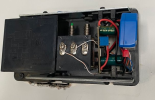
After that, it was just wiring it all in at the chime, which was pretty straight forward. For my install, the transformer was behind the chime, in a junction box. If your transformer is installed away from the chime, you will need to adjust your wiring accordingly, but the concept is the same.
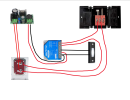
The Hubitat notification is instant, with the Pushover notification being delayed around 5-10 seconds, but at other times it is almost instant. I don't know why the lag, but it would be nice if it was more predictable.
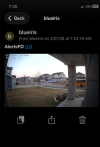
Below is what I get with my notification. I am now considering adding some rules to the cam above the door that would give me a notification for motion, so I have a pre-warning to someone ringing the doorbell.
I have been wanting to get rid of my Ring doorbell for a while, but I just couldn't find any good way to replicate its functionality. I never used the two-way feature, but the motion and visitor notifications were nice, and I just didn't have any other way to replicate that.
I finally decided I would try to replace it with the Reolink POE doorbell, hosted locally, but ran into snags since my camera system doesn't touch the internet. This meant no notifications when someone was at the door.
Something that had also been in the back of my mind was "why do I even need a smart doorbell? I don't use it, use it and only have it for the notifications. I also have 3 different views of my front door, plus 1 on the approach, and all of these have better resolution than the Reolink or Ring..." I thought about it more and started looking into various ways I could make a dumb doorbell smart, and it ended up actually being pretty simple.
This is the Ring FOV:
This is the FOV of the T54IR above the doorbell:
I also have this T54IR above the door:
With this one at the front of the porch, looking back at the door:
With the FOVs above, I decided I didn't need another camera at the doorbell and had thought up a pretty simple solution to use just a Shelly relay (with an AC to DC converter set to 12vdc) and a standard doorbell to push BI snapshots to my phone.
When the doorbell is pressed it turns the relay on, which rings the chime. When Hubitat sees the relay in the ON state, it sends a trigger to Blue Iris which takes a snapshot. BI then sends that to my phone via Pushover. The notification includes a link to the UI3 feed for the camera, so I can also get a real time look at who rang the doorbell.
To make this happen, the first thing I did was make a clone of the camera I was planning to use. You don't need to add a new camera, just a copy of the original. A copy/clone is needed because you need the trigger to only trigger for snapshots, plus there isn't a way to only send alerts for specific triggers. For this cloned camera, on the Trigger tab, you will want to turn off Motion and ONVIF triggers. On the Record tab, you will want to turn Video off and JPEGs on.
Next, I moved onto pairing the Shelly relay and adding it to Hubitat. From there, I created a rule to send a Hubitat notification and an HTTP Get request to Blue Iris for the trigger. The Hubitat notification was only for testing purposes until I got Pushover notifications hooked up in BI.
The command you will need for triggering the camera is below, see this thread for more information. Additionally, in BI's main settings, navigate to “Web server” => “Advanced’. There, from the Connection drop down, select Non-LAN and then UNcheck “use secure session keys and login page”. This is required for both the trigger and Pushover notifications to work.
http://BI-server-IP:BI-port/admin?camera=X&trigger=1&user=username&pw=password
Once Hubitat was successfully triggering the camera in BI, I moved onto hooking up the Pushover notifications. I already had this set up for another camera, so I copied them over. Unfortunately, in the process, trying to clean it up, I deleted a lot of the code and had to start over with getting it to work and have the notification formatted how I wanted.
I won't go fully into depth on Pushover, but you can find more on adding alerts to BI here. Below is the code I settled on. It is not copy and paste, and you will need to input some of your own information, but in the notification it gives the camera name, a link to the UI3 feed for the camera, and a snapshot in the alert. You will need to use &WAN if you're portforwarding, or be connected to your VPN/on your LAN for the code below.
Code:
https://api.pushover.net/1/messages.json -s --form-string "token=YOUR TOKEN" --form-string "user=YOUR USER" --form-string "message=<b>&CAM</b> <a href='http://192.168.0.223:81/mjpg/AlertsFD&user=YOUR USER&pw=YOUR PW'>UI3</a>" --form-string "html=1" --form-string "device=YOUR_PUSHOVER_DEVICE_NAME(S)_HERE" --form-string "sound=YOUR_PUSHOVER_SOUND_HERE" -F "attachment=@C:\BlueIris\Alerts\&ALERT_PATH"After that, it was just wiring it all in at the chime, which was pretty straight forward. For my install, the transformer was behind the chime, in a junction box. If your transformer is installed away from the chime, you will need to adjust your wiring accordingly, but the concept is the same.
The Hubitat notification is instant, with the Pushover notification being delayed around 5-10 seconds, but at other times it is almost instant. I don't know why the lag, but it would be nice if it was more predictable.
Below is what I get with my notification. I am now considering adding some rules to the cam above the door that would give me a notification for motion, so I have a pre-warning to someone ringing the doorbell.