Honeywell Performance series Nvr reset.

I have something similar, a HEN08102. As for shorting the those pads, I tried it with gloves on. It made a spark and reset the DVR but it didn't reset the password, so probably best not to try that method! I don't have a serial to USB cable so I wonder if taking out the battery would work.. Anyone tried that? the trouble is.. it's fixed really well to the board and I worried I might break the bracket off holding the battery in..

recommend using usb, cost cheaper. solved the problem already using the instruction aboved. null modem+usb cable
 
Has anyone successfully reset a Honeywell Performance Series NVR lately? I have a HEN16163 that I purchased off of eBay. Was advertised as factory reset and ready to install but it was not. I don't have the admin password to get in and reset it. I need to do a factory reset . If I am able to access through the serial port using a null modem, can I just reset to factory settings without doing the firmware (TFT) commands described earlier in this post?
 
Thanks for the file upload. Do you know if this firmware will work for Honeywell HEN16163?
The Firmware release notes state Product Name: HEN041*2, HEN081*2 , HEN161*2
Thank you.
 
Today i have Succesfully reset a honeywell HEN04102 (production date 2017.12.13)

i have used a usb-rs232 adapter, a NUll modem cable to connect the NVR to the rs232 adapter.

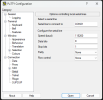
then i have set the following setting in putty:
1784223857379.png

-make sure the recorder is off and connected to the rs232 adapter
-press Open in putty.

-then a terminal window opens, make sure to click in that terminal so its active ( you dont see anything change yet)

then keep the * button pressed on your keyboard, and power the NVR,
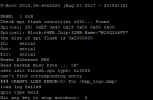
then after a few secs this screen should show up:

1784224093926.png

then type: eracfg
and press enter and it will erase the config.
1784224158502.png

then reboot the nvr and you can start setting it up (default password is 1234)