Hi everyone,
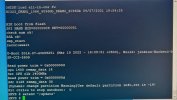
I’m trying to load firmware onto a Hikvision DVR iDS-7204HUHI-K1/4S(C) that is currently stuck in a reboot loop. When the DVR powers on, it shows the Hikvision logo briefly and then restarts repeatedly. I’ve previously recovered similar DVRs using the serial TTL method, which has worked well in the past. In this case, I connect via the serial console, press Ctrl+U during startup, and normally enter the command:
I’m trying to load firmware onto a Hikvision DVR iDS-7204HUHI-K1/4S(C) that is currently stuck in a reboot loop. When the DVR powers on, it shows the Hikvision logo briefly and then restarts repeatedly. I’ve previously recovered similar DVRs using the serial TTL method, which has worked well in the past. In this case, I connect via the serial console, press Ctrl+U during startup, and normally enter the command:
- setenv ';update'
- <span>setenv bootcmd 'tftp 0x42000000 uImage; update'</span>
- <span>setenv bootcmd ';update'</span>