Hi everyone,
I'm hoping someone here can help me with my Floureon SD26W PTZ camera. The horizontal pan axis has completely stopped responding to software commands, and I'm stuck.
Device info:
The problem:
The horizontal pan (left/right) no longer works via any software command. However:
CGI commands I tested (all acknowledged but no movement):
Steps already taken:
What I suspect:
The PTZ calibration table in the firmware may be corrupted after intensive command testing that pushed the motor to its limits. The motor itself seems fine (works at boot), but the firmware thinks it's permanently at the end stop.
What I'm looking for:
1. A firmware file for SD26W (V10.1.3.5.1-20180131 or newer) to reflash via the web Upgrade page
2. Any CGI command that could force a full PTZ recalibration/reset of end stops
3. Any other ideas!
Thanks in advance for any help!
I'm hoping someone here can help me with my Floureon SD26W PTZ camera. The horizontal pan axis has completely stopped responding to software commands, and I'm stuck.
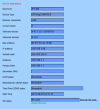
Device info:
- Model: Floureon SD26W
- Device Type: C6F0SgZ3N0P5L0
- Software Version: V10.1.3.5.1-20180131
- Webware Version: V1.0.1
- MAC Address: 00:FC:9C:4C:78:EE
- Chipset: HI3510
The problem:
The horizontal pan (left/right) no longer works via any software command. However:
- At startup, the camera physically performs a full pan AND tilt calibration sequence (both axes move)
- Vertical tilt (up/down) works perfectly
- Zoom (in/out) works perfectly
- All PTZ commands return HTTP 200 OK (confirmed via Wireshark) but horizontal motor does not move
CGI commands I tested (all acknowledged but no movement):
Code:
/web/cgi-bin/hi3510/ptzctrl.cgi?-step=0&-act=left&-speed=63
/web/cgi-bin/hi3510/ptzctrl.cgi?-step=0&-act=right&-speed=63
/web/cgi-bin/hi3510/ptzctrl.cgi?-step=1&-act=left&-speed=1
/web/cgi-bin/hi3510/ptzctrl.cgi?-step=0&-act=hscan&-speed=63
/web/cgi-bin/hi3510/ptzctrl.cgi?-step=0&-act=home&-speed=63
Steps already taken:
- Factory reset via physical button
- Factory reset via web interface
- Reboot via web interface
- Tested all speed values (1 to 63)
- Tested -step=0 and -step=1
What I suspect:
The PTZ calibration table in the firmware may be corrupted after intensive command testing that pushed the motor to its limits. The motor itself seems fine (works at boot), but the firmware thinks it's permanently at the end stop.
What I'm looking for:
1. A firmware file for SD26W (V10.1.3.5.1-20180131 or newer) to reflash via the web Upgrade page
2. Any CGI command that could force a full PTZ recalibration/reset of end stops
3. Any other ideas!
Thanks in advance for any help!