
Empiretech IPC-T54PRO-AS vs Reolink CX820 vs
- Thread starter vaerx
- Start date
You are using an out of date browser. It may not display this or other websites correctly.
You should upgrade or use an alternative browser.
You should upgrade or use an alternative browser.

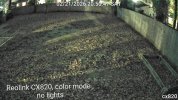
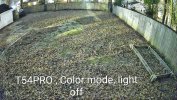


Whatever Im not familiar with this site yet and not sure how to edit the post .
The reolink looks like it's okay until any amount of motion occurs. It becomes genuinely 1fps or worse. I thought my Internet was breaking but viewing the T54PRO again and it was perfectly smooth.
The reolink looks like it's okay until any amount of motion occurs. It becomes genuinely 1fps or worse. I thought my Internet was breaking but viewing the T54PRO again and it was perfectly smooth.
I left them on default just to quickly compare. I'm not exactly experienced with cameras yet so I don't imagine changing the settings would drastically alter the outcome of a quick test like this. I suppose it's subject but the T54 didn't seem blurry to me— that could also be the fact that I was comparing it to that awful reolinkYeah, but what does it look like with motion at night....
I can tell you....both will be a blurry mess.
Those are set on auto/default settings, which produce some of the worse results out there.
Not many here would run the cameras that way unless it was purely overview.

Try it after 10pm when it’s actually dark and post a full res video clip of a human walking past at say 20-25ft
The 54 PRO has been tested extensively and does not do well at night without a lot of external added light. It has a poor sensor that while "bright" produces a lot of noise.
Again not knowing any better you may be ok with it. When compared to a 5442 series camera, it becomes obvious
But Yes compared to the Reolink it likely looks better.
The 54 PRO has been tested extensively and does not do well at night without a lot of external added light. It has a poor sensor that while "bright" produces a lot of noise.
Again not knowing any better you may be ok with it. When compared to a 5442 series camera, it becomes obvious
But Yes compared to the Reolink it likely looks better.
Yeah, reolink is about as bad as it gets with motion blur.
Peek around this site and you see the captures people get.
Sadly, there isn't much love for the T54PRO-AS here as it is an inferior sensor trying to do too much with AI.
Here are two threads with examples compared to the gold standard 54IR series cameras:
Peek around this site and you see the captures people get.
Sadly, there isn't much love for the T54PRO-AS here as it is an inferior sensor trying to do too much with AI.
Here are two threads with examples compared to the gold standard 54IR series cameras:

Dahua released new 5x59-PRO camera lineup with F1.0/F1.2 apertures and WizColor technology:
But also released new 5x59-IL Smart Dual Light cams with F1.6/F1.8 apertures and without WizColor technology:
Both lines looks almost identical (Smart Dual Light have extra Z4E models with telephoto both have extra Z4E models), both are using the same new firmware line...
But also released new 5x59-IL Smart Dual Light cams with F1.6/F1.8 apertures and without WizColor technology:
Both lines looks almost identical (
In terms of getting the most out of the camera, here is my "standard" post that many use as a start for dialing in day and night that helps get the clean captures and help the camera recognize people and cars.
Start with:
H264
8192 bitrate
CBR
15FPS and iframes if using 3rd party VMS (30 if using NVR is ok)
Every field of view is different, but I have found you need contrast to usually be 6-8 higher than the brightness number at night.
We want the ability to freeze frame capture a clean image from the video at night, and that is only done with a shutter of 1/60 or faster. At night, default/auto may be on 1/12s shutter or worse to make the image bright.
In my opinion, shutter (exposure) and gain are the two most important parameters and then base the others off of it. Shutter is more important than FPS. It is the shutter speed that prevents motion blur, not FPS. 15 FPS is more than enough for surveillance cameras as we are not producing Hollywood movies. Match iframes to FPS. 15FPS is all that is usually needed.
Many people do not realize there is manual shutter that lets you adjust shutter and gain and a shutter priority that only lets you adjust shutter speed but not gain. The higher the gain, the bigger the noise and see-through ghosting start to appear because the noise is amplified. Most people select shutter priority and run a faster shutter than they should because it is likely being done at 100 gain, so it is actually defeating their purpose of a faster shutter.
Go into shutter settings and change to manual shutter and start with custom shutter as ms and change to 0-8.3ms and gain 0-50 (night) and 0-4ms exposure and 0-30 gain (day)for starters. Auto could have a shutter speed of 100ms or more with a gain at 100 and shutter priority could result in gain up at 100 which will contribute to significant ghosting and that blinding white you will get from the infrared or white light.
Now what you will notice immediately at night is that your image gets A LOT darker. That faster the shutter, the more light that is needed. But it is a balance. The nice bright night static image results in Casper blur and ghost during motion LOL. What do we want, a nice static image or a clean image when there is motion introduced to the scene?
In the daytime, if it is still too bright, then drop the 4ms down to 3ms then 2ms, etc. You have to play with it for your field of view.
Then at night, if it is too dark, then start adding ms to the time. Go to 10ms, 12ms, etc. until you find what you feel is acceptable as an image. Then have someone walk around and see if you can get a clean shot. Try not to go above 16.67ms (but certainly not above 30ms) as that tends to be the point where blur starts to occur. Conversely, if it is still bright, then drop down in time to get a faster shutter.
You can also adjust brightness and contrast to improve the image. But try not to go above 70 for anything and try to have contrast be at least 7-10 digits higher than brightness.
You can also add some gain to brighten the image - but the higher the gain, the more ghosting you get. Some cameras can go to 70 or so before it is an issue and some can't go over 50.
But adjusting those two settings will have the biggest impact. The next one is noise reduction. Want to keep that as low as possible. Depending on the amount of light you have, you might be able to get down to 40 or so at night (again camera dependent) and 20-30 during the day, but take it as low as you can before it gets too noisy. Again this one is a balance as well. Too smooth and no noise can result in soft images and contribute to blur.
Do not use backlight features until you have exhausted every other parameter setting. And if you do have to use backlight, take it down as low as possible.
After every setting adjustment, have someone walk around outside and see if you can freeze-frame to get a clean image. If not, keep changing until you do. Clean motion pictures are what we are after, not a clean static image.
Start with:
H264
8192 bitrate
CBR
15FPS and iframes if using 3rd party VMS (30 if using NVR is ok)
Every field of view is different, but I have found you need contrast to usually be 6-8 higher than the brightness number at night.
We want the ability to freeze frame capture a clean image from the video at night, and that is only done with a shutter of 1/60 or faster. At night, default/auto may be on 1/12s shutter or worse to make the image bright.
In my opinion, shutter (exposure) and gain are the two most important parameters and then base the others off of it. Shutter is more important than FPS. It is the shutter speed that prevents motion blur, not FPS. 15 FPS is more than enough for surveillance cameras as we are not producing Hollywood movies. Match iframes to FPS. 15FPS is all that is usually needed.
Many people do not realize there is manual shutter that lets you adjust shutter and gain and a shutter priority that only lets you adjust shutter speed but not gain. The higher the gain, the bigger the noise and see-through ghosting start to appear because the noise is amplified. Most people select shutter priority and run a faster shutter than they should because it is likely being done at 100 gain, so it is actually defeating their purpose of a faster shutter.
Go into shutter settings and change to manual shutter and start with custom shutter as ms and change to 0-8.3ms and gain 0-50 (night) and 0-4ms exposure and 0-30 gain (day)for starters. Auto could have a shutter speed of 100ms or more with a gain at 100 and shutter priority could result in gain up at 100 which will contribute to significant ghosting and that blinding white you will get from the infrared or white light.
Now what you will notice immediately at night is that your image gets A LOT darker. That faster the shutter, the more light that is needed. But it is a balance. The nice bright night static image results in Casper blur and ghost during motion LOL. What do we want, a nice static image or a clean image when there is motion introduced to the scene?
In the daytime, if it is still too bright, then drop the 4ms down to 3ms then 2ms, etc. You have to play with it for your field of view.
Then at night, if it is too dark, then start adding ms to the time. Go to 10ms, 12ms, etc. until you find what you feel is acceptable as an image. Then have someone walk around and see if you can get a clean shot. Try not to go above 16.67ms (but certainly not above 30ms) as that tends to be the point where blur starts to occur. Conversely, if it is still bright, then drop down in time to get a faster shutter.
You can also adjust brightness and contrast to improve the image. But try not to go above 70 for anything and try to have contrast be at least 7-10 digits higher than brightness.
You can also add some gain to brighten the image - but the higher the gain, the more ghosting you get. Some cameras can go to 70 or so before it is an issue and some can't go over 50.
But adjusting those two settings will have the biggest impact. The next one is noise reduction. Want to keep that as low as possible. Depending on the amount of light you have, you might be able to get down to 40 or so at night (again camera dependent) and 20-30 during the day, but take it as low as you can before it gets too noisy. Again this one is a balance as well. Too smooth and no noise can result in soft images and contribute to blur.
Do not use backlight features until you have exhausted every other parameter setting. And if you do have to use backlight, take it down as low as possible.
After every setting adjustment, have someone walk around outside and see if you can freeze-frame to get a clean image. If not, keep changing until you do. Clean motion pictures are what we are after, not a clean static image.
Try it after 10pm when it’s actually dark and post a full res video clip of a human walking past at say 20-25ft
The 54 PRO has been tested extensively and does not do well at night without a lot of external added light. It has a poor sensor that while "bright" produces a lot of noise.
Again not knowing any better you may be ok with it. When compared to a 5442 series camera, it becomes obvious
But Yes compared to the Reolink it likely looks
Holy, this is incredibly informative. Thank you so much. I can't wait to try these out, it may even fix some of my other issues.In terms of getting the most out of the camera, here is my "standard" post that many use as a start for dialing in day and night that helps get the clean captures and help the camera recognize people and cars.
Start with:
H264
8192 bitrate
CBR
15FPS and iframes if using 3rd party VMS (30 if using NVR is ok)
Every field of view is different, but I have found you need contrast to usually be 6-8 higher than the brightness number at night.
We want the ability to freeze frame capture a clean image from the video at night, and that is only done with a shutter of 1/60 or faster. At night, default/auto may be on 1/12s shutter or worse to make the image bright.
In my opinion, shutter (exposure) and gain are the two most important parameters and then base the others off of it. Shutter is more important than FPS. It is the shutter speed that prevents motion blur, not FPS. 15 FPS is more than enough for surveillance cameras as we are not producing Hollywood movies. Match iframes to FPS. 15FPS is all that is usually needed.
Many people do not realize there is manual shutter that lets you adjust shutter and gain and a shutter priority that only lets you adjust shutter speed but not gain. The higher the gain, the bigger the noise and see-through ghosting start to appear because the noise is amplified. Most people select shutter priority and run a faster shutter than they should because it is likely being done at 100 gain, so it is actually defeating their purpose of a faster shutter.
Go into shutter settings and change to manual shutter and start with custom shutter as ms and change to 0-8.3ms and gain 0-50 (night) and 0-4ms exposure and 0-30 gain (day)for starters. Auto could have a shutter speed of 100ms or more with a gain at 100 and shutter priority could result in gain up at 100 which will contribute to significant ghosting and that blinding white you will get from the infrared or white light.
Now what you will notice immediately at night is that your image gets A LOT darker. That faster the shutter, the more light that is needed. But it is a balance. The nice bright night static image results in Casper blur and ghost during motion LOL. What do we want, a nice static image or a clean image when there is motion introduced to the scene?
In the daytime, if it is still too bright, then drop the 4ms down to 3ms then 2ms, etc. You have to play with it for your field of view.
Then at night, if it is too dark, then start adding ms to the time. Go to 10ms, 12ms, etc. until you find what you feel is acceptable as an image. Then have someone walk around and see if you can get a clean shot. Try not to go above 16.67ms (but certainly not above 30ms) as that tends to be the point where blur starts to occur. Conversely, if it is still bright, then drop down in time to get a faster shutter.
You can also adjust brightness and contrast to improve the image. But try not to go above 70 for anything and try to have contrast be at least 7-10 digits higher than brightness.
You can also add some gain to brighten the image - but the higher the gain, the more ghosting you get. Some cameras can go to 70 or so before it is an issue and some can't go over 50.
But adjusting those two settings will have the biggest impact. The next one is noise reduction. Want to keep that as low as possible. Depending on the amount of light you have, you might be able to get down to 40 or so at night (again camera dependent) and 20-30 during the day, but take it as low as you can before it gets too noisy. Again this one is a balance as well. Too smooth and no noise can result in soft images and contribute to blur.
Do not use backlight features until you have exhausted every other parameter setting. And if you do have to use backlight, take it down as low as possible.
After every setting adjustment, have someone walk around outside and see if you can freeze-frame to get a clean image. If not, keep changing until you do. Clean motion pictures are what we are after, not a clean static image.
It is easy to get fascinated with nice, bright static images at night, but we are not trying to win a ribbon for still photography at the county fair with these cameras - we need them to perform in low light and get a clean capture of the perp that the police can use for IDENTIFY purposes.
Unless one has stadium quality light or is ok using the built-in white LEDs, you will find that capturing color with detail at night is hard. But we can get a clean static image with little light.
So most run something like the 54IR with infrared and faster shutters for detail and something like the 4K/T at slower shutters for color
Unless one has stadium quality light or is ok using the built-in white LEDs, you will find that capturing color with detail at night is hard. But we can get a clean static image with little light.
So most run something like the 54IR with infrared and faster shutters for detail and something like the 4K/T at slower shutters for color
Reolinks suffer from firmware designed to provide a bright static image in low light conditions. But that comes at the expense of not getting clear captures at night.
Reolink gets lots of ghosting and blurring, and sometimes the invisible man LOL.
If all you care about is to look around, then probably ok. But if you plan to be able to use them in the event something happens and you need to get the police involved, think again....
What you mean a missing hand isn't normal LOL (plus look at the blur on the face and he is barely moving and this should be ideal indoor IR bounce and it struggles):

How about missing everything but the head and upper torso
The invisible man, where can he be. Thank goodness he is carrying around a reflective plate to see where he is LOL (hint - the person is literally in the middle of the image at the end of the fence holding a rectangular reflective piece of metal)
I've seen better images on an episode of ghost hunters

And of course, this is an example from Reolink's marketing videos - do you see a person in this picture...yes, there is a person in this picture.... Could this provide anything useful for the police other than the date and time something happened? Would this protect your home? The still picture looks great though except for the person and the blur of the vehicle... Will give you a hint - the person is in between the two visible columns:

Bad Boys
Bad Boys
Watcha gonna do
Watcha gonna do
When the camera can't see you
Here is the unofficial Reolink thread.
You can see all the attempts people have provided to demonstrate the quality of Reolink, and they are all a blurry mess at night or missing body parts or other messes.
We have challenged someone to provide a clean capture of someone moving at night with a Reolink and as you can see with over 20 pages, nobody has yet to provide a usable image with motion at night.
Reolink: Deconstruction of a dangerous misleading youtube review "Finding the BEST 4K Security Camera NVR Package (Reolink vs Amcrest vs Swann)"
Most will say these don't cut it.
Reolink gets lots of ghosting and blurring, and sometimes the invisible man LOL.
If all you care about is to look around, then probably ok. But if you plan to be able to use them in the event something happens and you need to get the police involved, think again....
What you mean a missing hand isn't normal LOL
(plus look at the blur on the face and he is barely moving and this should be ideal indoor IR bounce and it struggles):How about missing everything but the head and upper torso
The invisible man, where can he be. Thank goodness he is carrying around a reflective plate to see where he is LOL (hint - the person is literally in the middle of the image at the end of the fence holding a rectangular reflective piece of metal)
I've seen better images on an episode of ghost hunters
And of course, this is an example from Reolink's marketing videos - do you see a person in this picture...yes, there is a person in this picture.... Could this provide anything useful for the police other than the date and time something happened? Would this protect your home? The still picture looks great though except for the person and the blur of the vehicle... Will give you a hint - the person is in between the two visible columns:
Bad Boys
Bad Boys
Watcha gonna do
Watcha gonna do
When the camera can't see you
Here is the unofficial Reolink thread.
You can see all the attempts people have provided to demonstrate the quality of Reolink, and they are all a blurry mess at night or missing body parts or other messes.
We have challenged someone to provide a clean capture of someone moving at night with a Reolink and as you can see with over 20 pages, nobody has yet to provide a usable image with motion at night.
Reolink: Deconstruction of a dangerous misleading youtube review "Finding the BEST 4K Security Camera NVR Package (Reolink vs Amcrest vs Swann)"
Most will say these don't cut it.
So is there any use in getting a t58ir? or is it more or less a waste of money if the position of the t54ir is good?It is easy to get fascinated with nice, bright static images at night, but we are not trying to win a ribbon for still photography at the county fair with these cameras - we need them to perform in low light and get a clean capture of the perp that the police can use for IDENTIFY purposes.
Unless one has stadium quality light or is ok using the built-in white LEDs, you will find that capturing color with detail at night is hard. But we can get a clean static image with little light.
So most run something like the 54IR with infrared and faster shutters for detail and something like the 4K/T at slower shutters for color
So is there any use in getting a t58ir? or is it more or less a waste of money if the position of the t54ir is good?
The T58IR is on the same sensor as the T54IR, so the T54IR will beat the T58IR all night long as the T58IR will need double the light to produce the same brightness.
In low light, the lower MP camera on the same size sensor as the lower MP will outperform the higher MP camera.
During the day, the T58IR may hold a slight advantage, but at not it will be the opposite. And for most of us, low light performance is what we need.
If pixelation and ghosting is bad now, it will be bad with a camera on the less than ideal MP/sensor ratio.
At night, as you get more than say 15 feet from the camera, the 4MP will show an identifiable image where the 8MP will show an unidentifiable blob. And when the 4MP is showing an unidentifiable blob, the 8MP won't know anything is there at all.
thank you for the information. I just bought a IPC-T54IR-ZE and IPC-T54IR-AS . now that I have so many cameras though, how do I manage them before getting an NVR? Is it not possible? I have a unifi dream machine but obviously they're not compatible so I'm limited to frigate or empiretech / dahua NVR.The T58IR is on the same sensor as the T54IR, so the T54IR will beat the T58IR all night long as the T58IR will need double the light to produce the same brightness.
In low light, the lower MP camera on the same size sensor as the lower MP will outperform the higher MP camera.
During the day, the T58IR may hold a slight advantage, but at not it will be the opposite. And for most of us, low light performance is what we need.
If pixelation and ghosting is bad now, it will be bad with a camera on the less than ideal MP/sensor ratio.
At night, as you get more than say 15 feet from the camera, the 4MP will show an identifiable image where the 8MP will show an unidentifiable blob. And when the 4MP is showing an unidentifiable blob, the 8MP won't know anything is there at all.