Cobra 8CH NVR from Harbor Freight Issues

kursed

n3wb
Apr 7, 2026
6
8
VA
Hey guys, so I'm a complete noob when it comes to IP cameras and I've been working on a setup my mother bought from Harbor Freight a couple years ago. The system was working well for about a year, then we started having issues with corrosion on the connector pins (RJ45?). So she went to talk to them about returning it, and the local harbor freight just gave her a another system they had that was open box without even asking for the old one back because they had discontinued it at this point. I installed the new cameras making sure I had all the gaskets and O-Rings on the weathertight cables installed correctly, or so I thought. Almost a year later and the cameras are on the fritz again due to corrosion.

I cleaned two cameras today with Deoxit and a very small sanding stick that I use for building model cars, and got them working again. I'm still working on the last one. I have one spare camera that I tried adding a new RJ45 connector to, but took me a while to find the pinout. I'll be trying to install that one tomorrow.

I will definitely be using some dielectric grease and some rubber tape and/or caulking.

I also purchased one Reolink RCL510-A camera in an attempt to see if that would work with the system, but I have yet to get the darn thing working. It will power on, but the Cobra NVR/DVR won't recognize the camera automatically like it does the original Cobra cameras. I'll keep fiddling with it to see if I can get it to connect as well. I'll keep you updated on what I find out as I go through the repair process.

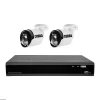
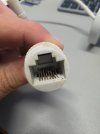
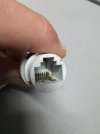
Got the first one in the pics cleaned after this picture. The second one looks like a couple of the pins are damaged, and the dang plastic housing is molded around the wiring so you can't just disassemble them to repair them.
 

Attachments

  • 20260407_151605.jpg
    20260407_151605.jpg
    505.5 KB · Views: 6
  • 20260407_205950.jpg
    20260407_205950.jpg
    535.4 KB · Views: 6
  • 57648_W3-1.webp
    57648_W3-1.webp
    35.9 KB · Views: 6
  • Like
Reactions: mat200
As you found out, those waterproof connectors are not waterproof. Plus you trap air moisture that goes thru the thermal cycle and that is why dielectric grease is key.

You will find many of these cheap brands are proprietary, which is why the reolink didn't work and likely won't work.

But reolink isn't really a step up from what you have either.
 
  • Like
Reactions: mat200
As you found out, those waterproof connectors are not waterproof. Plus you trap air moisture that goes thru the thermal cycle and that is why dielectric grease is key.

You will find many of these cheap brands are proprietary, which is why the reolink didn't work and likely won't work.

But reolink isn't really a step up from what you have either.
Yeah, I know it's a cheap system, but it is what we could afford and it did come in handy when one of her neighbors threatened another neighbor with a machete and we caught that on video for the police. I'm hoping to be able to get her a better system sometime within the next year or so, but for now we at least have two of the cameras working again, so that's better than nothing.
 
  • Like
Reactions: mat200
You would be better off scouring ebay for some cobra cams than trying to get other brands to work.

Even with the better equipment like Dahua and Hikvision, best and recommended practice is to match NVR brand with camera brand.
 
  • Like
Reactions: mat200
Hey guys, so I'm a complete noob when it comes to IP cameras and I've been working on a setup my mother bought from Harbor Freight a couple years ago. The system was working well for about a year, then we started having issues with corrosion on the connector pins (RJ45?). So she went to talk to them about returning it, and the local harbor freight just gave her a another system they had that was open box without even asking for the old one back because they had discontinued it at this point. I installed the new cameras making sure I had all the gaskets and O-Rings on the weathertight cables installed correctly, or so I thought. Almost a year later and the cameras are on the fritz again due to corrosion.

I cleaned two cameras today with Deoxit and a very small sanding stick that I use for building model cars, and got them working again. I'm still working on the last one. I have one spare camera that I tried adding a new RJ45 connector to, but took me a while to find the pinout. I'll be trying to install that one tomorrow.

I will definitely be using some dielectric grease and some rubber tape and/or caulking.

I also purchased one Reolink RCL510-A camera in an attempt to see if that would work with the system, but I have yet to get the darn thing working. It will power on, but the Cobra NVR/DVR won't recognize the camera automatically like it does the original Cobra cameras. I'll keep fiddling with it to see if I can get it to connect as well. I'll keep you updated on what I find out as I go through the repair process.

Got the first one in the pics cleaned after this picture. The second one looks like a couple of the pins are damaged, and the dang plastic housing is molded around the wiring so you can't just disassemble them to repair them.

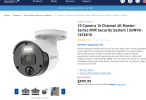
The cameras on that Harbor Freight Cobra kit look similar to some of the OEM models that Swann rebranded.

Looks like a RaySharp body to me

IF this is the case, I would think it works with PoE standards, and perhaps it will be a question of getting the IP configuration properly set.
( you may need to configure the Reolink to run ONVIF spec and that channel it is on to run ONVIF spec )

Ideally, if you can try to source a Cobra camera from ebay or the like if you need more.

The connectors, I would try to clean them up and see if you can get them to work again.

( note the Harbor Freight image shows the cameras mounted upside down, as normally you want the lip / brim to be directed up )


1775617531885.png
Swann has used multiple OEMs for manufacturing, primarily in China, with recent shifts due to geopolitical concerns:

  • Zhuhai Raysharp Technology (Ray Sharp) – A Chinese supplier previously used by Swann for its Max Range cameras. Swann ended this partnership in late 2024 after the US government banned Ray Sharp over national security concerns.
  • Hikvision – Industry sources and forums suggest Hikvision has manufactured Swann CCTV systems in the past, leveraging its large-scale production capabilities.
  • Multiple Global Suppliers – Following the Ray Sharp exit, Swann confirmed it shifted production of high-end products to new suppliers outside of China and maintains a multi-country manufacturing strategy to mitigate risk.
Swann, originally Australian and now part of the Infinova Group (with Chinese majority ownership), designs its products in Australia but relies on a global network for component sourcing and assembly.
 
The cameras on that Harbor Freight Cobra kit look similar to some of the OEM models that Swann rebranded.

Looks like a RaySharp body to me

IF this is the case, I would think it works with PoE standards, and perhaps it will be a question of getting the IP configuration properly set.
( you may need to configure the Reolink to run ONVIF spec and that channel it is on to run ONVIF spec )

Ideally, if you can try to source a Cobra camera from ebay or the like if you need more.

The connectors, I would try to clean them up and see if you can get them to work again.

( note the Harbor Freight image shows the cameras mounted upside down, as normally you want the lip / brim to be directed up )


View attachment 241533
Swann has used multiple OEMs for manufacturing, primarily in China, with recent shifts due to geopolitical concerns:

  • Zhuhai Raysharp Technology (Ray Sharp) – A Chinese supplier previously used by Swann for its Max Range cameras. Swann ended this partnership in late 2024 after the US government banned Ray Sharp over national security concerns.
  • Hikvision – Industry sources and forums suggest Hikvision has manufactured Swann CCTV systems in the past, leveraging its large-scale production capabilities.
  • Multiple Global Suppliers – Following the Ray Sharp exit, Swann confirmed it shifted production of high-end products to new suppliers outside of China and maintains a multi-country manufacturing strategy to mitigate risk.
Swann, originally Australian and now part of the Infinova Group (with Chinese majority ownership), designs its products in Australia but relies on a global network for component sourcing and assembly.
Yes sir on all accounts. I noticed the upside down cameras in the H.F. pic as well, but upside down seems to be par for the course when it comes to them. LOL!

I got two cameras cleaned up and working last night. The third camera was the one with the damaged pins, so I snipped the connector off, installed a new pass through RJ45 connector, and got that one working this morning.

Now my mother has all three cameras up and working again. I'll go to Home Depot this evening and snoop out all the waterproofing goodies I can find and make sure everything is sealed up tighter than a gnats ar$e tomorrow.

I am not also left with one spare Cobra NVR, one spare Cobra cam (had to replace the RJ45 on it as well, but it's also now working), and one spare Reolink cam that I can put to use here at my house if I can get it working.

I ordered a PoE switch last night so I can connect that to my router, then connect the Reolink to the switch and get the IP setup. I read online last night after lots of digging that the Cobra NVR won't recognize the Reolink when plugged in direct to the NVR, so you have to go the PoE switch to router method and initialize the cam through their proprietary app first, then you can connect it to the Cobra NVR and using ONVIF settings it should work.

I also plan on looking into the Swann cameras to maybe try one of those, as well as watching fleaBay for any Cobra cams to pop up.

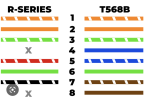
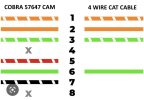
I found this wiring diagram here on the forum for direct wiring a Cobra cam, but found that one of the cables at my mother's house only had 4 wires (green/white, green, orange/white, and orange) so I edited the pic to show those are the only necessary wires in case someone else comes across the same issue. First pic is original, second pic is my edited version.
 

Attachments

  • R-Series Camera to T-568B Wiring Diagram.png
    R-Series Camera to T-568B Wiring Diagram.png
    72 KB · Views: 1
  • COBRA Camera to 4 wire CAT Wiring Diagram.jpg
    COBRA Camera to 4 wire CAT Wiring Diagram.jpg
    41.5 KB · Views: 1
Yes sir on all accounts. I noticed the upside down cameras in the H.F. pic as well, but upside down seems to be par for the course when it comes to them. LOL!

I got two cameras cleaned up and working last night. The third camera was the one with the damaged pins, so I snipped the connector off, installed a new pass through RJ45 connector, and got that one working this morning.

Now my mother has all three cameras up and working again. I'll go to Home Depot this evening and snoop out all the waterproofing goodies I can find and make sure everything is sealed up tighter than a gnats ar$e tomorrow.

I am not also left with one spare Cobra NVR, one spare Cobra cam (had to replace the RJ45 on it as well, but it's also now working), and one spare Reolink cam that I can put to use here at my house if I can get it working.

I ordered a PoE switch last night so I can connect that to my router, then connect the Reolink to the switch and get the IP setup. I read online last night after lots of digging that the Cobra NVR won't recognize the Reolink when plugged in direct to the NVR, so you have to go the PoE switch to router method and initialize the cam through their proprietary app first, then you can connect it to the Cobra NVR and using ONVIF settings it should work.

I also plan on looking into the Swann cameras to maybe try one of those, as well as watching fleaBay for any Cobra cams to pop up.

I found this wiring diagram here on the forum for direct wiring a Cobra cam, but found that one of the cables at my mother's house only had 4 wires (green/white, green, orange/white, and orange) so I edited the pic to show those are the only necessary wires in case someone else comes across the same issue. First pic is original, second pic is my edited version.

Nice job @kursed

Personally, I really like junction boxes to help keep water away from the connection.

here's my recommendations
0) Get a junction box, install the base .. install the camera on the lid of the junction box
1) Di-electric gel in the RJ45 boot .. connect to RJ45 plug - test
2) Stretch Silicone Tape or Coax seal around the connection RJ45 Boot and RJ45 plug - test again
3) Good quality electrical tape around that - test again
4) place all the cabling in the junction box and screw the lid w/camera on - test again

If the cabling is exposed outdoors, make certain you setup a drip loop so that the water does not drip into the RJ45 connections.

The trick is to keep moister out of the connection and out of the camera as best as you can.

Do let us know how it turns out.

note on the cheaper NVRs, you may start to encounter bandwidth issues of image capture or display once you hit about 1/2 of the ports utilized. If this is the case, lower the fps on the cameras that you do not need as many fps. ( I really do not want to lower resolution, rather get 10 fps instead of 15 fps )