Can't get e-mail send function to work on 5-year-old HDW-2431 turret camera, is there a (safe) firmware solution available?

sumguy

Getting the hang of it
Jan 23, 2016
123
24
Summary: HDW-2431T 4-mp turrent camera can't send email to my office mail server from home, other cameras at home can.

==================

I have a pair of HDW-2431T cameras that I bought at the same time, maybe 4 or 5 years ago. They have different lenses (one is more wide-angle than the other one, off hand I don't know the exact specs there).

The wide-angle camera has been in service since purchased, the other one has not really seen any use.

The wide-angle has software build date of 02-29/2020 system version 14.R, the other camera is 04-18/2020 system version 16.R. So 2 month difference in the firmware.

I'm trying to put the other camera into use, but I can't get its e-mail send function to work.

The wide-angle camera communicates with my email server at my office, so the camera is on the same network as the mail server. Very basic interaction with the mail server, no SMTP login, no TLS or SSL.

The other camera is at home, and it fails all attempts when I try the test-send email function. I have other non-dahau cameras at home, and they all can send mail directly to my office mail server no problem.

I will take this camera to the office tomorrow and put it on the LAN and see if it will talk directly to the mail server in that situation.

I'm wondering about the firmware version difference I'm seeing here between these cameras. Is it "safe" to try to down-grade the problem camera to the same version as the working camera? Or, since these are now 4+ years old, is there a known / working / better firmware file I can try on the problem camera?
 
Last edited:
  • Like
Reactions: Flintstone61
Very much doubt its a FW issue. I would analyze all of the network parts first.

Double check Login/pass, SMTP server etc

Is this camera and the others at home all on the same network?
Do they go through an NVR?
How are they setup to access remotely from the outside world? P2P? Port forwarding?
 
Very much doubt its a FW issue. I would analyze all of the network parts first.

Double check Login/pass, SMTP server etc

Is this camera and the others at home all on the same network?
Do they go through an NVR?
How are they setup to access remotely from the outside world? P2P? Port forwarding?

While at the office I can interact with the camera at home (home router port-forwarding). I have 2 browser windows open and I can see both camera configuration screens simultaneously.

Both cameras have the SMTP server set as IP address (not host name). In the case of the office it's 192.168.2.130 (the local LAN IP of the mail server) and the port is 25 (standard SMTP port). The camera at home has my office IP address (which is static) and uses port 2525. My office router (UBNT Edgerouter ER4) is set to forward incoming port 2525 to lan IP 192.168.2.130 port 25.

I have several really cheap Dlink cameras (DCS-930 and varients) at home, they can do rudimentary motion detection in-camera, and they email pictures from detection events directly to the office mail server in the same way, using office IP and port 2525. No SMTP auth-login is used. No TLS or SSL.

There is no NVR in this situation. And no VPN. It's all done directly by IP (is that P2P ?).

Both of these Dahau's I have the network TCP settings for DNS pointing to garbage IP's (like 3.4.5.6) because I don't want the camera's to be "phoning home". They have no need to resolve any host names when the mail server I give them is in the form of an IP address.

Also, this home Dahau (the problem camera) I do have NTP server set to point to my office IP - the Edgerouter performs NTP service for all LAN devices and also for any devices I have at home that I point to it. And this does work - the camera does get correct date and time from the office router.
 
  • Like
Reactions: bigredfish
On the dahuaSecurity web site, download center, firmware, I see something called "DH_Molec Platform" where the supported models include maybe a dozen different 2431 varients. The date for this is 21/03/2025.

Are these particular cameras known as the "Molec Platform" ?

The release notes mentions something called the "ConfigTool", some sort of software you run on a PC that checks the camera and verifies the new firmware is correct?
 
Thats the name for the FW variant/family. I'm afraid I don;t know if your camera is compatible.
Is it an AS or VF?

AS here with Jan '25 FW but again I can't be sure of your exact model

I quit using their Config tool years ago. But maybe it can be helpful in verifying FW version compatibility. :idk:

I think your method of trying from the office location next is a good move
 
I downloaded this from Dahau:

IPC-HDW2431T-AS-S2_Firmware.zip
General_ConfigTool_ChnEng_V5.001.0000003.1.R.20231130.exe

I won't try any of those until after I test this camera at the office tommorrow.

My camera is an IPC T2431T-AS (no S2 after that - what is S2 ?). It's a fixed focal length 3.6 mm.

I also stumbled across this - might be useful:

 
  • Like
Reactions: Flintstone61
Dahua designates a different chipset/sensor/whatever you want to call it by the S# designation, so the same model could have different firmware for different chipsets used during the life of that model. Usually it is a result of the previous chipset not being available and/or they went with a different vendor. Sometimes the newer chipset is better and sometimes it is worse.

Here is an example - the HFW3549T1-AS-PV is available in 2 versions of firmware across 3 different chipsets for the same model camera:
  • HFW3549T1-AS-PV-S4 uses the HX3XXX-Taurus firmware.
  • HFW3549T1-AS-PV and IPC-HFW3549T1-AS-PV-S3 use the HX5XXX-Volt firmware
And trying to update with the wrong version could brick the camera.

In this instance, Dahua added an S# designation after the model number (while Hikvision adds a C).
 
  • Like
Reactions: bigredfish
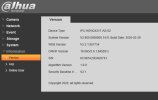
Interesting. When I bring up the Information - Version screen on the office camera (the wide-angle camera, I think 2.8 mm focal length) I see this:

1.JPG

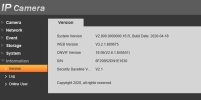
See the first line? Device Type. Now here's the "problem" camera - the one at home, should be identical except 3.6 mm focal length:

2.JPG

Where is the Device Type line? Not there. AND look at the banner line - the top line. One has the Dahua logo, the other one just says "IP Camera". Strange.
 
Last edited:
Interesting. When I bring up the Information - Version screen on the office camera (the wide-angle camera, I think 2.8 mm focal length) I see this:

View attachment 233668

See the first line? Device Type. Now here's the "problem" camera - the one at home, should be identical except 3.6 mm focal length:

View attachment 233669

Where is the Device Type line? Not there.

One of the many great mysteries
 
Ok I got it sorted out. First thing - the SMTP send function on these cameras don't work with my mail server. It's not a mis-match between TLS or SSL or auth-login because none of those things are enabled on my server. Some packet detective work sorted this out, so we have the Dahau's send mail through an intermediate PC on the lan that captures and re-directs the packets to the mail server, while fixing something in the SMTP hand-shake that I can't recall what it is. That was done a few years ago. But in this case that didn't solve the entire problem because this camera was still failing the mail-send test. In the email settings I had to enter a few random characters in the Username and Password fields even though I have authentication set to none. Then it worked. Otherwise the test failed very quickly, too quickly, like it knew it wasn't going through with the test with those fields being empty, but it doesn't tell you that.
 
  • Wow
Reactions: bigredfish