Per the title - I would like to customize the settings on my Dahua/EmpireTech camera which would need, at a minimum, to have Day and Night different settings/profiles. But I cannot change the time plan settings in the camera. I have tried:
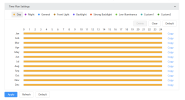
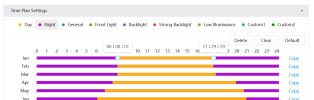
Screenshot of what the time plan settings look like attached.
IPC-Color4K-T
V3.140.000000043.R
Any advice appreciated!
- different browsers (chrome, firefox, IE, Edge in IE mode though that mode doesn't seem to be available anymore)
- updated the camera firmware (which btw then requires a modern browser, IE doesn't work)
- with/without the browser plugin (since the firmware update it's not installed)
Screenshot of what the time plan settings look like attached.
IPC-Color4K-T
V3.140.000000043.R
Any advice appreciated!