
- Aug 23, 2016
- 9
- 1
Hi guys!
Really rare that I get stuck with something but here we go.
Blue iris latest running on Windows10 LTSC VM on a Ryzen 9950X Proxmox, everything works great and snappy, events getting detected properly, persons, vehicles detected properly, round trips for AI in the 50-60ms range. But there is a mystery here.
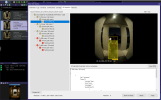
Please see the attached screenshot. WHY did this event not trigger? A person was clearly detected with 84% and 70% and then 63% confidence in three frames in a row. The canceled alert just says "occupied" and there is a yellow stopwatch.
I have other (confirmed red person) events from the same camera with less confidence or person detected in just one of the frames yet it triggered correctly.
It feels like Blue Iris is on the cutting edge with the software but the docs are ANCIENT.
Does anyone know whats going on here?
Really rare that I get stuck with something but here we go.
Blue iris latest running on Windows10 LTSC VM on a Ryzen 9950X Proxmox, everything works great and snappy, events getting detected properly, persons, vehicles detected properly, round trips for AI in the 50-60ms range. But there is a mystery here.
Please see the attached screenshot. WHY did this event not trigger? A person was clearly detected with 84% and 70% and then 63% confidence in three frames in a row. The canceled alert just says "occupied" and there is a yellow stopwatch.
I have other (confirmed red person) events from the same camera with less confidence or person detected in just one of the frames yet it triggered correctly.
It feels like Blue Iris is on the cutting edge with the software but the docs are ANCIENT.
Does anyone know whats going on here?


