Blue iris motion notifications in home assistant to run an automation.

Keizer

Getting comfortable
Jan 3, 2023
359
637
Wa
I have five 4K T full time color Andy cams deployed around the house. At each camera I have external LED soffit lighting connected to Tapo dimming light switches integrated into Home assistant. These LEDS all come on/off with a sunset/sunrise automation in home assistant. I have them all dimmed down somewhere between 25% and 50% depending on the scene.

What I would like to do is be able to get motion notifications from the cameras/Blue Iris sent to Home assistant. Then set up an automation in HA that increses the brightness on the different LED lights to 100% after said notification. I'm using the AI built into the cameras for motion and not the motion sensing built into BI.

What would be an easy way to accomplish this? I'm not interested in viewing the cameras video in HA........just the motion notifications.

Anyone done something like this?
 
  • Like
Reactions: Flintstone61
MQTT is probably the easiest. You can set BI to send out a specific MQTT command as part of a "triggered event". In other words, the camera might detect motion internally and send out an ONVIV event to BI. BI already acts on these events (starting a recording if you aren't recording 24/7, flagging footage for easy review, etc). You will just add a new step/function in the triggered event to send out a unique MQTT command. You can repeat this in as many/all of your cameras if you want. In each of the camera's triggered events, you just need to set it to send a unique MQTT command so you know which camera sent out the command simply by the MQTT command itself. For example, the MQTT command might be "blueiris/frontdoorcamera/state" or "blueris/sideyardcamera/state" etc.

Since HA also supports MQTT, you should be able to trigger HA to do "something" when it receives a specific MQTT command. It can obviously be programmed to do something different for each camera if you use a unique MQTT command from each camera's triggered event.

I do this exact thing with one of my front door cameras and my front porchlight. The light automatically turns on at dusk and off when we arm the alarm in "night" mode (meaning we are off to bed), but BI will send out a MQTT command on motion that causes the automation system to turn the porch light on again for "x" minutes (if it is night time and the light is currently off). Any new motion/trigger will cause a new MQTT command to be sent which will reset the "X minutes" timer and cause the light to stay on longer. It's been a while since I set this up, but if you get stuck I can certainly post screenshots of my BI setup, etc if needed. I don't currently use HA, so I can't help with that side of the integration however.
 
Last edited:
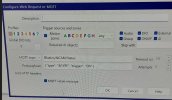
Well I got MQTT all set up on both Home Assistant and Blue Iris. I can see all my cams now in Home Assistant. The problem is I can't seem to get motion detection notifications to pass from Blue Iris to Home assistant. Looking at my screen shot, this is how I have it set up in BI.
MQTT.jpg
 
  • Like
Reactions: Flintstone61
I just installed MQTT explorer and I am indeed getting the correct info from Blue Iris into Home Assistant. I'm using my CAM 4 as a test cam trying to get this set up.QT.jpg
 
Finally got this thing working........pot of coffee later!!

I had to change the payload that I showed in the pic above. I replaced "&TYPE" with "Motion" and I'm now showing motion alerts in Home assistant. I set up a test automation in HA that when my office cam detects motion it turns on the bedroom light. Worked like a charm!!