No doubt something that has been asked many times before.
What is more important for BI, CPU clock speed or CPU cores? I understand that BI can make good use of multiple cores, but what is the minimum required single-core clock for streaming to UI3 etc etc without issues?
Currently, I have a BI VM with 4 cores of E5-1630 v3 Xeon at 3.7 GHz. I have 19 cameras added currently, ranging between 2-5MP, most of them are recording continuously bar about 6 of them, and only 2 have motion detection enabled in BI.
With sub streams enabled, Blue Iris reports a load of 88.4 MP/s. I am not 100% sure what this load represents though, because BI has direct-to-disk enabled for recording, and firing up UI3 doesn't seem to affect the figure at all.
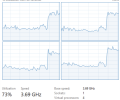
Like this, with the local console closed, and no UI3 connections open, the CPU on the machine (which is a VM) sits at around 32-40%. Processing 1x 4MP stream (E.G viewing timeline in UI3) pushes it to the 70-80% range if I remember right.
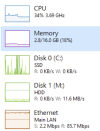
Firstly, does this CPU load sound about right for the number of cameras in BI? I think I have followed most of the CPU Optimizing steps, but I wanted to make sure I haven't overlooked anything.
And then, because the BI machine is a VM on a hypervisor, I was wondering about upgrading my CPU to something like a Xeon E5-2667V3 - this would give more cores, useful for other VM's etc, however it has a base clock of 3.2 GHz - 0.5 less than the current CPU.
Is this going to cause performance issues for BI? If I have more CPU cores in total, I can probably afford to assign more than 4 cores to the BI VM, giving it a bit more compute, but of course at a slightly lower single-core clock.
Would appreciate any advice.
What is more important for BI, CPU clock speed or CPU cores? I understand that BI can make good use of multiple cores, but what is the minimum required single-core clock for streaming to UI3 etc etc without issues?
Currently, I have a BI VM with 4 cores of E5-1630 v3 Xeon at 3.7 GHz. I have 19 cameras added currently, ranging between 2-5MP, most of them are recording continuously bar about 6 of them, and only 2 have motion detection enabled in BI.
With sub streams enabled, Blue Iris reports a load of 88.4 MP/s. I am not 100% sure what this load represents though, because BI has direct-to-disk enabled for recording, and firing up UI3 doesn't seem to affect the figure at all.
Like this, with the local console closed, and no UI3 connections open, the CPU on the machine (which is a VM) sits at around 32-40%. Processing 1x 4MP stream (E.G viewing timeline in UI3) pushes it to the 70-80% range if I remember right.
Firstly, does this CPU load sound about right for the number of cameras in BI? I think I have followed most of the CPU Optimizing steps, but I wanted to make sure I haven't overlooked anything.
And then, because the BI machine is a VM on a hypervisor, I was wondering about upgrading my CPU to something like a Xeon E5-2667V3 - this would give more cores, useful for other VM's etc, however it has a base clock of 3.2 GHz - 0.5 less than the current CPU.
Is this going to cause performance issues for BI? If I have more CPU cores in total, I can probably afford to assign more than 4 cores to the BI VM, giving it a bit more compute, but of course at a slightly lower single-core clock.
Would appreciate any advice.