BI6 AI detects object but still reports "nothing found"

CAL7

Getting the hang of it
Nov 26, 2020
74
33
Florida
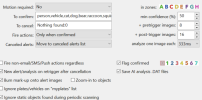
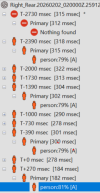
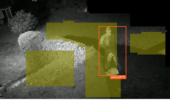
For the most part, the new AI is working well for me. But this one problem befuddles me, here's one example: In the AI Inspector it identifies a person with confidence from 55% to 81% but it still reports "nothing found".
1770044523090.png
1770044567089.png

1770044641890.png
How can it identify the object, e.g. person, and still classify it as a canceled alert? Thanks for any tips on how to tweak or at least diagnose.
 
  • Like
Reactions: ticines
Try clearing the "To cancel:" field, no harm in trying this!
Also not sure why you are putting in the ":0" in that field, I though that was to specify a confidence level for objects founds to override the global confidence setting!
You could also test by just removing the ":0" in that field.
 
  • Like
Reactions: anijet
In the help for the Camera AI settings it says the following:

Labels may also be used to specifically cancel alerts. For an alert to proceed, labels (corresponding to detected objects and faces) must appear in the to confirm box (or that box may be empty), but must not appear in the to cancel box. For example, although you may specify person in the to confirm box, a specific face name in the to cancel box will cancel the alert. You may override the default confidence % for any label by appending a : and a number to the label, for example person:80. Require that an object first appear in a specific zone or zones by adding those following the optional confidence number, for example person:AB for zones A or B, or person:80AB for zones A or B with a confidence of at least 80%.

I suspect that by putting in the exact phrase the the AI uses to report nothing found, you are explicitaly telling it to cancel as soon as nothing is found!