

BI 6.0.2.7 - very odd alert behavior

jrbeddow

Getting comfortable
Oct 26, 2021
527
620
USA
I tried updating BI to 6.0.2.7 (from 6.0.2.6) yesterday, but wound up reverting in about 5-10 minutes as it was acting very odd with the alerts. The version notes indicate that it added "AI object counting", and associated Macros, but little in further explanation or suggestions for how to use this capability.
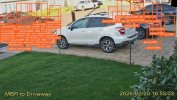
In any case, the first few alerts had a wild overlay of dozens of orange alert boxes overlapping, all indicating a Person, when in fact the triggering object was a car. It also had crazy high confidence on the detections, fully 100% across the board, something I have never seen before.

Did anyone else see similar behavior, or is this something unique to my setup? I'm not complaining, I'm well aware of the dangers of running the latest Betas, and had no problem reverting, just curious.@1409146518856297.jpeg
 
No, mine seems to be fine. Out of curiosity did you get this with periodic scan enabled?
Yes, I had enabled periodic scanning (and checked the box to "ignore static objects detected during periodic scanning" ) a day or two prior, in an effort to cut down on other false detections of truly static vehicles shown as moving. I seem to have fixed that with this combination, but apparently can't use this very latest update.
 
Oddly, I reinstalled 6.0.2.7 today, but this time I did an immediate reboot following the installation and all seems normal this time around. One-off fluke on Friday I suppose.
 
  • Like
Reactions: Bruce_H
Oddly, I reinstalled 6.0.2.7 today, but this time I did an immediate reboot following the installation and all seems normal this time around. One-off fluke on Friday I suppose.
By no means do I reboot pc after every update, but I have seen this kind of behavior many times and a reboot will fix it. So, what's a beta tester to do? Reboot if it acts goofy :lol:
BTW 6.0.2.7 has been running very good for me.
 
  • Like
Reactions: jrbeddow
By no means do I reboot pc after every update, but I have seen this kind of behavior many times and a reboot will fix it. So, what's a beta tester to do? Reboot if it acts goofy :lol:
BTW 6.0.2.7 has been running very good for me.
Very strange that a reboot has any effect when the update restarts the whole BI service, and you clearly see all BI processes briefly disappear and all the RAM and GPU ram freed up. You'd assume everything would be flushed, I wonder if there is something to this, maybe an odd temp file or something not fully flushing from ram, pfft you have to love Windows and it's need for reboots :lmao:
 
  • Like
Reactions: jrbeddow
Very strange that a reboot has any effect when the update restarts the whole BI service, and you clearly see all BI processes briefly disappear and all the RAM and GPU ram freed up. You'd assume everything would be flushed, I wonder if there is something to this, maybe an odd temp file or something not fully flushing from ram, pfft you have to love Windows and it's need for reboots :lmao:

Kinda like how many of us have the 3 factory reset method when updating camera firmware LOL
 
  • Like
Reactions: jrbeddow
Very strange that a reboot has any effect when the update restarts the whole BI service, and you clearly see all BI processes briefly disappear and all the RAM and GPU ram freed up. You'd assume everything would be flushed, I wonder if there is something to this, maybe an odd temp file or something not fully flushing from ram, pfft you have to love Windows and it's need for reboots :lmao:
I fully agree: a reboot shouldn't have been necessary (for all the reasons you mentioned), and yet...somehow...I had different results entirely after a reboot.