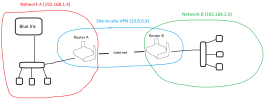
Hey, loooong time lurker here. Searched for this but couldn't find it.
First off, thank you all for contributing to this forum. I've learned so much here and love my BI system. I have 5 5442 cams around the house with an Asus router running OpenVPN . This forum has helped me dial it all in even though I am a noob in so many ways still. I know enough to be dangerous and screw things up regularly when I tinker (sad but true). No way could I have done this without the generous comments, suggestions and ideas from this community.
We have a condo near the grandkids where I installed a travel router (GL.inet) so I could stream my cable feed and not buy another subscription. So far so good. I thought I could just plug a camera into it and it would be seen on my home network (I mentioned I'm a noob) and I could add it to BI. WRONG. It seems I have to adjust my settings on the home router's OpenVPN setup and the travel router to allow traffic flow both ways. Haven't gotten to do the travel router as it's a few hours away.
Here's my confusion. Once I do enable 2 way traffic on the travel router, I add the camera on the travel router network if I understand correctly? What should that look like? The "native" address is 192.168.8.1 which I used to make it an OpenVPN client. Will it be 192.168.8.xxx? I'd like to get this straight so I can dial it in the next time I go. I bought a 54PRO cam from Andy and am anxious to install.
Thanks for any help you can provide...
First off, thank you all for contributing to this forum. I've learned so much here and love my BI system. I have 5 5442 cams around the house with an Asus router running OpenVPN . This forum has helped me dial it all in even though I am a noob in so many ways still. I know enough to be dangerous and screw things up regularly when I tinker (sad but true). No way could I have done this without the generous comments, suggestions and ideas from this community.
We have a condo near the grandkids where I installed a travel router (GL.inet) so I could stream my cable feed and not buy another subscription. So far so good. I thought I could just plug a camera into it and it would be seen on my home network (I mentioned I'm a noob) and I could add it to BI. WRONG. It seems I have to adjust my settings on the home router's OpenVPN setup and the travel router to allow traffic flow both ways. Haven't gotten to do the travel router as it's a few hours away.
Here's my confusion. Once I do enable 2 way traffic on the travel router, I add the camera on the travel router network if I understand correctly? What should that look like? The "native" address is 192.168.8.1 which I used to make it an OpenVPN client. Will it be 192.168.8.xxx? I'd like to get this straight so I can dial it in the next time I go. I bought a 54PRO cam from Andy and am anxious to install.
Thanks for any help you can provide...