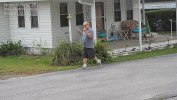
Another new OWL VIEW Camera Comparison

Andykev

Getting the hang of it
Jun 21, 2021
70
38
SF Bay Area
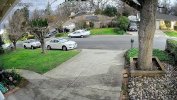
I just replaced my IR 4MP Uniview with a Uniview 4MP Owl View WISE camera. The IPC2B14SE-ADF28K-WP-I1 captures video up to a resolution of 4MP @ 30 fps, which is 2688 x 1520 pixels.
The price was $359, which I found on a website and sold by a Security Company in Los Angeles. I have seen this model selling elsewhere for $699, as it has the "AI" enhanced 1.8 sensor.
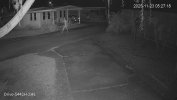
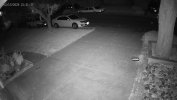
Anyway.... here are the side by side. Taken one night apart at 9:20 pm or so. The new Owl View has a wider field of view both H and V. Our street is very dark, with one street light about 90 feet to the right, and another street lighe about 250 feet to the left. The sky was overcast so there was a bit more ambient light reflected. With a full moon, the video is almost as good as full daylight.

The audio on the Owl view is significantly better than my UNV 4mp IR camera (UNV-2124SB-ADF28KM). The only down side is the Owl View is easily twice as big, if not a bit more. The camera has no IR lights, but does have "white light" which adjusts automatically if you enable it. I do not think I will need to activate this due to the available light on the street. I have the "non IA" version of the OWL VIEW in my backyard, and that does use the white light when the sky or moon are not providing enough reflective light.
 

Attachments

  • UNIVIEW Front Yard 2026-02-13 10.05.21.239 PM.jpg
    UNIVIEW Front Yard 2026-02-13 10.05.21.239 PM.jpg
    423.6 KB · Views: 25
  • UNIVIEW Front Yard 2026-02-14 09.17.41.493 PM.jpg
    UNIVIEW Front Yard 2026-02-14 09.17.41.493 PM.jpg
    1.3 MB · Views: 25
I was going to say I only see a night time and day time photo. lol Whats motion look like though? Any video of that?
 
The motion settings I may need to tweak as I just installed the camera (plus drilled new holes for the mounting box) this evening. I probably need to set the frame rate and FPS etc.
But I will play with that tomorrow. With the IR camera, (that I just removed) there was hardly any detail on persons walking down the street, and they needed to be pretty much in front of the driveway. Also the IR camera hardly gave a decent image of the pickup truck, and anything beyond that was impossible to see.
 

Attachments

The motion settings I may need to tweak as I just installed the camera (plus drilled new holes for the mounting box) this evening. I probably need to set the frame rate and FPS etc.
But I will play with that tomorrow. With the IR camera, (that I just removed) there was hardly any detail on persons walking down the street, and they needed to be pretty much in front of the driveway. Also the IR camera hardly gave a decent image of the pickup truck, and anything beyond that was impossible to see.


Its a shitty image.

Why you say?
Because you can make almost ANY camera be bright at night with Auto type settings and a very slow shutter

Look at the people. Stop the video and tell me what you see?
Colors? Yes, any ID detail? No. Fuzzy motion blur blob.

This is a well known trick played on those who don't know any better.

Show a video of a vehicle well after dark, say 10pm or later, driving normally. or people walking closer to the camera

If that's all the quality level you need, then sure, but you can spend far less to get the same.
 
Last edited:
  • Haha
Reactions: Arjun
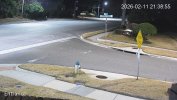
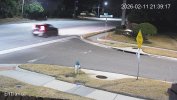
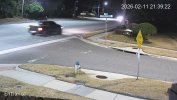
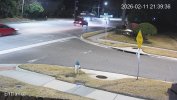
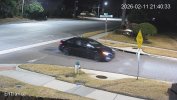
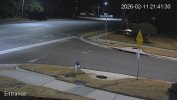
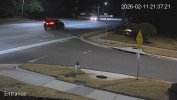
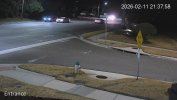
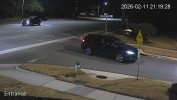
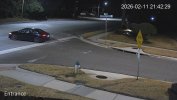
While less dramatic in "brightness", this is an example of Auto setting exposure vs a dialed in exposure and other settings

"Auto" on most Dahua and other brand cameras is a 1/30 exposure. Thety can be made even "Brighter" by reducing this to 1/15, 1/10 or even slower exposure.
The result is a bright but practically useless image for ID.

Again if your only requirement is that its "bright" and seeing color, thats fine.


Example using the Dahua 5442 series.


Auto settings to brighten the image

HOAEntrP2P_Entrance_main_20260211213858_@2.jpgHOAEntrP2P_Entrance_main_20260211213920_@2.jpg HOAEntrP2P_Entrance_main_20260211213924_@2.jpg HOAEntrP2P_Entrance_main_20260211213939_@2.jpg HOAEntrP2P_Entrance_main_20260211214033_@2.jpg


Manual 1/120 exposure and other various settings adjusted to provide more clear images with little motion blur

HOAEntrP2P_Entrance_main_20260211214132_@2.jpg HOAEntrP2P_Entrance_main_20260211213724_@2.jpg HOAEntrP2P_Entrance_main_20260211213801_@2.jpgHOAEntrP2P_Entrance_main_19691231190000_@2.jpgHOAEntrP2P_Entrance_main_20260211214229_@2.jpg
 
  • Like
Reactions: Arjun
Once again, you can't go wrong with the cheaper Dahua 5442 series. I'm not even getting paid to promote Andy's cameras because the proof is already present. The 5442 camera is a solid performer and performs beautifully 24/7.
 
While less dramatic in "brightness", this is an example of Auto setting exposure vs a dialed in exposure and other settings

"Auto" on most Dahua and other brand cameras is a 1/30 exposure. Thety can be made even "Brighter" by reducing this to 1/15, 1/10 or even slower exposure.
The result is a bright but practically useless image for ID.

Again if your only requirement is that its "bright" and seeing color, thats fine.


Example using the Dahua 5442 series.


Auto settings to brighten the image

View attachment 238226View attachment 238227 View attachment 238228 View attachment 238229 View attachment 238230


Manual 1/120 exposure and other various settings adjusted to provide more clear images with little motion blur

View attachment 238222 View attachment 238220 View attachment 238221View attachment 238219View attachment 238223

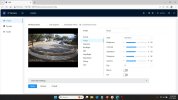
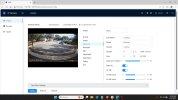
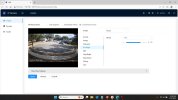
I am NEW to using BI and installing cameras. What I am looking for is a suggestion on SETTINGS which are many on the camera to offer good night vision and smooth as possible clarity for motion.

The camera, I just put it up and it has it's "factory" out of the box settings. What do you suggest other than a critical of Uniview vs Dahu.
 
Last edited:
I’m not condemning the camera. They may be just as good or better than Dahua. I haven’t played with one.

The point is that most folks think “brighter” is better and if you don’t care about moving image quality it is!

Each scene and camera settings is different. Each camera sensor and model SOC is different. I have 11 cams at my home and dozens of others I manage and while there are similarities, I’d say there aren’t more than 2 with the same nighttime settings

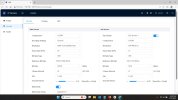
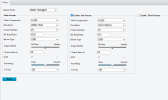
Give me a minute and I’ll gladly give you nighttime settings to get you in the ballpark.

Just be aware that they’ll be darker. You may or may not be able to run in color vs B&W with or without IR when you increase exposure and decrease NR to a point of getting clean moving objects. As exposure is increased, less light reaches the sensor.

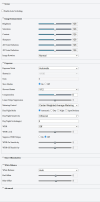
Start with manual 1/60 exposure, if you can get to 1/120 even better.

 
These may get you in the neighborhood
I chose a camera that has good ambient light from a streetlight and homes
That camera has a 1/1/8" sensor so should be reasonably comparable to a Dahua 5442

Note I run this in color 24/7 but have very different settings for night and day.
During the day I can run 0-3ms or about 1/375 seconds

8.33ms is about 1/120 seconds

If thats wayy too dark, back off to 1/60 or about 0-12.66ms

Note I run HLC for backlight due to cars shining headlights right at the camera. You shouldnt need it.
In most cases you're better off not running any type of Backlight


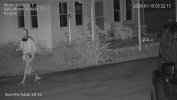
night1.jpg night2.jpg night3.jpg night4.jpg


I probably need to back off sharpness a bit as I just replaced that one a few weeks ago, and the lens cover needs cleaned, but you get the idea.
The fuzzies from the headlights are a combination of a dirty lens cover and the HLC dimming the lights

View attachment HOARearP2P_ch2_20260209202052_20260209202113.mp4
 
Last edited:
Very much appreciate the help. I have been using the IR camera for past 3 years. The new to me Owl view have excellent daytime image and motion. Night with the IR cam is obviously limited in "range" due to the light from the IR. But the motion was much sharper. The color Owl View is quite good especially on full moon nights. Using the camera's "white light" also greatly improves motion but the tradeoff is having the light on, similar to having a small flashlight. I prefer the camera not "call attention to itself" at night, but some could argue it is a detereent. A commercial area vs residential, I prefer being unnoticed.

I will try to adjust settings to see if the motion can be smoothed. The street light and some lights from neighbor's houses seem sufficient and the "white light" on the camera never activated. This is day two of the camera being installed so I'm just getting started. Thanks again.
 
  • Like
Reactions: bigredfish
The other trap you're in is distance vs lens.

Thats a wide angle lens. I'm guessing 2.8mm or 3.6mm or a variable focus set to be wide angle.

Physics says you can only see so much detail at so much distance.

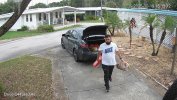
If you really want good ID at the street, you need a 2nd camera. We see this time and time again. Trying to do too much with one camera


Its 55ft to the center of the street, 60ft to the far side
One camera is to keep watch over the Jeep thats normally in the driveway, the 2nd camera is for ID on the street

192.168.1.110_Drive-5442H-ZHE_main_20251123052718_@1.jpg 192.168.1.110_Drive-5442H-ZHE_main_20251019151512_@1.jpg


192.168.1.110_StreetW-5442-Z4-S3_main_20260110032213_@1.jpg 192.168.1.110_StreetW-5442-Z4-S3_main_20251227135155_@1.jpg
 
IPC2B14SE-ADF28(40)K-WP-I1
4MP WDR OwlView Plus Bullet Network Camera
• High quality image with 4 MP, 1/1.8" CMOS sensor
• 4 MP (2688 × 1520)@30/25 (default) fps; 4 MP (2560 × 1440)@30/25 fps; 3 MP (2304 × 1296)@30/25 fps; 1080P (1920 × 1080)@30/25 fps
• Ultra 265, H.265, H.264, MJPEG
• ColorHunter with Wise-ISP technology ensures 24-hour full-color images
• Intelligent perimeter protection, including cross line, intrusion, enter area, leave area detection
• Based on target classification, smart intrusion prevention significantly reduces false alarm caused by leaves, birds and lights, accurately focusing on human, motor vehicle and non-motor vehicle
• Intelligent people flow counting and crowd density monitoring
• Smart intrusion prevention with color retrieval
• ASM (auto scene match)
• 130 dB true WDR technology enables clear image in strong light scene
• Supports 9:16 corridor mode
• Alarm I/O: 1/1, audio I/O: 1/1, built-in mic
• White light, up to 40 m (131.2 ft) warm light distance
• MicroSD, up to 512 GB
• Supports NEMA 4X, IK10 vandal resistant and IP67 protection


IPC2B14SE-ADF28K-WP-I1 - Uniview - Leader of AIoT Solution
 
  • Like
Reactions: bigredfish
IPC2B14SE-ADF28(40)K-WP-I1
4MP WDR OwlView Plus Bullet Network Camera
• High quality image with 4 MP, 1/1.8" CMOS sensor
• 4 MP (2688 × 1520)@30/25 (default) fps; 4 MP (2560 × 1440)@30/25 fps; 3 MP (2304 × 1296)@30/25 fps; 1080P (1920 × 1080)@30/25 fps
• Ultra 265, H.265, H.264, MJPEG
• ColorHunter with Wise-ISP technology ensures 24-hour full-color images
• Intelligent perimeter protection, including cross line, intrusion, enter area, leave area detection
• Based on target classification, smart intrusion prevention significantly reduces false alarm caused by leaves, birds and lights, accurately focusing on human, motor vehicle and non-motor vehicle
• Intelligent people flow counting and crowd density monitoring
• Smart intrusion prevention with color retrieval
• ASM (auto scene match)
• 130 dB true WDR technology enables clear image in strong light scene
• Supports 9:16 corridor mode
• Alarm I/O: 1/1, audio I/O: 1/1, built-in mic
• White light, up to 40 m (131.2 ft) warm light distance
• MicroSD, up to 512 GB
• Supports NEMA 4X, IK10 vandal resistant and IP67 protection


IPC2B14SE-ADF28K-WP-I1 - Uniview - Leader of AIoT Solution

Should perform close to a 5442
I’d be interested in seeing how it does once you dial it in .