
6.0.3.6 New Logfile Entries
- Thread starter jaydeel
- Start date
You are using an out of date browser. It may not display this or other websites correctly.
You should upgrade or use an alternative browser.
You should upgrade or use an alternative browser.



Techie007L
n3wb
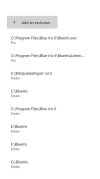
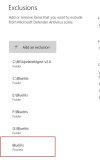
@Tinman Delete your two File exemptions (the top two entries) from there, and create a new Process exemption for BlueIris.exe. Exempting the BlueIris.exe file itself from scanning is not the same thing as exempting the actions of the BlueIris.exe process from scanning. Also, your file exemption is redundant because you already have the whole program folder exempted.

well thanks, never knew there was a process exclusion. So I changed it but error still is popping up.@Tinman Delete your two File exemptions (the top two entries) from there, and create a new Process exemption for BlueIris.exe. Exempting the BlueIris.exe file itself from scanning is not the same thing as exempting the actions of the BlueIris.exe process from scanning. Also, your file exemption is redundant because you already have the whole program folder exempted.
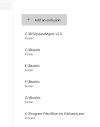
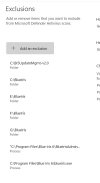
I'm wondering if its due to my not default location. The installer gave me the option to specify location when I installed BI6, so wouldn't think that would be a issue.

Techie007L
n3wb
You could try to rule that out quickly by creating a new folder in Program Files named "Blue Iris", copying the "BlueIris.exe" file over to it, and creating a process exception for the copied file. If the message stops appearing on Blue Iris startup, that would confirm it's looking for a hardcoded exception path.

IAmATeaf
Known around here
IAmATeaf
Known around here
My BI demo i use for testing worked perfect first time I added Blueiris.exe as a process exclusion. I am still having issue with my main install, I have just about tried everything and reboots as well, still get error. I will keep digging.Try with just the exe name and not the full path, code could be simply comparing against Blueiris.exe ?
BTW, my demo location is same as main machine, so that is not the issue. Stumped for now.

Last edited:
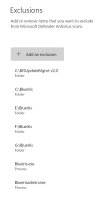
Update: Finally got it fixed. I had entered so many things, I just removed the whole exclusion list and started over. It worked!
Some notes:
You must enter Blueiris.exe as a process rule (yes we had used file rules for years, but not anymore)
Ken said it also wouldn't hurt to add blueirisadmin.exe as well.
Off to test 6.0.3.8
Some notes:
You must enter Blueiris.exe as a process rule (yes we had used file rules for years, but not anymore)
Ken said it also wouldn't hurt to add blueirisadmin.exe as well.
Off to test 6.0.3.8
Last edited:
I missed this too. I just checked my archive of old Help PDFs. The guidance has been there since 5.3.9.0 (1/31/2021)You must enter Blueiris.exe as a process rule (yes we had used file rules for years, but not anymore)

Last edited:
