

Blue Iris server local view laggy
- Thread starter Tyler Burridge
- Start date
You are using an out of date browser. It may not display this or other websites correctly.
You should upgrade or use an alternative browser.
You should upgrade or use an alternative browser.


Hi Tony, thank you I have all the optimized settings and my buffer is 20mb but my local view is still choppy

Every time I've been relegated to Evaluation mode maybe 4-5 times for one reason or another, I see how gimped the software is.
It doesn't behave that way in my experience on the paid versions/
It doesn't behave that way in my experience on the paid versions/
Of course if im wrong , ( could be)
then we'd need to know
what hardware is doing what on the system.
usually recommend an SSD drive for C:\
and large capacity 3.5" Hard drive for streaming from the cameras.
then we'd need to know
what hardware is doing what on the system.
usually recommend an SSD drive for C:\
and large capacity 3.5" Hard drive for streaming from the cameras.
people running windows and BI and DataBase, and the "new" folder (BI default storage folder) on the same drive.
can experience lag retrieving/scrubbing thru video
can experience lag retrieving/scrubbing thru video

Doesn't matter if it is an SSD (they're fast enough).people running windows and BI and DataBase, and the "new" folder (BI default storage folder) on the same drive.
can experience lag retrieving/scrubbing thru video
Doesn't matter much if it is an HDD (they're just laggy).

I've currently got Blue Iris installed for evaluation and its been perfect for my requirements, however on the local camera view, its choppy and refreshes every 5 seconds, whereas on UI3 the live playback is flawless. have I missed anything
Thank you!
BI Settings > Cameras tab.
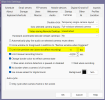

I see. my UI3 usage and experience is entry level, and I 'm using it more and more.
I've been handing out the LAN address to the girls that stay home alone with Grandma so they can get a look around the property on their phones.
It's pretty handy that way.
I haven't had lag on my system local or remote thankfully. Except when i built my 1st BI machine on version 5.0 w no substreams and learned the limitation of an SMR drive in heavy multitasking on a 3rd generation intel chip.
I've been handing out the LAN address to the girls that stay home alone with Grandma so they can get a look around the property on their phones.
It's pretty handy that way.
I haven't had lag on my system local or remote thankfully. Except when i built my 1st BI machine on version 5.0 w no substreams and learned the limitation of an SMR drive in heavy multitasking on a 3rd generation intel chip.
Last edited: