

Folks,
I have no idea what's going on - tried doing some searching through these forums and through Chat GPT without luck...
Basic problem - I'm getting motion triggering the AI review - and when I put the .dat file through the AI Inspector, I see that it's ID'd a person and even a face with a high enough probability, but it's not displaying as an alert.
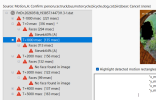
You can see the AI inspector output below. The issue seems to be that something is erroring out (I assume - due to the red triangle with the exclamation point).
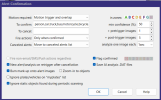
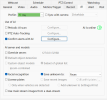
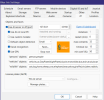
The settings for Alert Confirmation and AI are also shown below. From what I can see, everything should be working fine, but it's not.
I'm thinking of changing the "To Confirm" to look at all models instead of the specified set, since I have plenty of headroom on the server, but I'm not even certain that leaving that field blank, or using a * will do that.
Does anyone have any idea what might be going on?
Cheers,
SK
I have no idea what's going on - tried doing some searching through these forums and through Chat GPT without luck...
Basic problem - I'm getting motion triggering the AI review - and when I put the .dat file through the AI Inspector, I see that it's ID'd a person and even a face with a high enough probability, but it's not displaying as an alert.
You can see the AI inspector output below. The issue seems to be that something is erroring out (I assume - due to the red triangle with the exclamation point).
The settings for Alert Confirmation and AI are also shown below. From what I can see, everything should be working fine, but it's not.
I'm thinking of changing the "To Confirm" to look at all models instead of the specified set, since I have plenty of headroom on the server, but I'm not even certain that leaving that field blank, or using a * will do that.
Does anyone have any idea what might be going on?
Cheers,
SK

 .
.

