DO NOT UPDATE DS-2DE4A425IW-DE

I don't meane transfer, but use the same settings, but i don't know or the Menu is the same. it cost a lot of time to set all the settings that everything is perfect (daily and night).

The settings for the cameras are similar... it really doesn't take too much time to run though/set all the settings on the new camera and I don't think there is an alternative.
 
De instellingen voor de camera's zijn vergelijkbaar. Het kost echt niet zoveel tijd om alle instellingen op de nieuwe camera in te stellen. Ik denk niet dat er een alternatief is.
Dank je wel voor je reactie !

Ik ben er ook achter waar het verschil zit in de software die ik in 2021 op de camera had en de huidige instellingen (2025).
Ik had namelijk printscreens gemaakt en die heb ik nu vergeleken met de huidige instellingen en wat zie ik:
In het Menu onder Video- en Audio stond in 2021 nog de mogelijkheid om ROI te stellen.
Deze ROI is nu helemaal verdwenen in de camera.
Onder de ROI kon ik in 2021 'Beweging tracken' aanvinken en dan 'gezicht volgen' aanvinken en daaronder 'doel volgen inschakelen' aanvinken.
Dit was dus een extra optie die werd aangezet om naast de al onder PTZ in het menu te staan (Slimme tracking) die je ook kan en kon inschakelen.
Maar in de huidige software is dat Slimme tracking aanzetten dus geen werking terwijl dat in 2021 effectief samenwerkte met dat wat onder ROI stond.
 
Toch een correctie op mijn bericht hierboven: ik kwam er via AI(handig hoor) achter dat Smart Tracking niet goed werkt als je de camera op H.265+ zet. En vooral dat + maakt het dat het niet goed zou werken.
Nu heb ik de camera dus op gewoon H.265 gezet (zonder +) en nu is ROI (wat ik hierboven beschreef dat verdwenen was) weer terug.
Echter... helaas werkt de Smart Tracking nog steeds niet.

Als software heb ik: V.5.6.0

Werkt de H.265+ wel op die nieuwe camera (de opvolger) samen met Smart Tracking?
 
Last edited:
I have a ds-2de4a425IWG-E camera. I don't see the auto tracking option. I updated the firmware. That didn't help. Do I need to install different firmware?


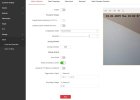
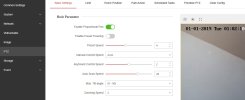
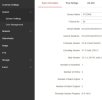
cam2.jpgcam1.jpgcam00.jpg
 
Last edited:
I have a ds-2de4a425IWG-E camera. I don't see the auto tracking option.

Hi @trempek ...

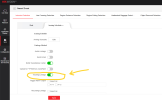
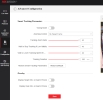
I have the same camera... "Smart Tracking" is set in the VCA menus... you need to configure a "Smart Event" and turn on "Tracking Linkage" for that event...


Screenshot 2026-05-05 082658.png


"Smart Tracking Parameters" can be set in the "Advanced Configuration" menu....


Screenshot 2026-05-05 082632.png


Screenshot 2026-05-05 082534.png


It works reasonably well... start there and let me know if you have questions!
 
  • Like
Reactions: trempek
Also, a little more info on smart tracking in a post I made earlier in this thread (back in May 2025)...

I have the camera schedule set to always patrol:

View attachment 221645


The patrol sends the camera to two different presets every 15 seconds... at each preset I have an intrusion detection event setup for "human" with "Tracking Linkage" enabled:

View attachment 221646 View attachment 221647


Here are the "Advanced Configuration" settings I use:

View attachment 221648


I would prefer to use my NVR settings to use 2 of my other stationary cameras to send the PTZ to the presets (rather than scheduled patrol):

View attachment 221649

BUT, when the PTZ arrives at the preset there is a 5 second delay before the intrusion detection event for that preset is activated... when the patrol sends the PTZ to each preset, the intrusion detection event is activated immediately.

If any of this isn't clear or helpful, let me know and I will reply again :)
 
  • Like
Reactions: trempek
I remember a couple years ago there was a batch of PTZ's that had issues. The issues were with the servos prematurely going out. Also what I would assume was code optimization of the firmware was not too great. The firmware part was back when Hikvision got banned due to NDAA and had to use a different chipset. During that time the software seemed to have a lot of glitches. There were issues with auto tracking to where it won't track like it should. It would even do a left/right swaying motions which was weird. For the servo part I would see the camera running through a patrol/pattern/auto tracking and in the middle of the movement the ptz would suddenly drop down like the servo died. It's like the PTZ had sleep apnea or something. It didn't need a reboot to "wake" it up. It would run through the motions by itself and drop again. Due to such, Hikvision came out with the firmware to upgrade the cameras as a "fix" but actually removed the auto tracking. I don't remember a new firmware that brought it back as it was a hardware issue. When they released the new model/update the auto tracking feature was back.
 
  • Like
Reactions: johnfitz