Soliciting Suggestions For A Better Or Simpler Surveillance Network Design

XrayDoc88

Getting the hang of it
Dec 15, 2017
135
31
United States
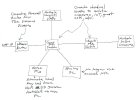
I set up a home network with multiple Dahua cameras many years ago. At the time it was emphasized that I shouldn't allow my cameras to have internet access. I've drawn a diagram of what I created. It required two POE switches and a dedicated Blue Iris computer with two ethernet connections. I used a Ubiquiti Cloud Key to access my Ubiquiti WAPs on my main subnet. I then installed the UniFi Network application on my Blue Iris computer. That software allowed me access to my one Ubiquiti switch located on my second subnet. I would use remote desktop to reach the Blue Iris computer to use the UniFi software.

This has worked well, but things got messy when I updated the UniFi Network application to the Unifi OS Server. It has "overtaken" my Cloud Key which no longer controls my WAPs. My Ubiquiti switch is no longer adopted. Anyway, I'm considering revising my network design, possibly using VLANs instead of the double NIC approach. I would love some advice on how other members have setup their home networks and kept their cameras isolated from the internet.Home Network For Surveillance System.jpg
 
  • Like
Reactions: mat200
My setup is identical to yours to the right of your cisco switch (except for the vlan ip addresses). This is the correct way to set up your cams so they dont have internet access or access to your home network.

I would not change this setup.

I also have a pfsense device as my router and firewall like you.

Not sure why you didnt just run Unifi network application from the cloud key... why split it up? If you can no longer adopt your APs then there might be a routing issue going through that Cisco switch. Im not familiar with cisco switches. Or maybe Unifi OS server is bound to the wrong NIC on your blue iris computer?
 
I didn't actually setup any VLANs in the switches. I just set a static IP of 192.168.2.X for one Blue Iris NIC and 192.168.3.X for the second NIC. My cloud key could only see the WAPs that were on the 2.x subnet. That's why I installed the Network software on the Blue Iris computer. That software could then access the Ubiquiti switch for firmware updates, setting the static IP, etc. Was there another way for the cloud key to reach two different subnets?
 
I mispoke when I said my network was the same. It is not actually. You have your Unifi switch separated from your cisco switch with the BI computer in between. This is a bad design actually. You need to setup VLANS and have the switches directly connected. Unifi can't access both the .2 and .3 networks I think

I would definitely redo your network and add VLANs. One way to set it up is to have the untagged VLAN as your management VLAN so it can access everything and put all your unifi hardware on there. This is how I do it. I have the cloud key on there also for management software no issues. No issues adopting new devices. I also have IOT and Guest VLAN in addition to IPCAM VLAN.

Setting up VLANs in Unifi and pfsense isnt too bad. Once you get your VLANs you can create all the firewall rules you want to customize your network
 
You have your Unifi switch separated from your cisco switch with the BI computer in between. This is a bad design actually.
I'm just curious....in what way is it a "bad design"? :cool:
 
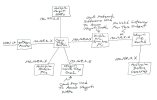
I've been reading about using VLANs instead of my Blue Iris double NIC solution. I've never setup VLANs, but I think I understand it and could do it. I need to use both of my current switches because of the number of ports required in my home. Both of my switches are considered "smart" switches. From my research, they will drop VLAN tags unless VLANs are stored on each switch individually. I guess this doubles my work, but I believe the network should still function properly. Also, the release of UniFi OS Server software has cancelled the continued requirement of a Cloud Key Gen 2 device to access Ubiquiti products. Please look at my revised network diagram below and comment if you think it's good or could still be better. Thanks!

Home Network For Surveillance System (Revised).jpg
 

Attachments

  • Home Network For Surveillance System (Revised).jpg
    Home Network For Surveillance System (Revised).jpg
    159.4 KB · Views: 1
You should keep the double NIC on Blue Iris and make sure the NIC with no gateway is the IPcam VLAN. That way your Dahaua cameras will not have access to your network or the internet

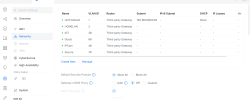
In Unifi when you enable VLANs, you must have a default VLAN 1 that will be untagged. This can not be changed. Give that whatever subnet you want to use. That VLAN will not be configured in pfsense.

The rest of the VLANs will need to be created in pfsense then added to Unifi as third party gateways.

My subnet addresses more or less match the VLAN ID to make it easy to remember... so IOT is 192.168.30.0/24 and so on

vlans.png
 
But in my original diagram I couldn't access my Ubiquiti Switch on the different subnet using the cloud key. Having the original UniFi Network application on the BI computer solved that problem. Since I upgraded from the network application to the UniFi OS Server software however, I can no longer access the switch, even from the BI computer. I can ping it, but I have been unable to change the IP address. I don't know if I can find the older software and revert to that and if that would solve my issue again.