Remote access issue with BI 6

AGI

n3wb
Oct 26, 2018
3
0
Luxembourg
Since I upgraded my Blue Iris from v5 to v6, remote access works for a couple of hours after having (re-)started the PC (or having restarted the service (I run BI as a service)), but then stops working.

Rolling back to v6.0.2.10 doesn't solve the problem.

The Windows Defender Firewall allows inbound traffic for "C:\program files\blue iris\blueiris.exe" on all TCP and UDP ports for domain, private and public networks.

Remote access is configured via a Traefik reverse proxy (that worked without issues with v5), forwarding traffic from to my BI PC on .

Remote access to other sites proxied via Traefik is working fine.

The following restrictions are configured in Traefik:

Code:
default-headers:
      headers:
        frameDeny: true
        browserXssFilter: true
        contentTypeNosniff: true
        forceSTSHeader: true
        stsIncludeSubdomains: true
        stsPreload: true
        stsSeconds: 15552000
        customFrameOptionsValue: SAMEORIGIN
        customRequestHeaders:
          X-Forwarded-Proto: https

Is one of those perhaps too strict with v6 ?

Otherwise I'll just have to roll back to v5 ... :idk:
 
@AGI Check your Blue Iris log file for clues as to why it stops working. Since you're using a reverse proxy in front of Blue Iris, you may want to add its IP in Blue Iris's "Limit access by IP address" box as always allowed (e.g. +127.0.0.1).
 
@Techie007L didn't really explain why it is happening. The theory is that you could be getting burned by Blue Iris's new "security" features which automatically ban IP addresses suspected of being unwanted automated traffic. You can search the Blue Iris 6 changelog for the word "ban" to find mentions of the stuff that was added in late February and early March.

It is very poorly documented, but basically, Blue Iris now automatically bans IP addresses that are believed to be sending unwanted traffic.

Blue Iris will ban an IP for:
  • Making a request with an unrecognized or missing User-Agent header. This can be configured in Blue Iris Settings > Web server > Advanced.
  • Requesting certain URLs often requested by vulnerability scanners, but not by legitimate Blue Iris client traffic (like /.env or /cgi-bin). This is not configurable.
  • Possibly other things, I'm not sure. As I said, it is very poorly documented.
If your proxy server is publicly accessible (especially on TCP 80 or 443), then it will be carrying this kind of automated traffic frequently.

Early implementations were highly problematic, banning basically all third-party integrations and reverse proxy servers that happened to carry a web request Blue Iris did not approve of, and not logging things properly.

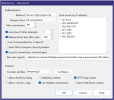
However since about BI 6.0.3.8 (or newer), Blue Iris should not be banning any IP addresses it thinks are "local" or "LAN". We don't know for sure which addresses those are; whether Blue Iris looks at your network interface subnets or uses hard-coded "private address" lists or is IPv6-aware. It is all unknown. To be safe, you should whitelist the addresses your Traefik server might use in Blue Iris Settings > Web server > Advanced > Limit access by IP address, with a preceding plus sign as noted by @Techie007L. If there are any addresses you do not recognize in the "Limit access by IP address" box, delete them. They could have been added by one of the problematic BI versions. You can also empty out the "Ban user-agents" textbox if you want.

I don't really know what the intent was behind these so-called "security" features but it probably had something to do with people finding a bunch of unrecognized addresses in their Blue Iris Status > Connections window and opening support tickets about it. Because these "security" changes do nothing to help with real security threats.

There's also a BI web server advanced setting, "Use X-Forwarded-For, X-Real-IP" which can be helpful if you set it up correctly because it will allow Blue Iris to identify the real client IP address from behind your reverse proxy server(s). But don't enable that checkbox if you don't know how to configure BOTH of those headers in your reverse proxies, otherwise you could actually be opening the door for hackers to easily spoof those headers.
 
@Techie007L @bp2008 Many thanks for your help and insights, this is very useful.

Following your advice, I did the following and it works up till now:

 
Well ... I cheered too soon. I still have the same issue. Remote access works for some time (it may be an hour, sometimes several hours) after having restarted the Blue Iris service and then stops working.

When remote access works, the Blue Iris log shows:

Code:
10    06/05/2026 23:24:40.118    Server                  [::ffff:192.168.99.247]: Connected
10    06/05/2026 23:24:40.192    admin                   [::ffff:192.168.99.247]: Login
10    06/05/2026 23:24:46.700    admin                   [::ffff:192.168.99.247]: Logout, 0:06

192.168.99.247 is the Traefik proxy server.

When remote access doesn't work, I can't find anything in the Blue Iris log.

In Traefik, when remote access works, the access log shows:

Code:
{"ClientAddr":"[IP address]:12044","ClientHost":"[IP address]","ClientPort":"12044","ClientUsername":"-","DownstreamContentSize":2844,"DownstreamStatus":200,"Duration":12658508,"OriginContentSize":2844,"OriginDuration":12302960,"OriginStatus":200,"Overhead":355548,"RequestAddr":"blir.mydomain.com","RequestContentSize":62,"RequestCount":21617,"RequestHost":"blir.mydomain.com","RequestMethod":"POST","RequestPath":"/json?random=1778102336428","RequestPort":"-","RequestProtocol":"HTTP/2.0","RequestScheme":"https","RetryAttempts":0,"RouterName":"blir@file","ServiceAddr":"192.168.178.28","ServiceName":"blir@file","ServiceURL":"https://192.168.178.28","StartLocal":"2026-05-06T23:18:56.97984023+02:00","StartUTC":"2026-05-06T21:18:56.97984023Z","TLSCipher":"TLS_CHACHA20_POLY1305_SHA256","TLSVersion":"1.3","entryPointName":"https","level":"info","msg":"","request_User-Agent":"okhttp/4.9.3","time":"2026-05-06T23:18:56+02:00"}

When remote access doesn't work, the Traefik access log shows:

Code:
{"ClientAddr":"[IP address]:13133","ClientHost":"[IP address]","ClientPort":"13133","ClientUsername":"-","DownstreamContentSize":11,"DownstreamStatus":502,"Duration":1036647095,"OriginContentSize":11,"OriginDuration":1004100700,"OriginStatus":502,"Overhead":32546395,"RequestAddr":"blir.mydomain.com","RequestContentSize":0,"RequestCount":21578,"RequestHost":"blir.mydomain.com","RequestMethod":"POST","RequestPath":"/json?random=1778101849715","RequestPort":"-","RequestProtocol":"HTTP/2.0","RequestScheme":"https","RetryAttempts":0,"RouterName":"blir@file","ServiceAddr":"192.168.178.28","ServiceName":"blir@file","ServiceURL":"https://192.168.178.28","StartLocal":"2026-05-06T23:10:50.407923238+02:00","StartUTC":"2026-05-06T21:10:50.407923238Z","TLSCipher":"TLS_CHACHA20_POLY1305_SHA256","TLSVersion":"1.3","entryPointName":"https","level":"info","msg":"","request_User-Agent":"okhttp/4.9.3","time":"2026-05-06T23:10:51+02:00"}

The 502 code indicates an issue with the Blue Iris webserver, right?