
Other people can stream your feed.

Mar 29, 2026
8
0
E.Devon
I have an IPCAM in a nest box and would love to share the feed with friends but can't get it to work.

When I stream the video using IPCams App it says the stream info is as the below image.
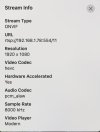
Stream Info.jpeg

On my (Apple) computer, when I paste that URL into the address bar and press enter, it opens the stream in the VLC player bot nobody else can get it to work.

Do I need to do something else to make it work please??
 
Consider doing a youtube livestream. There are also some dedicated IP camera streaming services out there but they charge a subscription fee whereas youtube will let you livestream for free.

Many other solutions are going to involve a much bigger learning curve and potential risks. For example you could forward port 554 through your router to the camera, but then you expose security vulnerabilities in the camera to the internet. Not a good idea because sooner or later the camera would get hacked, and through that, everything on your network is at risk. A little safer would be running software that can proxy the video feed (such as MediaMTX) on a computer in your house (keeping the camera from being accessed directly by the internet) and forwarding the appropriate port or ports to that instead of to the camera. Or you could set up a VPN server for safer remote access, but then everyone who wants to view it needs to connect to your VPN.
 
I agree that the easiest solution is to "live stream" the feed on something like Youtube. This way your local network can be locked down and you don't have to do anything special to give people access to the feed. You can make the stream "private" on Youtube and give out the URL as needed (vs having the URL be publicly searchable/findable). But that's probably overkill for a bird nest camera.

If your NVR/DVR cannot handle something like that natively, you can use a free software called OBS (Open Broadcasters Software) to broadcast the stream on Youtube (or whatever online solution you want).