Hikvision NVR POE not working

ratdude747

n3wb
Apr 23, 2026
7
1
Madison, IN
Trying to get some HikVision DS-7616NXI-K2/16P NVRs to work with some SINIS 5010W28IP POE cameras. A project for work.

I can't get the camera to power up at all on any of the 16 POE ports. But it powers up just fine (and video stream shows on the NVR) I use an external POE injector (TrendNet TPE-113GI) between the camera and NVR. I've tried two of the four NVRs I purchased so far and both fail to power the camera directly. Both have good 52VDC internal power supply busses. Everything is correctly enabled as far as I can tell on the NVR side.

Supposedly everything is 802.11af POE compliant. Did I get a bunch of dud NVRs? Or am I overlooking something? This is my first time working with NVRs.
 
Last edited:
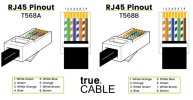
Are you using the same cable(s) when trying the NVR as you are when using the POE injector and if not, do all cables have all 8 conductors and are wired to either T-568A or T-568B spec on BOTH ends?


RJ-45 T-568A and T-568B.jpg
 
  • Like
Reactions: looney2ns
The datasheet from HikVision says it supports both 802.11af and 802.11at.
Are you using the same cable(s) when trying the NVR as you are when using the POE injector and if not, do all cables have all 8 conductors and are wired to either T-568A or T-568B spec on BOTH ends?
Yes. I am using the patch cable included with the camera along with a hand-crimped patch cable I routinely use for connecting to machines at work. Both are Cat5e and crimped to T568B AFAIK (the hand-crimped one is for sure). Currently I am bench testing things.
 
Last edited:
  • Like
Reactions: TonyR
I read this thread:


Pulled the board from one of the units. TVS diode is not shorted. Strike that possibility from the list.

If these weren't "sealed" in package I'd wonder if the Amazon seller was unscrupulously selling some faulty returns (that are currently discontinued). I didn't know they were discontined at the time. Although the currently sold 8K unit is a lot more expensive (All I needed was NVRs with alarm inputs and at least 6 channels, 4K is more than enough for the project at hand).

I'm not sure how easy it is to return/RMA these since it was bought through my employer's purchasing department. Worst case, I have to buy a POE switch and hard-configure the IPs on the cameras (which by default are DHCP, perfectly compatible with the DVR if not for this lack of POE).


^^ Which prompts the questions: are these NVR's 'new' or if not, were they previously working OK?
 
^^ Which prompts the questions: are these NVR's 'new' or if not, were they previously working OK?
They were bought from the RICHSECU store on Amazon. I'd post a link but since this site is affiliated with a vendor, I don't want to run afoul of the rules.

(As for why Amazon, we have Amazon setup as a vendor, which saves us having to BBQ our company credit cards on large purchases).

Supposedly they offer 30-day returns...

Sounds like I need to power up the other two units and see if any of them work (at least to the point of powering up and talking to a camera without an injector).
 
None of the four NVRs would power the camera by itself. And all 4 were marked as "new".

Since my POE injector is an active injector (802.3af compliant), I am safe to presume that this is an HVR issue, not a camera issue?
 
Contacted the seller. They're saying that if you're not using HIK cameras you have to use a separate POE switch. 802.3af compatibility my (backside)...

Probably going to be returning these unless I can't find a POE NVR for a decent price that'll actually support 802.3af (and have alarm inputs). For this application I really don't want to have to mess with having to set the IP's on each camera individually (as one would have to do if using an external switch).
 
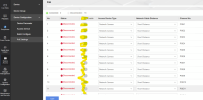
There should be a menu on the NVR for POE. One would show if the POE power is on/off along with if the extend mode is enabled or not. Another would show the watts sent out through the port. I would check that first in case the POE power output is turned off. Here is an example from my NVR.
1777491304460.png
You don't need to have Hikvision cameras in order to use the built in POE switch. Any POE camera would work. Note that if they are third party cameras then the NVR won't be able to activate the cameras and bring them online though. Would still need to do it manually using the vendor's discovery tool software on your computer. So using that tool, you would activate (assign password, IP address, port number, etc). Then in the NVR... select the channel/port number, change it from "Plug & Play" to "Manual" and then enter in the information for each camera.
 
There should be a menu on the NVR for POE. One would show if the POE power is on/off along with if the extend mode is enabled or not. Another would show the watts sent out through the port. I would check that first in case the POE power output is turned off. Here is an example from my NVR.
View attachment 242784
You don't need to have Hikvision cameras in order to use the built in POE switch. Any POE camera would work. Note that if they are third party cameras then the NVR won't be able to activate the cameras and bring them online though. Would still need to do it manually using the vendor's discovery tool software on your computer. So using that tool, you would activate (assign password, IP address, port number, etc). Then in the NVR... select the channel/port number, change it from "Plug & Play" to "Manual" and then enter in the information for each camera.
I already returned them. All POEs were enabled and switching power modes had no effect. I since have ordered a pair of Lorex Fusion NVRs (project scope changed, and my boss was pushing them) direct from Lorex in hopes of a better result.

Funny enough, the Hikvision units would automatically detect the camera if used with an injector (cameras are DHCP by default and do support ONVIF)... the issue was strictly with the port being unable to power the camera. This "has to be our cameras to power" may have been a cover for "we won't let you call our product faulty if you aren't using our cameras". In any case, I wasn't impressed.