Good day,
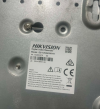
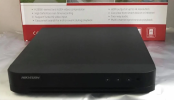
I have a friend who is asking me to help try to reset the admin password for their Hikvision security camera. I have tried probing the thing and confirmed it boots up when plugged in and hooked to a monitor and it shows the date/time for the camera was 03-21-2025.
I also tried to connect the thing to a router directly through internet and looked for it's IP address and managed to get into the hikvision login page. Through there I was able to see that they had not set any security questions, hikconnect and recovery email.
I also tried to run the SADP tool but for some reason the camera wouldn't show up on SADP. Though, I doubt I would be able to reset this by emailing official support since it was probably bought from some unknown reseller/distributor.
After painstakingly looking stuff up online, I came across a method which used something called TFTP but I am very unsure if TFTP would work on this specific model and worried it would lead me to bricking this thing entirely. I would appreciate any help with this matter since admittedly this is the first case I have handled involving something like this.
I have a friend who is asking me to help try to reset the admin password for their Hikvision security camera. I have tried probing the thing and confirmed it boots up when plugged in and hooked to a monitor and it shows the date/time for the camera was 03-21-2025.
I also tried to connect the thing to a router directly through internet and looked for it's IP address and managed to get into the hikvision login page. Through there I was able to see that they had not set any security questions, hikconnect and recovery email.
I also tried to run the SADP tool but for some reason the camera wouldn't show up on SADP. Though, I doubt I would be able to reset this by emailing official support since it was probably bought from some unknown reseller/distributor.
After painstakingly looking stuff up online, I came across a method which used something called TFTP but I am very unsure if TFTP would work on this specific model and worried it would lead me to bricking this thing entirely. I would appreciate any help with this matter since admittedly this is the first case I have handled involving something like this.