H4C blue iris P and T setting

camuse16

n3wb
Sep 25, 2016
28
7
NL
Does anyone know the settings for blue iris for the pan and tilt on a H4C camera? I let blue iris find and inspect, it finds it but does not display video and the p and t not working. I used a amcrest setting or dahua and got the video working but no pan and tilt. I have tired several under the ptz/control tab and ports, and cant get the right one.. Assuming there is a right one. I have not changed anything, its right out of the box..

Thanks
 
I know almost nothing about this camera, but do have Amcrest pan/tilt cameras (rebadged Dahua cameras) at home. I'd expect Dahua to use existing software/protocols, but you never know. What I did find at the Dahua Wiki had a section for Pelco users, which leads me to believe it may follow a Pelco-compatible protocol.

On the BI Camera Settings page, select the PTZ/Control tab, and try either the Amcrest or Pelco protocols beneath:
o Enable Pan/Tilt/Zoom and Other Controls (this should be enabled/selected)
o Network IP | Amcrest (this is my setting, it MAY work for you)
o Enable PTZ UI (This should be enabled/selected)

Further research using the Brave search engine returned this:

Blue Iris: Supports Dahua PTZ cameras, allowing control through ONVIF or direct integration, though firmware compatibility (e.g., presence of "AT" for Auto Tracking) can affect functionality.
 
Last edited:
I know almost nothing about this camera, but do have Amcrest pan/tilt cameras (rebadged Dahua cameras) at home. I'd expect Dahua to use existing software/protocols, but you never know. What I did find at the Dahua Wiki had a section for Pelco users, which leads me to believe it may follow a Pelco-compatible protocol.

On the BI Camera Settings page, select the PTZ/Control tab, and try either the Amcrest or Pelco protocols beneath:
o Enable Pan/Tilt/Zoom and Other Controls (this should be enabled/selected)
o Network IP | Amcrest (this is my setting, it MAY work for you)
o Enable PTZ UI (This should be enabled/selected)

Further research using the Brave search engine returned this:

Blue Iris: Supports Dahua PTZ cameras, allowing control through ONVIF or direct integration, though firmware compatibility (e.g., presence of "AT" for Auto Tracking) can affect functionality.
Thanks, yes I have tried all of that as you suggested. Tried a few different cameras, and even ports, with no luck..
 
I assume you are talking about:
or H4C - Dahua MENA

That camera makes no claim of ONVIF compatibility, but nonetheless that is what you should probably try in the PTZ/control tab of the camera settings in Blue Iris. It can be tricky though because there are 65534 different ports it could be listening on (if it is listening at all for ONVIF commands) and you can't even be entirely sure which port number Blue Iris is trying to use unless you specify it in the "User another ip/port" box.

1775971017763.png

If the camera has a web interface, look through it for anything about ONVIF. It'll probably be in the Network section of the camera's web interface settings. If it has a web interface. I was able to find a toggle for ONVIF very low-end cameras sold by Annke but that is no guarantee you'll be able to find the same thing in this H4C. If you're very lucky the camera's mobile app could let you enable ONVIF too.
 
Regarding the H4C and ONVIF, I stumbled across this below. The H4C is also known as the "Hero C1". Insure your camera has updated firmware. If your camera's firmware is dated after 2025/04/16 it should be OK:

 
Regarding the H4C and ONVIF, I stumbled across this below. The H4C is also known as the "Hero C1". Insure your camera has updated firmware. If your camera's firmware is dated after 2025/04/16 it should be OK:

Yes, seen this also. Firmware is Build Date: 2024-01-23 at the moment. I have asked Andy if there is newer..
 
Last edited:
I assume you are talking about:
or H4C - Dahua MENA

That camera makes no claim of ONVIF compatibility, but nonetheless that is what you should probably try in the PTZ/control tab of the camera settings in Blue Iris. It can be tricky though because there are 65534 different ports it could be listening on (if it is listening at all for ONVIF commands) and you can't even be entirely sure which port number Blue Iris is trying to use unless you specify it in the "User another ip/port" box.

View attachment 241723

If the camera has a web interface, look through it for anything about ONVIF. It'll probably be in the Network section of the camera's web interface settings. If it has a web interface. I was able to find a toggle for ONVIF very low-end cameras sold by Annke but that is no guarantee you'll be able to find the same thing in this H4C. If you're very lucky the camera's mobile app could let you enable ONVIF too.
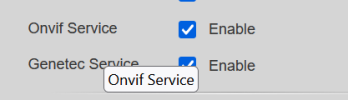
Yes, shows ONVIF Version 21.06(V2.0.1.61051). And there was a check mark for it. And it was checked. you've been here for a while :) I remember you back a long time ago.. Good you are still active..
 

Attachments

  • 1776080776881.png
    1776080776881.png
    9.1 KB · Views: 0
  • Like
Reactions: bp2008