Newb needs help putting a system together

DPGDirk

n3wb
Apr 3, 2026
2
2
Kansas
Hi everyone.
Total newb here.
I am wanting a new system and have questions. Having a hard time finding answers and I am completely new to this.
It seems like all the packages out there are subscription driven and tied to the internet and wi-fi.
I have no interest in being tied to the cloud or having my system accessible by anyone but myself.
I work from home and primarily want this to monitor in real time.

I am looking to go with an 8 camera High-Def system with 2 monitors (one upstairs and 1 downstairs) and a big hard drive for storage in case I need to review anything.
Ease of function and simplicity would be nice. I mostly don't touch it unless I want to review footage and it would be nice to be able to enlarge any of the 8 screens to full screen for viewing.

I want to hard wire the cameras and not be hooked to wi-fi, unless I can turn that on only occasionally to monitor if I'm away.
Someone in the industry said to stay with American cameras, as chinese stuff might have a back door...?
Just not wanting to "participate" in the coming AI surveillance network if I don't have to.

So, can anyone recommend a package, or what specific pieces I can buy separately for higher (4k?) resolution, with good day and night vision capabilities and distance?
I don't need any pan or zoom functions- just fixed outdoor cameras.

I don't want to pay a fortune, but I don't want junk that isn't reliable, so quality over price.

Any help would be appreciated.

Thanks!
 
Last edited:
  • Like
Reactions: mat200
Welcome to IPCAMTALK. Good luck with your new project.

The first thing most folks here will tell you to do is read the following two sections:

There are basically three ways to proceed.
1. Buy a bundled group of cams and NVR (like Swann or Reolink),
2. buy into a consumer ecosystem like Ring, Arlo, etc.
3. put together a prosumer set of cams (Dahua, Hikvision, etc.) and either a name brand NVR or a PC running camera software (like BlueIris, Frigate, or something tied to a NAS).

Most folks here will tell you to steer clear of options 1 and 2. However, Amcrest does have some decent cams and NVR. They are watered down versions of Dahua cams. The trouble with bundles is that they generally have just one specific cam and they are usually a wide-angle cam that will be great for static images with plenty of light but will suck in low light with motion.

Putting together a set of good prosumer cams and then an NVR or PC system is what most here will recommend.

Here are some points that you should consider before buying anything:
  • You need to make a plan. Start simple. The first question you would have to decide is what are your objectives for a cam system? After that you list requirements. You kind of have started that but need to get more detailed.
  • Now lets talk about planning. A plan is NOT "I want 4 cams and located here". A plan is derived from a list of requirements. Like I want to be able to get a good face shot at night of some perp in my driveway at my car door. From that requirement, a plan can be made. In general, we recommend two cams for a driveway. One mounted on either side of the garage door pointing in a crossing pattern zoomed in to the location of your parked car(s). This will give you two possible shots of the perp.
  • The first thing you need to do is look at your house and decide where you want coverage and make requirements for each position. From those requirements you make a plan and choose cams. You also have to decide on NVR or a PC running something like Blue Iris. That decision will dictate what brand of cams you get. If you want to go the NVR route, then you really need to get the same brand NVR as the cams you get
  • I would advise you to not go and buy a bunch of cams and install them right away. Start out small. I suggest one varifocal cam, like the Dahua 5442 turret varifocal. Place it on a test rig as described in the Cliff Notes and test your plan. Do not run wires or mount cam until you are happy with the proposed location. Make sure you walk it at night. Use that to critique your plan. See what the views look like from the locations you are thinking about. This can also help you decide on the specific cam for each location. It is important to understand what you want from each location/view and buy the appropriate cam for that. Fit-for-purpose cams are really the way to go.

A few other things to consider:

  • Do not chase MP. Realize that the way to get good low light performance is to get as big a sensor as possible. Currently in the prosumer grade of cams, the Dahua 5442 series is the go to cam. It is 4MP on a 1/1.8" sensor. It gives great low light color performance. The 4K cams are generally on 1/2.8" sensors, with some on 1/1.8" sensors. But even on the 1/1.8" sensors, shoving 8MP on there gives each pixel less light, half the light of the 4MP cams on the same sensor. They look nice in daytime wide angle shots and well lit nighttime shots for marketing purposes, but in real life they are not good in low light and any movement of the subject will cause blur.
  • The wider the angle, the closer a perp has to be to the cam to get a useful face shot. Wide angle cams are fine for overview shots, but you need to have cams focused on the action areas to get good enough face shots to ID and convict.
  • Dome cams are not recommended for outdoors as they get quite dirty and rain beads up on the dome and makes it useless when wet. Also the IR can reflect off the dome and cause poor video. The plastic domes are susceptible to UV fogging over time. Stick with turrets or bullets for outdoor cams. Choosing a bullet or turret is mostly personal taste. Some like the bullets since they scream "Security Camera!" but others like the turrets since they tend to blend in more. It depends on whether or not you want people to notice your cams. Some folks believe that the obvious cams prevent theft. But I have seen countless videos of perps giving the finger to the cam as they do their dirty deeds. Some say the bullets give a little better depth of field than the turrets.

Hope this helps. Others will chime in.
 
FYI - I just posted this in another thread that could be useful


Welcome @DPGDirk

This is what I ended up doing, and many others here in the forum, it is a solid good recommendation from samplenhold :

"3. put together a prosumer set of cams (Dahua, Hikvision, etc.) and either a name brand NVR or a PC running camera software (like BlueIris, Frigate, or something tied to a NAS)." - @samplenhold

How to start,
1) Get ONE good IP PoE varifocal 4MP 1/1.8" sensor camera,
2) One decent IP PoE switch ( or PoE power adapter ) - I like the switch idea as it works better for a few cameras
3) Get a good length of quality cat6/5e copper wired ( not CCA ) cable
4) setup a test rig ( search for links )
5) and start playing around with it. You will typically need a windows PC to configure and connect to the new camera.

Once you get to using and playing with this camera you can buy fixed lens cameras for a bit cheaper to cover areas. ( 3.6mm less is better for me than 2.8mm for most of my general cameras )

Do pay attention to the DORI section of the cliff notes.

That for me is very important to help increase my chances of getting an good ID facial image
 
Last edited:
  • Like
Reactions: Oceanslider
Also forgot to mention. Stay away from WIFI cams. They drop out a lot, usually when you need them the most.

Check these threads out:

 
  • Like
Reactions: mat200
Welcome!

As far as who makes the camera - the recommendation here is to isolate your cameras from the internet regardless of who makes them. Doing so prevents the backdoor issue.

Without knowing what your goals of the camera is, this thread is used as the go to for the new person here outlining the commonly recommended cameras (along with Amazon links) based on distance to IDENTIFY that represent the overall best value/best bang for the buck in terms of price and performance day and night. It might be a 2MP camera in some instances. Many here feel 4MP is the current sweet spot for these cameras.

The Importance of Focal Length over MP in camera selection

And coupled with that thread is this great thread which will show why all of the same 2.8 or 3.6mm cameras is the wrong choice (these are the common focal lengths consumer brands sell):

i-want-2-8mm-cameras-everywhere-to-see-everything-this-is-why-you-need-specific-fovs-with-purposeful-focal-lengths.70053/

We would encourage you to look at those threads in detail.

It will probably raise more questions than answers LOL.


If you want true easy peasy, plug-n-play simplicity, then just go with one of the consumer brands - Ring, Arlo, Nest, Blink, etc. They are true plug-n-play because those cameras all run on default/auto settings with very little, to no ability to change camera parameters. Just recognize nighttime motion quality will be poor.

Simply download their app and scan the camera QR code and you are up and running, with a better app experience also. The battery operated ones can be up and running in under 10 minutes.

But their plug-n-play simplicity comes at a cost of nighttime performance and ability to customize stuff, but obviously many do not seem to care about that as those systems are popular and those consumer grade systems are a perfect fit for those that want simplicity and not having to learn how to use an NVR or other type of VMS system.

Just recognize that at night, all you will be able to do is tell the police what time something happened, but won't have any IDENTIFY type features associated with those camera images.

But if you want to be able to actually provide the police with more than what time it happened, it will take some time to learn and dial in the settings of a better camera.
 
  • Like
Reactions: mat200
That is a lot to take in!
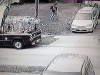
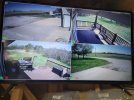
I am currently running a 4 cam system that I've had for a decade or so, but I didn't install it and really don't know much about it all.
It is 4 cams that are rated at 720p, hard wired to a NVR and that's it. I can rewind/review with a mouse that's plugged in and that's about all I know.

I am well lit all around my house at night, so while I want night vision performance, it is pretty well lit up here at night.
Here's a pic of my current setup.secCams.jpg

It's not "terrible," but I just thought I'd try to do a new system with 8 cams instead and try to get better definition while I'm at it.
I think wide angle cams would be great for most of the views, but a cam that can get face recognition might be good for the porch/front door view.
Being able to see a tag number leaving the driveway would be good too, but thinking maybe a good quality wide angle cam would do that?

So, I really need help deciding what NVR and cams I need?
Both need to be the same brand?
I would rather put my own together instead of buying any bundles, as you guys said.

8 cams, bigger capacity nvr and capabilities of running 2 TV monitors is what I want to end up with.

Sorry to be a pain. I haven't been able to get much help online or locally so far. You guys have already helped way more than anyone I've found.
Any suggestions are appreciated! I know I can play around with one camera at a time, but I'd love to just get everything at once and be done with it.

Thanks!
 
  • Like
Reactions: mat200
Just to add my own thoughts..

I use Ctronics cameras. I have 2x CTIPC-285C but they have other cameras available from Ctronics Security Camera | Ctronics®official site

My two aren't perfect, sometimes video can lag a bit but they have a web interface, two different apps (ctronics and ctronics pro - both of which are free), windows software (Hip2p) the option to subscribe to a cloud storage if you want (it's offered but they don't pressure you to use it), micro SD cards supported and their cameras can also upload images / videos to FTP or send by email - two features which seem to have vanished with the new cheaper cameras out there that have turned up on the market in recent years.

Ctronics offer fixed lens and also zoom lens cameras. PTZ, solar, 4G etc are also available (though on 4G due to carrier grade NAT, you won't get access to any webUI if it exists on the device).

As I said, the cheap ones certainly aren't perfect and both of my 285C's lag at times but they are far more configurable than the newer stuff out there. I can also control them from my phone - using an app called Automate (android) I can setup http requests to the camera to move it to presets, change the lighting config, recalibrate.. anything that can be done via the web browser basically (chromes developer tools in network mode helped me get the right urls and parameters).

Another camera I have is a 360eyes device. It's great, the lighting is variable or you can turn it completely off (unlike ctronics) but again, it's a phone app ONLY, no PC software, no web UI and while it does have an micro sd card slot, there is no FTP / email ability and access is only using p2p via 360eyes servers - in other words, they own it and you have to agree to their terms to use your own camera (which includes a term that they can terminate your use at any time).

Ctronics are not perfect but I given that I have direct control over them I'm sticking with them.